
What Is DMARC?
Your Guide to the Global Email Security Standard
Email is one of the most exploited channels for phishing, spoofing, and brand impersonation. Today, AI makes it easier than ever for attackers to create convincing fraudulent emails at scale.
So, how do you protect your domain and the people who trust your brand?
Start with DMARC...
It’s one of the most effective ways to reduce domain abuse, strengthen email trust, and protect customers, employees, and partners from fake emails sent in your name.
DMARC Explained
DMARC stands for Domain-based Message Authentication, Reporting, and Conformance.
It is an email authentication protocol that helps domain owners protect their domains against unauthorized email use. DMARC builds on SPF and DKIM and tells receiving mail servers how to handle messages that fail DMARC checks.
DMARC can also enable reporting, allowing participating mailbox providers to send aggregate reports that help you see who is sending mail using your domain and whether those messages pass authentication.
It is a free, open standard used to help protect your domain from spoofing and phishing. When properly configured, DMARC helps receiving servers identify unauthorized messages sent using your domain and improves visibility into your email ecosystem.
Let’s break down its definition:
Domain-based:
DMARC is implemented at the domain level using a DNS record. In that record, you publish a policy that tells receiving mail servers how to handle messages claiming to be from your domain.
Message Authentication:
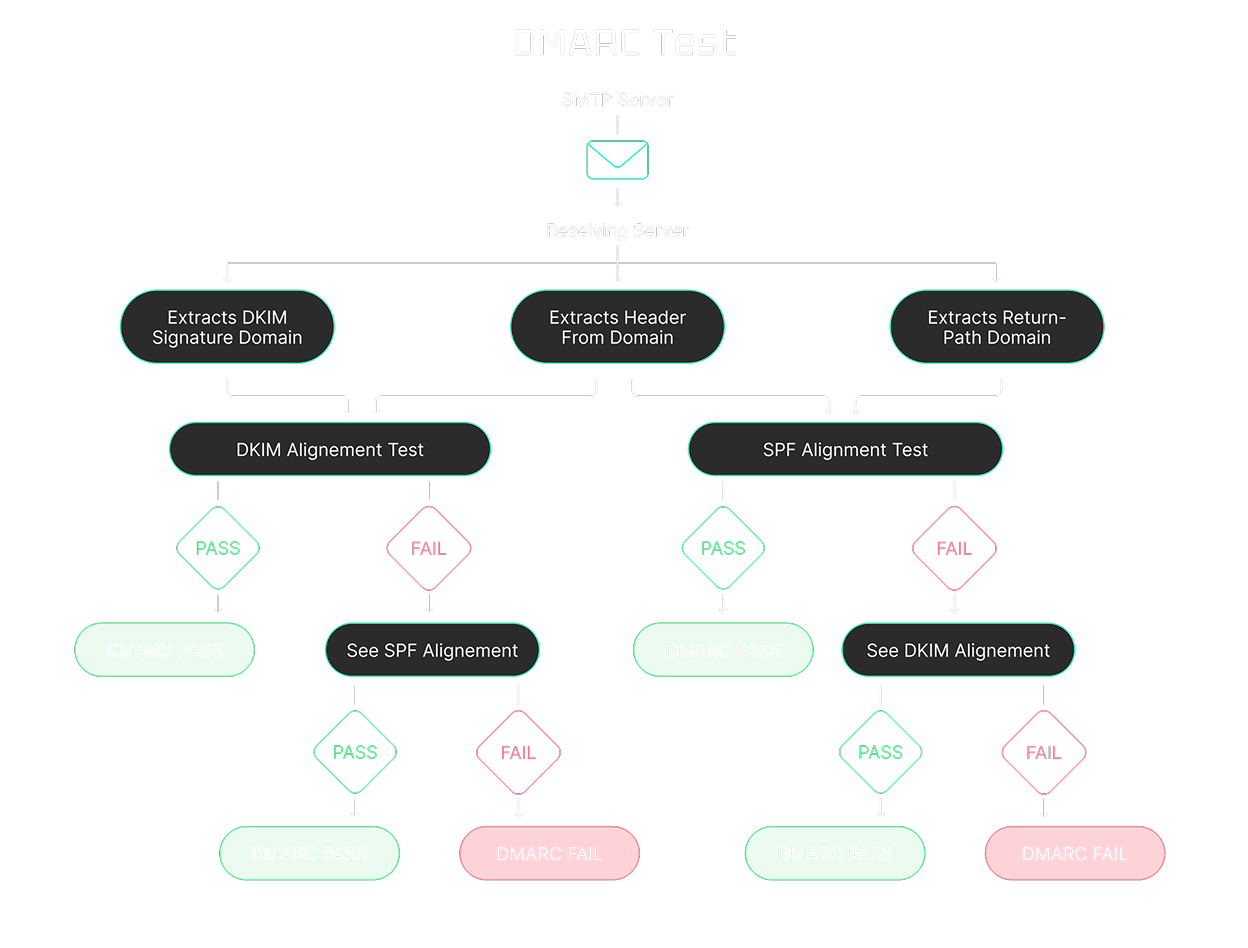
DMARC checks whether SPF and/or DKIM pass and whether the authenticated domain aligns with the domain in the From header. This helps receiving servers identify and handle unauthorized messages sent using your domain.
Reporting:
DMARC can enable reporting from participating mailbox providers. These aggregate XML reports show which sources are sending mail using your domain and whether those messages pass or fail DMARC checks.
Conformance:
As the domain owner, you define the policy for messages that fail DMARC: monitor only (none), quarantine them (often to spam/junk), or reject them.
How does DMARC work?
Here’s the process in 4 simple steps:
An email arrives at a receiving server.
The server checks whether SPF and/or DKIM pass and whether at least one authenticated domain aligns with the domain in the “From” header.
Based on your DMARC policy (none, quarantine, or reject), the server decides how to handle messages that fail DMARC.
Participating mailbox providers may send DMARC reports, giving you visibility into sending sources and authentication results.
DMARC Record Example
A typical DMARC record is added to your DNS as a TXT record.
Example:
v=DMARC1; p=reject; rua=mailto:xxx@ar.dmarkoff.com; ruf=mailto:xxx@fr.dmarkoff.com; adkim=r; aspf=r; np=reject;
What Are DMARC Policies?
DMARC doesn’t just validate email authentication. It also tells receiving mail servers how to handle messages that fail DMARC checks. There are three enforcement levels:
Best practice: Start with p=none to monitor traffic and identify legitimate sending sources. Then move to stricter policies as your sending sources are properly authenticated and aligned.
How to Create a DMARC Record
Creating a DMARC record is simple, especially with DMARKOFF:
Generate a DMARC record in seconds with our platform.
Add the record to your domain’s DNS settings.
Once published (with a rua address), participating mailbox providers can begin sending DMARC aggregate reports.
DMARKOFF turns those reports into clear insights and step-by-step recommendations.
No more endless XML files, confusing dashboards, or long DMARC digests.
Just convenient monitoring across all your domains in one place.
Why is DMARC Important?
DMARC helps mailbox providers identify legitimate emails sent from your domain and handle unauthorized messages more effectively. This strengthens your authentication posture, supports deliverability, and reduces spoofing and phishing risk.
It also protects your brand reputation, your team, and your customers from domain impersonation attacks.
That’s why businesses of all sizes, from startups to enterprises, should implement DMARC as a core part of modern email security and sender compliance.
Core Benefits of DMARC
• Provides visibility into who is sending emails using your domain
• Helps prevent email spoofing and phishing attacks
• Reduces unauthorized use of your domain in email
• Strengthens email authentication and brand protection
• Can improve deliverability for legitimate email
• Helps protect customers and employees from impersonation emails
• Reduces the risk of spam filtering and reputation issues
• Supports compliance with modern sender requirements and security frameworks
Become A Trusted Brand — Set Up DMARC Today
Authentication is no longer optional — it's the foundation of responsible, secure communication.
Whether you're just getting started or managing multiple domains, our platform helps you implement the DMARC protocol quickly, monitor your domain health, and fix issues with ease.
DMARKOFF turns complex DMARC XML reports into clear, human-readable insights.
With convenient domain management, secure project sharing, real-time alerts, and actionable steps, you’ll stay DMARC compliant and protected without the headache.
Enjoy full benefits for free today!
FAQ
DMARC is an email authentication protocol designed to help protect your domain from spoofing and phishing. The acronym stands for Domain-based Message Authentication, Reporting, and Conformance. It works with SPF and DKIM to help receiving mail servers evaluate whether messages using your domain are legitimate. DMARC also tells receiving servers how to handle messages that fail DMARC checks and can enable reporting that gives you visibility into who is sending email using your domain.
DMARC is not universally mandatory for every sender, but it is effectively required in many real-world sending scenarios.
Google requires DMARC for bulk senders sending more than 5,000 messages per day to personal Gmail accounts. Microsoft has introduced similar requirements for high-volume senders to Outlook.com consumer domains (including outlook.com, hotmail.com, and live.com) at more than 5,000 emails per day. Yahoo also requires DMARC for bulk senders, but it does not publish a fixed volume threshold and instead refers to “significant volume” senders.
Many organisations and security programs also expect DMARC as part of modern email authentication and anti-spoofing controls. Even if you’re not subject to a formal requirement, implementing DMARC is a best practice for protecting your domain, improving visibility into sending sources, and supporting deliverability for legitimate email.
A DMARC record is a TXT record published in your domain’s DNS settings that defines your DMARC policy for email authentication. It tells receiving mail servers how to handle messages that fail DMARC evaluation (for example, when neither SPF nor DKIM produces an aligned pass). With DMARKOFF, generating a DMARC record for your domain takes just a few clicks.
Yes. If you send emails from your domain, you should have a DMARC record.
A DMARC record tells receiving mail servers how to handle messages that fail DMARC checks, helps reduce unauthorized use of your domain in email, and provides visibility into who is sending mail using your domain. It also supports modern email sender requirements and security expectations. Major mailbox providers such as Google, Microsoft, and Yahoo check email authentication signals, including DMARC. Without a DMARC record, your messages may be more likely to be filtered, flagged, or rejected, especially for higher-volume sending.
A DMARC policy defines how receiving mail servers should handle messages that fail DMARC checks.
You can set it to:
• none — monitor only (no enforcement)
• quarantine — treat the message as suspicious (often sent to Spam/Junk)
• reject — reject the message during delivery
This policy is specified in your DMARC record (the p tag) and is key to moving from monitoring to stronger enforcement over time.
To implement DMARC, you publish a DMARC TXT record in your domain’s DNS.
A common best practice is to start with a p=none policy to monitor email traffic and collect DMARC report data, then move to quarantine or reject after confirming that your legitimate sending sources are properly authenticated and aligned.
Tools like DMARKOFF make this easier by helping you generate the record and convert raw DMARC XML reports into clear, human-readable insights.