
DMARC Reports: How to Read, Analyze, and Act on DMARC Data


DMARC continues to progress as email providers and standards organizations work to make email authentication more reliable, secure, and easier to implement.
This visibility comes through DMARC reports. Understanding how to read and analyze DMARC reports enables businesses to improve email security, strengthen domain reputation, and ensure legitimate messages reach recipients' inboxes.
Key Takeaways
- DMARC reports provide visibility into all email traffic sent using your domain.
- Aggregate reports (RUA) summarize authentication results across all sending sources.
- Failure reports (RUF) provide detailed information about individual authentication failures.
- DMARC reports help identify spoofing attempts and unauthorized senders.
- Analyzing DMARC reports can improve email deliverability and domain reputation.
- DMARKOFF simplifies DMARC report analysis by converting complex XML files into actionable insights.
What Is a DMARC Report?
Before learning how to analyze DMARC reports, it's important to understand what they are and why they exist.
DMARC (Domain-based Message Authentication, Reporting & Conformance) is an email authentication protocol that works alongside SPF and DKIM to help protect domains from unauthorized use.
A DMARC report is a feedback report sent by mailbox providers to domain owners. These reports give domain owners access to the authentication outcomes for every email sent on their behalf. If you know how to read DMARC reports, you may efficiently track deliverability problems, locate and stop malicious sending sources, and quickly fix DMARC protocol implementation mistakes. You can keep your email ecosystem secure and in control thanks to DMARC reports.
By reviewing DMARC reports, organizations can:
- Monitor email authentication performance
- Identify legitimate and unauthorized sending sources
- Detect spoofing attempts
- Troubleshoot authentication failures
- Improve email deliverability
- Validate DMARC policy enforcement
In short, DMARC reports allow you to see exactly what is happening behind the scenes with your domain's email.
Why Is Understanding DMARC Reports Important?
Many organizations publish a DMARC record and assume their work is complete. However, DMARC is most effective when reports are actively monitored and analyzed.
Without reviewing DMARC reports, businesses may be unaware of:
- Misconfigured SPF records
- Missing DKIM signatures
- Unauthorized third-party senders
- Domain alignment issues
- Deliverability problems
- Ongoing spoofing attempts
If you know how to analyze DMARC reports, you can have complete visibility into your email authentication data and fix any issues with your email exchange system configuration.
Types of DMARC Reports
DMARC supports two primary reporting mechanisms: aggregate reports and failure (forensic) reports.
Each serves a different purpose and provides a different level of detail.
1. Aggregate DMARC Reports.
Aggregate reports, also known as RUA reports, provide a summary of email authentication activity over a specific period, typically 24 hours.
These reports contain information such as:
- Sending IP addresses
- Message volumes
- SPF authentication results
- DKIM authentication results
- DMARC evaluation results
- Policy actions applied by receiving servers
Aggregate reports help domain owners identify which systems are sending email on behalf of their domain and whether those systems are properly authenticated.
- For example, an aggregate report may reveal that:
- Your marketing platform is passing SPF and DKIM
- Your CRM system is failing DKIM
- An unknown IP address is attempting to send emails using your domain
Aggregate reports are the most commonly used DMARC reporting format.
2. Failure DMARC Reports (Formerly Known as Forensic Reports).
Failure reports, also known as RUF reports, provide detailed information about individual email messages that fail DMARC authentication.
Unlike aggregate reports, which summarize large volumes of email activity, failure reports focus on specific failures.
These reports may include:
- Authentication failure details
- Message headers
- Sender information
- Failure reasons
DMARC reports are delivered in XML format. It provides detailed authentication data for every sending source. However, reviewing raw XML files manually can be very difficult and time-consuming, which is why many organizations use dedicated DMARC tools to simplify analysis and monitoring.
"Most domain owners stop at publishing the record. The reports are where the actual work starts. I've seen companies sit on months of XML data showing an active spoofing campaign that nobody opened. The data was there the whole time, just unreadable."
Aliaksandr MarkauCo-founder & CTO at DMARKOFF and GlockApps, email security specialist with 20+ years of experience, Golang & ClickHouse expert. A happy father of two teenagers.

Why Do You Need DMARC Reports?
DMARC reports provide benefits that extend beyond email authentication alone.
Let's examine the key reasons organizations rely on DMARC reporting.
1. Monitor Email Authentication.
One of the primary purposes of DMARC reports is monitoring authentication results.
Every email claiming to originate from your domain must pass SPF and/or DKIM authentication while also satisfying DMARC alignment requirements.
DMARC reports show:
- Which senders pass authentication
- Which senders fail authentication
- Which systems require configuration changes
2. Improve Email Deliverability.
Email authentication and email deliverability are closely connected. When SPF, DKIM, or DMARC are incorrectly configured, mailbox providers may:
- Send emails to spam folders
- Reject messages entirely
- Lower sender reputation scores
DMARC reports help identify authentication issues that could impact inbox placement.
3. Detect Spoofing and Phishing Attacks.
By carefully studying a DMARC report, domain owners can identify patterns and trends in email activity that might signify fraudulent or malicious behavior.
By reviewing reports regularly, organizations can identify:
- Unknown sending IP addresses
- Unauthorized infrastructure
- Suspicious sending patterns
- High volumes of authentication failures
This information helps security teams detect and respond to potential threats more quickly.
4. Meet Security and Compliance Requirements.
Organizations operating in regulated industries often face strict security requirements related to data protection and communications. Email authentication protocols such as SPF, DKIM, and DMARC are viewed as essential security controls. Since 2024, both Gmail and Yahoo have required bulk senders (typically sending more than 5,000 emails per day) to implement email authentication, including DMARC. Failure to meet these requirements can negatively affect deliverability, increase spam placement, and, in some cases, result in message rejection.
DMARC reports provide evidence that organizations are actively monitoring authentication performance and maintaining visibility into email activity.
5. Collaborate with Email Service Providers.
DMARC reporting improves communication between domain owners and email providers. By exchanging DMARC reports, domain owners and email service providers can work together to detect and resolve issues with email authentication.
How to Start Receiving DMARC Reports for Your Domain
Before you can analyze DMARC reports, you need to configure your domain to receive them. Fortunately, the process is relatively easy and only requires a properly configured DMARC record in your DNS settings.
You can easily create a DMARC record with DMARKOFF.
To do this:
- Log in to your DMARKOFF account. You can start a 14-day free trial.
- Create a new project or open an existing one.
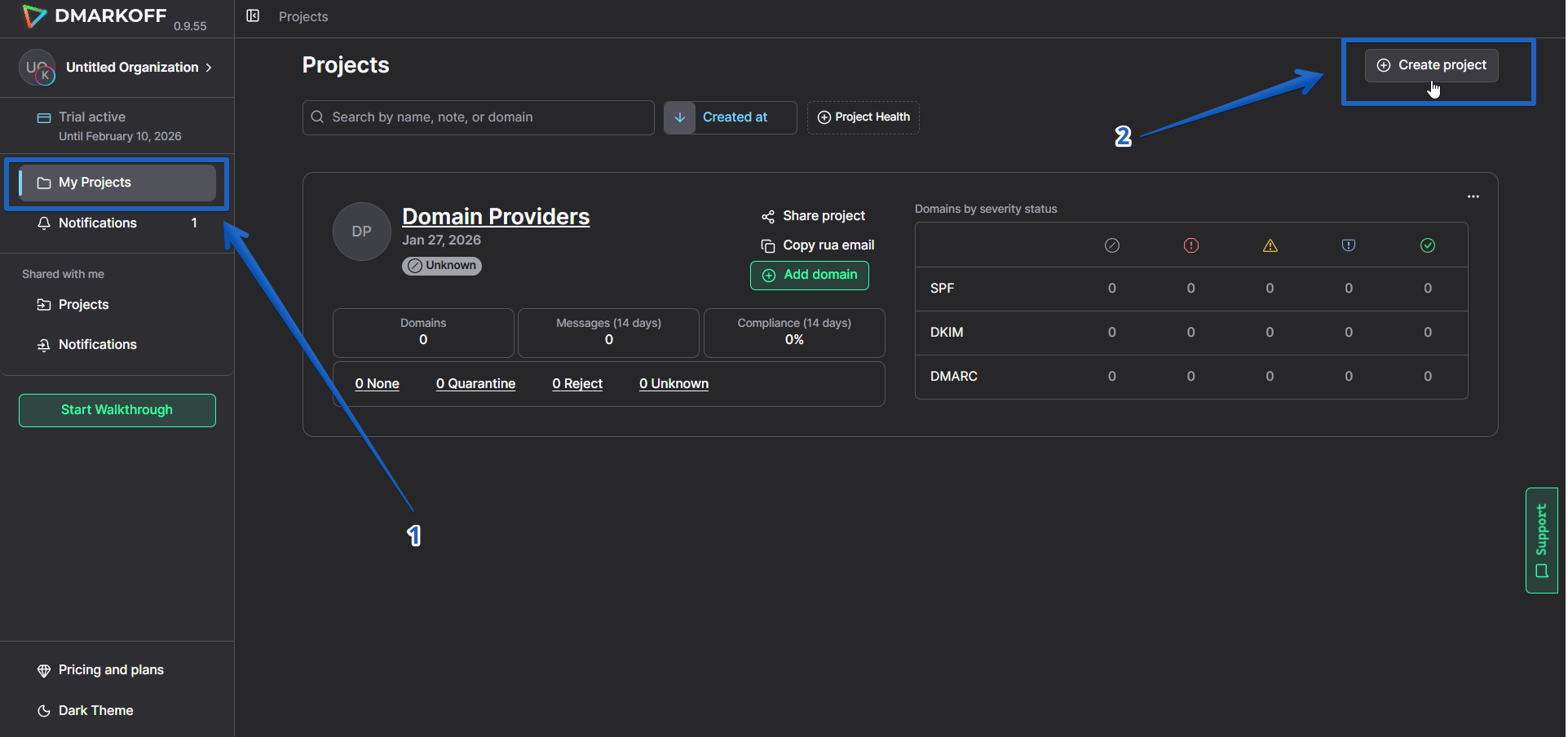
Go to My Projects → Create Project
- Click Add Domain and enter your domain name.
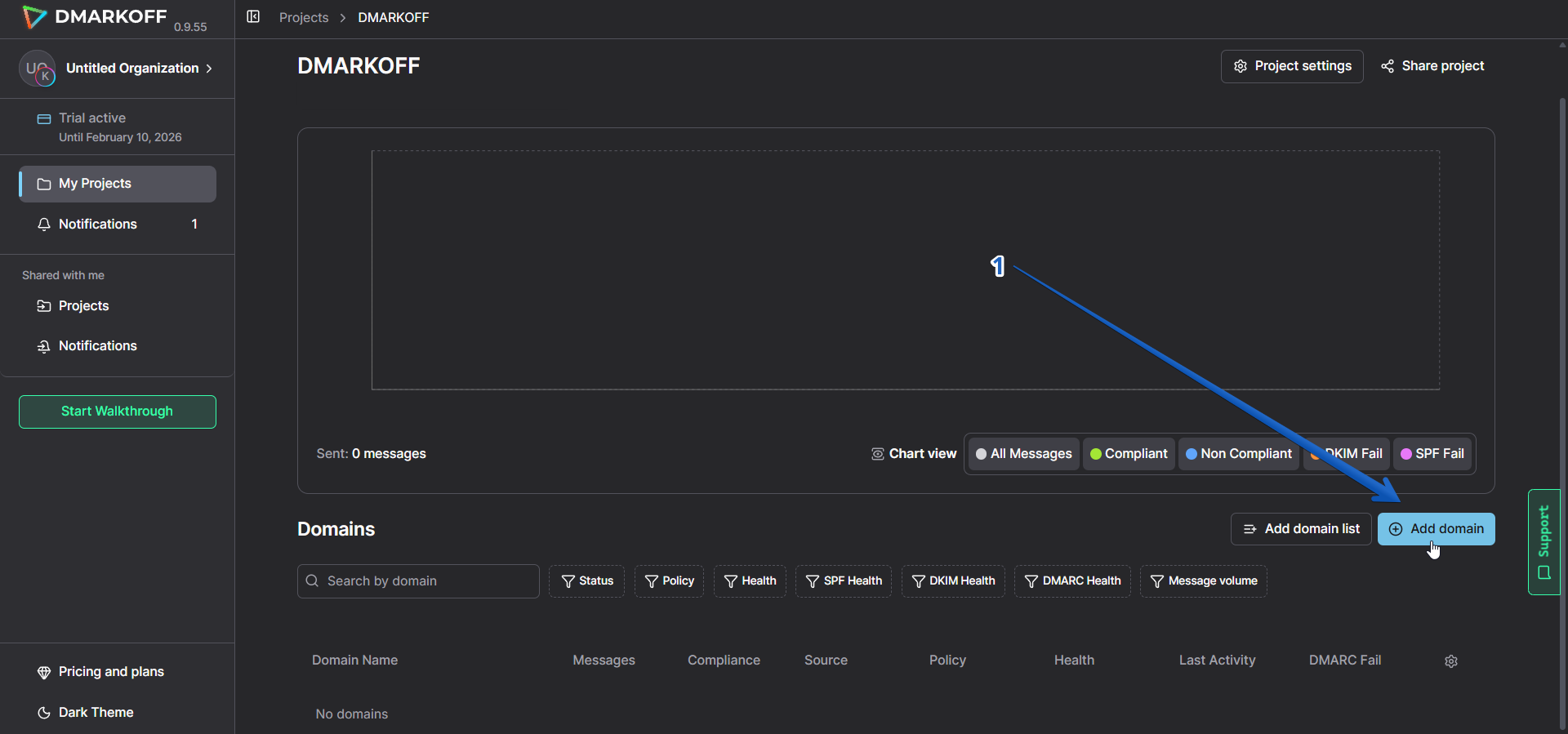
Click Add Domain inside the project
-
Skip the Check Records step.
-
Configure your DMARC settings:
- Policy: If you're new to DMARC, start with p=none to monitor email traffic without affecting delivery.
- Subdomain Policy: Optionally apply a different policy to subdomains.
- DKIM Alignment: Choose Relaxed for greater flexibility or Strict for stronger protection.
- SPF Alignment: Choose Relaxed for greater flexibility or Strict for stronger protection.
In most cases, Relaxed alignment is recommended because it allows the legitimate use of subdomains (for example, for mailing list server bounce addresses) while maintaining authentication alignment with the primary domain.
- Click Generate Record.
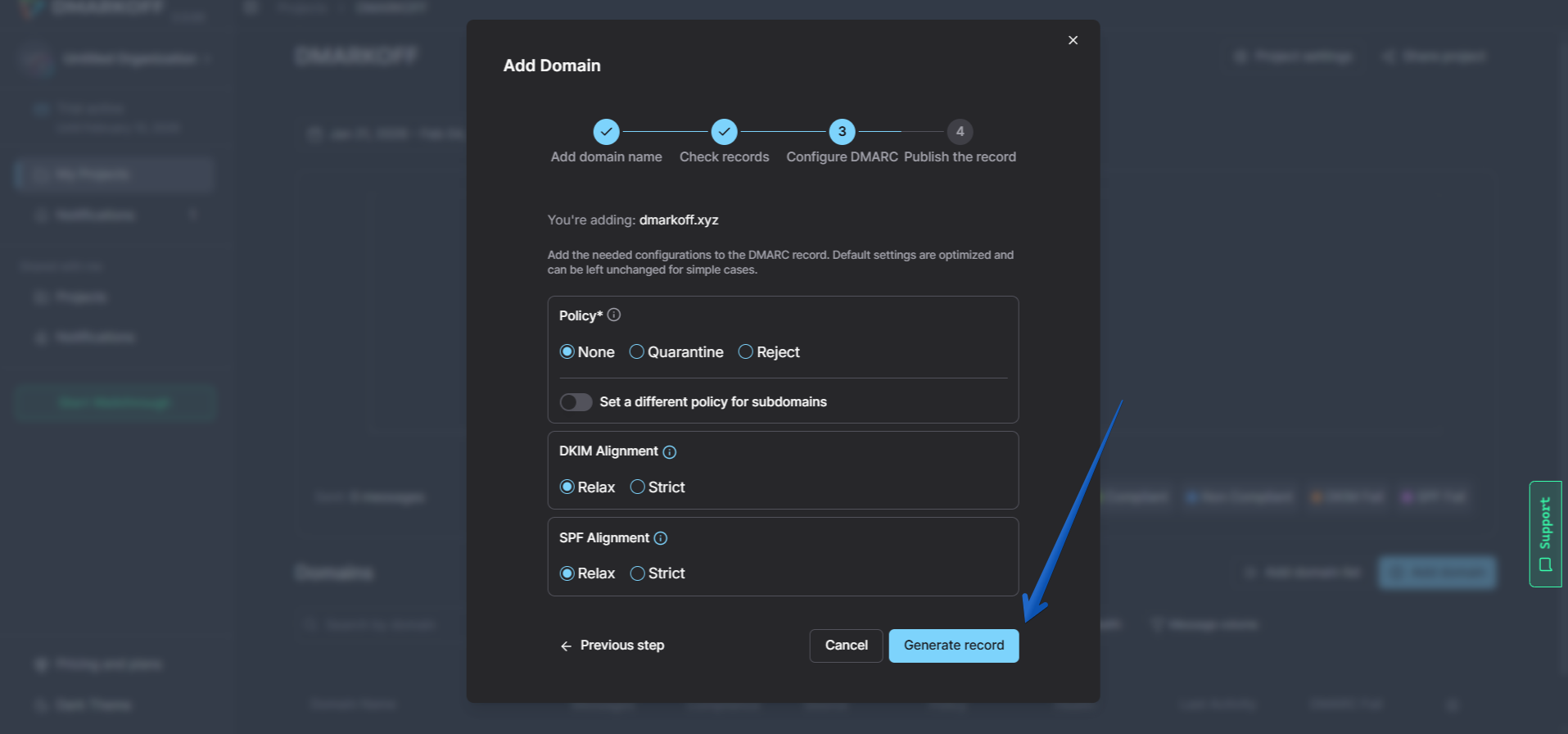
Specify your DMARC policy and click Generate Record
- Publish the Record in DNS and Click Finish.
Add the TXT DMARC record provided by DMARKOFF to your hosting provider's DNS settings. After publishing, go back to your DMARKOFF account and click Finish.
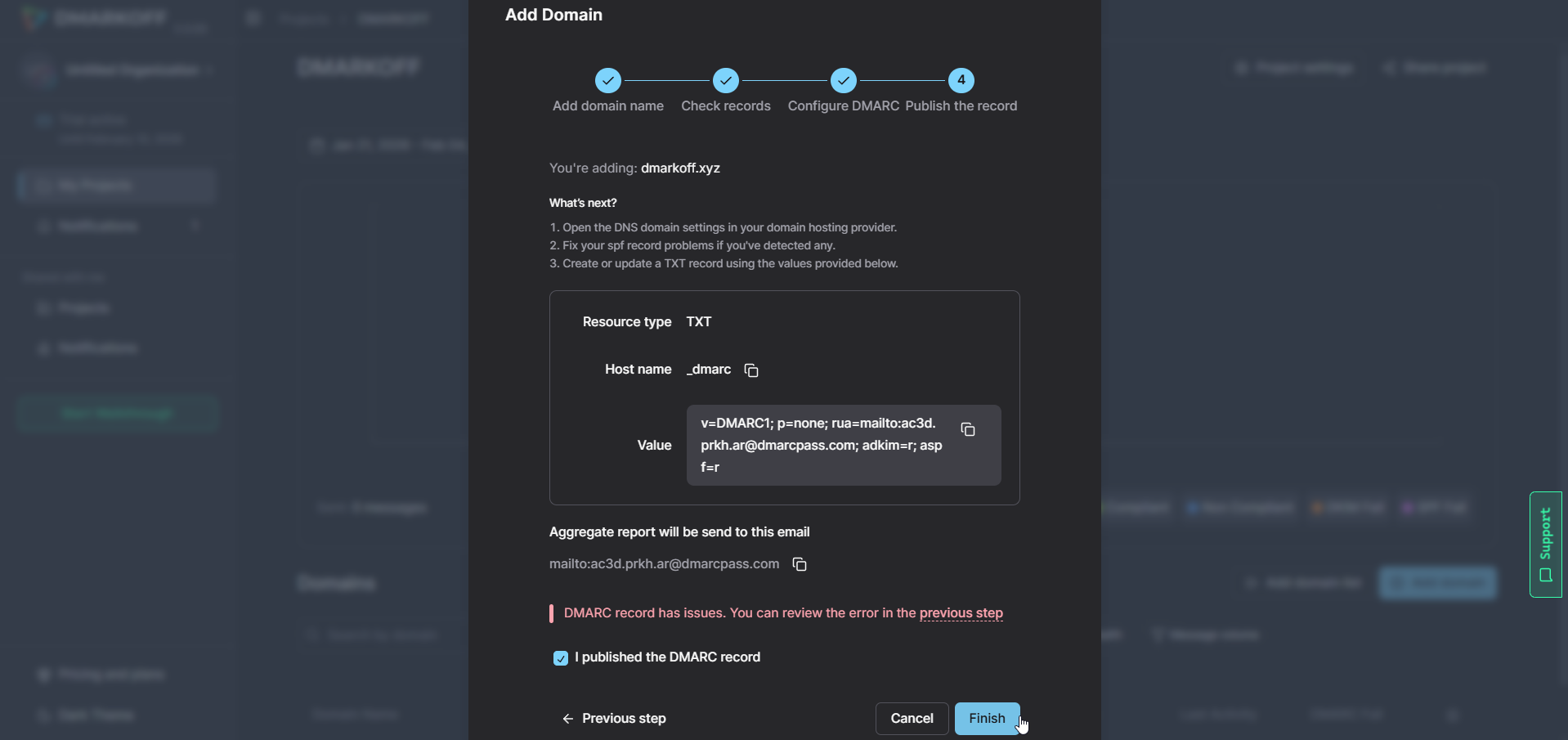
Add your DMARC record to DNS and click Finish
- Check Your DMARC Record.
If everything is set up correctly, you'll find your DMARC record displayed next to your domain name in the Project dashboard.
You can quickly assess its status by hovering your cursor over the checkmark.
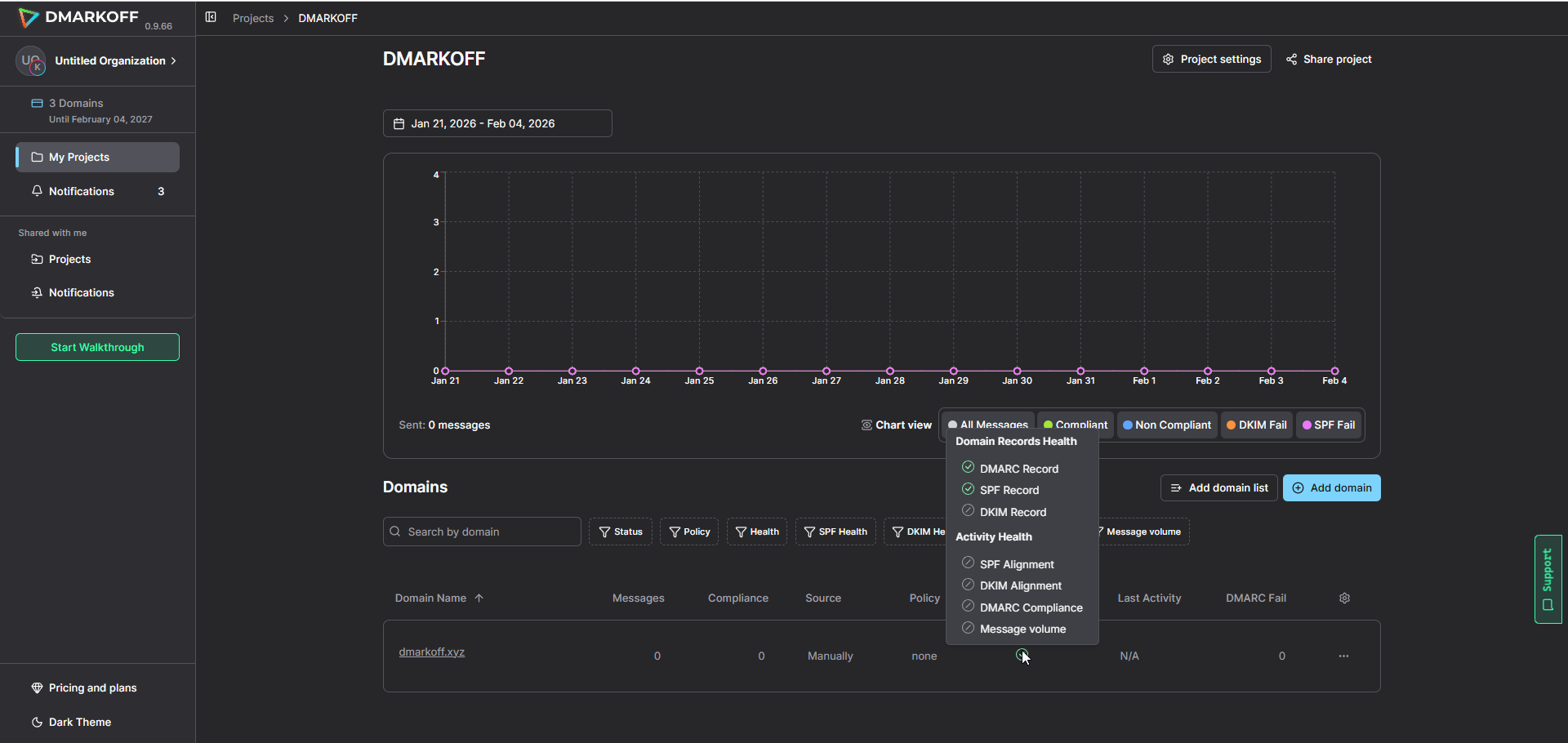
Hover your cursor over the checkmark next to your domain in the Project view to see your DMARC record status
To see more details, click on the domain name and explore the Domain Records Health report.
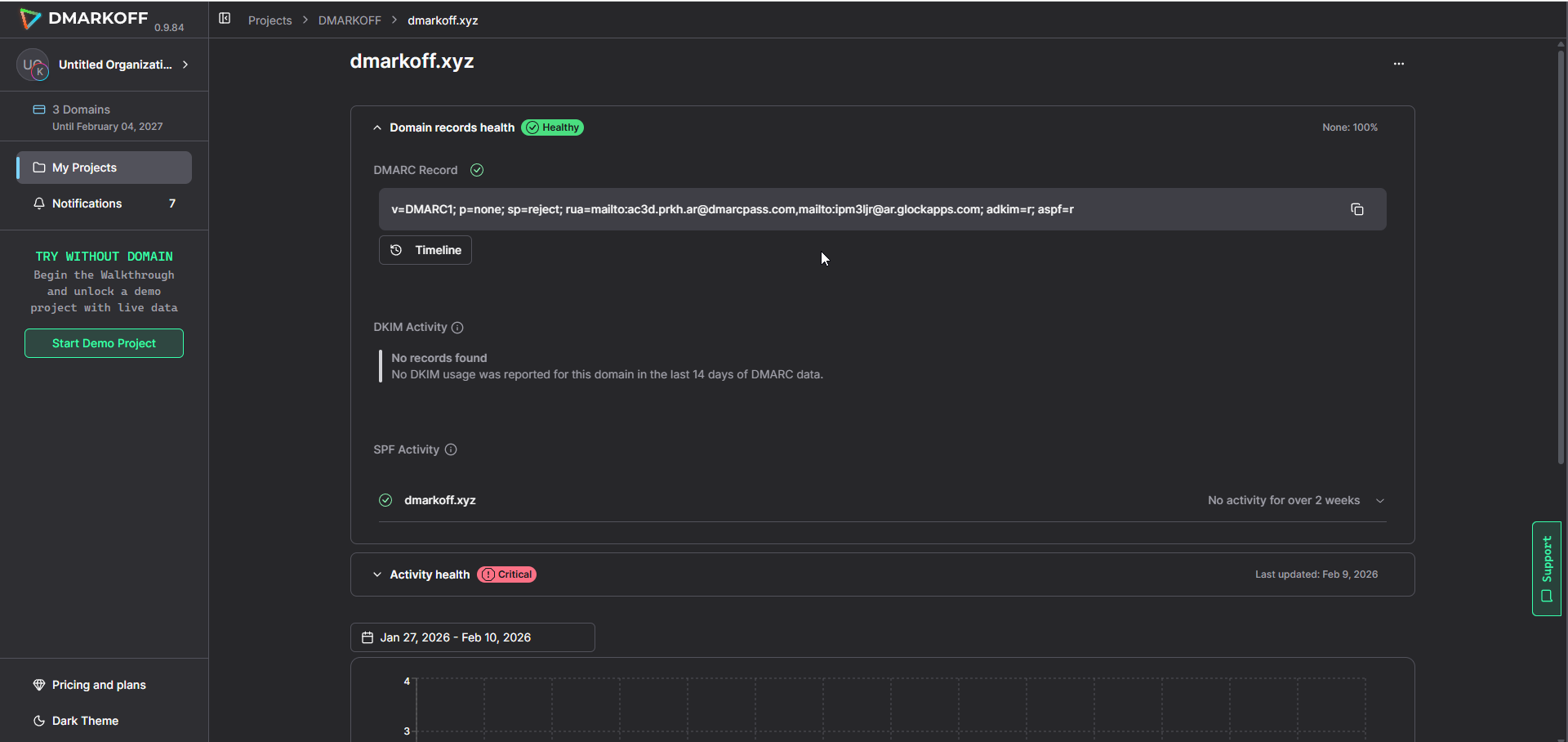
Domain Records Health report
How to Analyze DMARC Reports
Receiving DMARC reports is only the beginning. The real value comes from understanding what the reports are telling you.
For many organizations, this is where the process becomes challenging.
Most aggregate DMARC reports are delivered as XML files containing thousands of lines of structured data. While machines can process these files easily, manually reviewing them can be difficult and time-consuming.
Without the right tools, extracting meaningful insights from raw DMARC reports often requires technical expertise.
When analyzing a DMARC report, you should focus on:
- Identifying all legitimate sending sources
- Detecting unknown or unauthorized senders
- Reviewing SPF authentication results
- Reviewing DKIM authentication results
- Monitoring DMARC alignment
- Investigating authentication failures
- Evaluating policy enforcement results
The goal is to gain a complete understanding of who is sending email on behalf of your domain and whether those messages are authentic.
Understanding DMARC Reports Better
To better understand how to read a DMARC report, let's examine the key components you'll typically find inside an aggregate report.
The Receiving Mailbox Provider
Every DMARC report identifies the mailbox provider generating the report. Common reporting organizations include:
- Microsoft
- Yahoo
- AOL
- Fastmail
- Proofpoint
This information helps you understand where authentication activity is being observed.
Report ID
Each DMARC report contains a unique identifier assigned by the reporting organization. The report ID helps distinguish one report from another and can be useful when troubleshooting or reviewing historical data.
Reporting Period (The date range)
DMARC reports typically cover a specific timeframe, usually 24 hours.
The report period allows you to determine when authentication activity occurred and helps identify trends over time.
DMARC Policy Settings
The report includes the DMARC policy currently published in DNS. Common policy values include:
p=none – monitor only
p=quarantine – suspicious messages may be sent to spam
p=reject – failing messages should be rejected
Sending Source IP Address
One of the most important sections of a DMARC report is the sending source information.
The raw report provides:
- Sending IP addresses
- Message volumes
By analyzing these IP addresses, DMARKOFF translates raw numbers into readable infrastructure providers and email platforms (such as Google Workspace, Mailchimp, or Salesforce). Identifying these underlying sources is what helps you distinguish legitimate senders from potentially malicious actors.
Analyzing sending sources helps distinguish legitimate senders from potentially malicious actors.
Message Disposition
Disposition indicates how the receiving mail server handled the message.
These actions are based on your DMARC policy and the authentication results associated with each message.
SPF Authentication Results
SPF verifies whether the sending server is authorized to send emails on behalf of a domain.
A DMARC report will indicate two key SPF-related results:
- Protocol Validation: Passed or Failed
- Domain Alignment: Passed or Failed
Frequent SPF failures often indicate misconfigured sending infrastructure or unauthorized senders.
DKIM Authentication Results
DKIM uses cryptographic signatures to verify that messages have not been altered during transit.
DMARC reports reveal whether DKIM validation succeeded or failed.
How to Analyze DMARC Reports with DMARKOFF
While understanding DMARC reports is essential, manually reviewing XML files every day is rarely practical.
As organizations scale their email operations, they may receive hundreds or even thousands of reports each month from mailbox providers around the world. DMARKOFF simplifies this process by transforming complex DMARC reports into clear, actionable insights.
Instead of manually parsing XML files, organizations can view authentication results through an intuitive dashboard designed specifically for DMARC monitoring and analysis.
With DMARKOFF, you can:
- Monitor authentication activity across multiple domains
- Identify unauthorized sending sources
- Review SPF and DKIM performance
- Analyze DMARC failures
- Investigate suspicious activity more efficiently
This significantly reduces the time required to review reports while improving visibility into domain activity.
Dedicated Mailbox or DMARKOFF Report Reader?
Many organizations choose to create a dedicated mailbox for receiving DMARC reports.
While this approach helps centralize reporting data, it does not solve the biggest challenge associated with DMARC monitoring: analysis.
A dedicated mailbox simply stores incoming reports. It does not:
- Parse XML files
- Organize authentication data
- Visualize trends
- Identify suspicious activity
- Simplify troubleshooting
As report volume increases, manually managing DMARC reports through a mailbox quickly becomes difficult.
Advantages of Using DMARKOFF DMARC Report Analysis
DMARKOFF offers several advantages over manually reviewing DMARC reports or relying solely on a dedicated mailbox.
Comprehensive Visibility
View DMARC reports from multiple providers in a centralized dashboard.
Instead of reviewing individual XML files, you gain a complete overview of your authentication ecosystem.
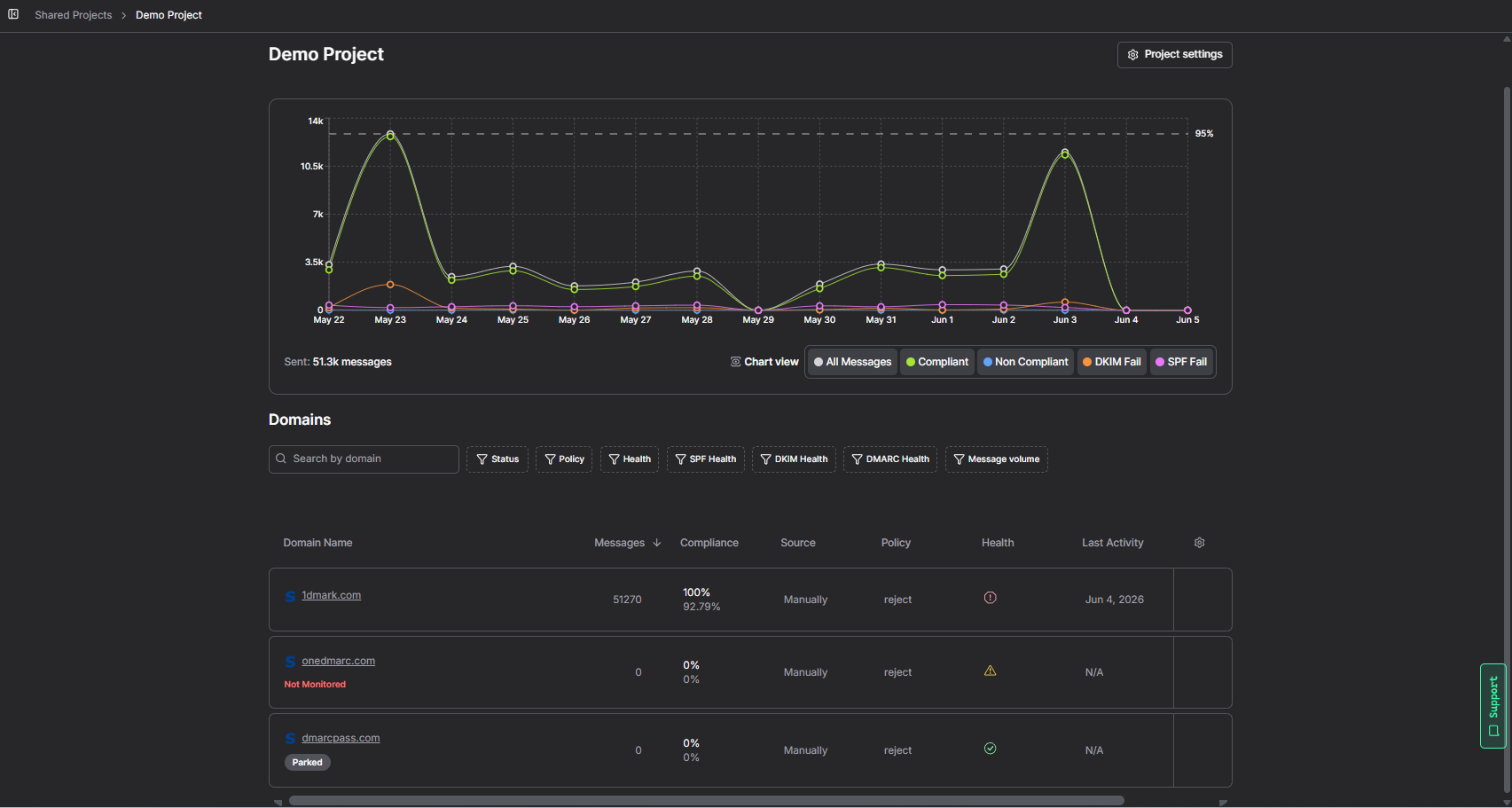
Project View
Domain-Specific Filtering
Organizations managing multiple domains can quickly filter results and focus on a specific domain or subdomain. This makes the process faster and more efficient.
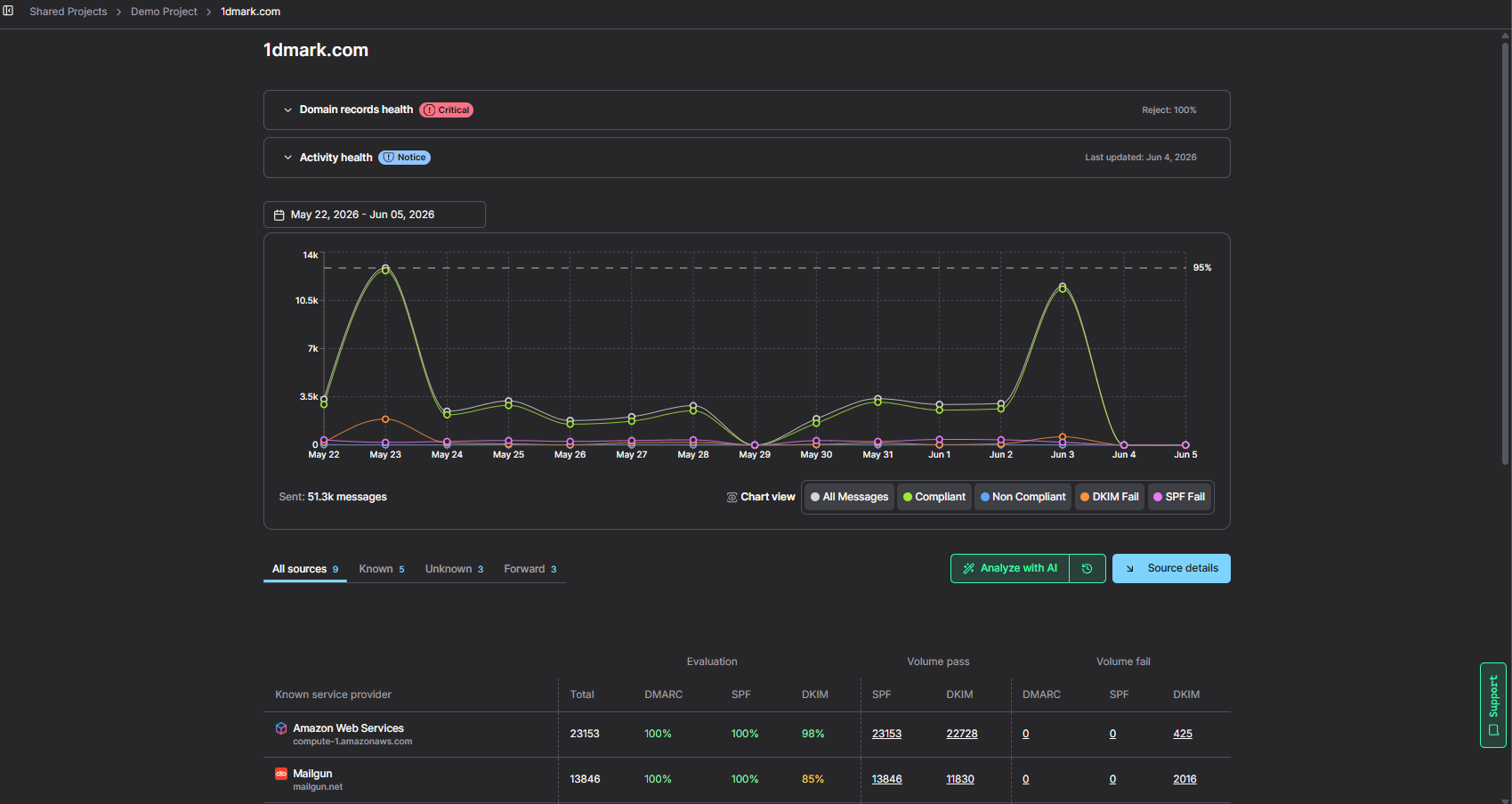
Domain View
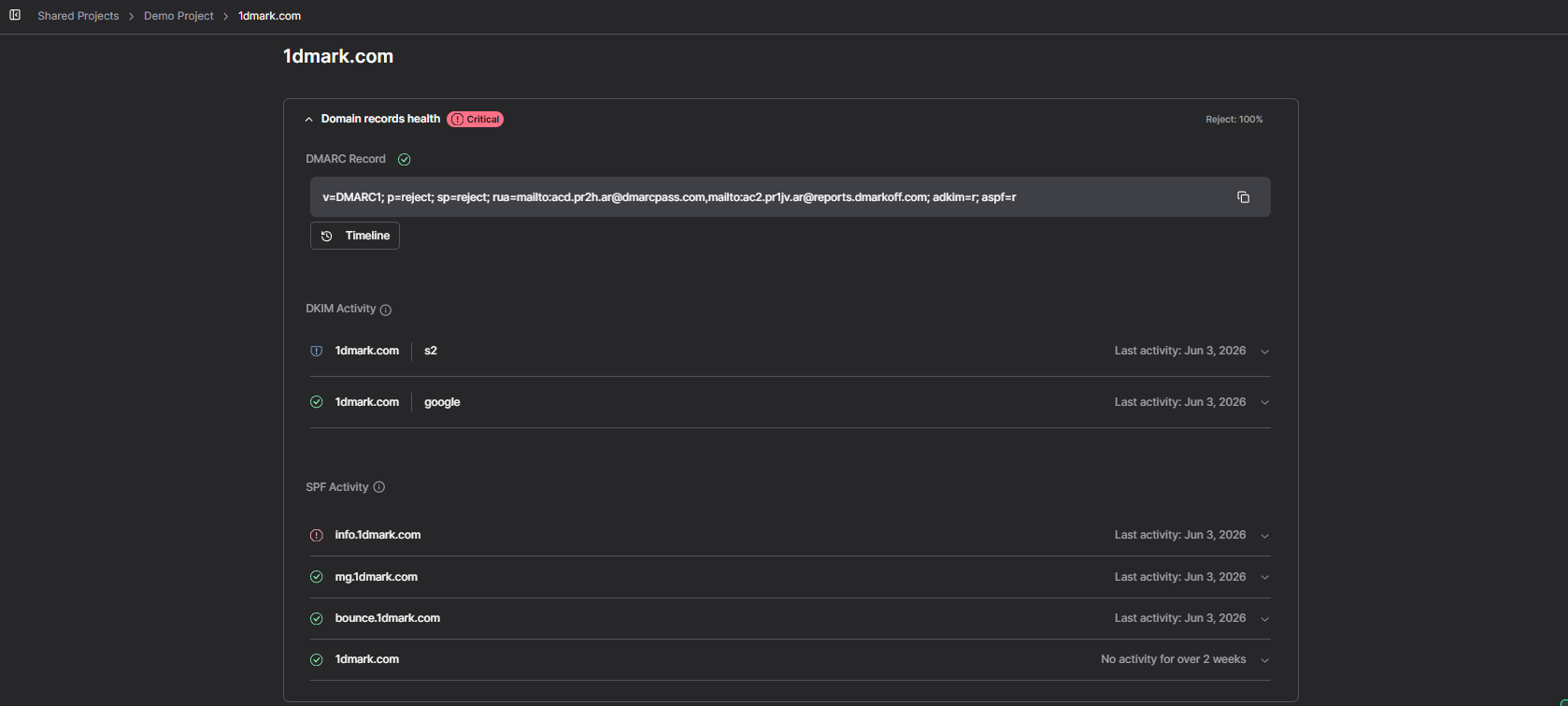
Domain Records Health Report
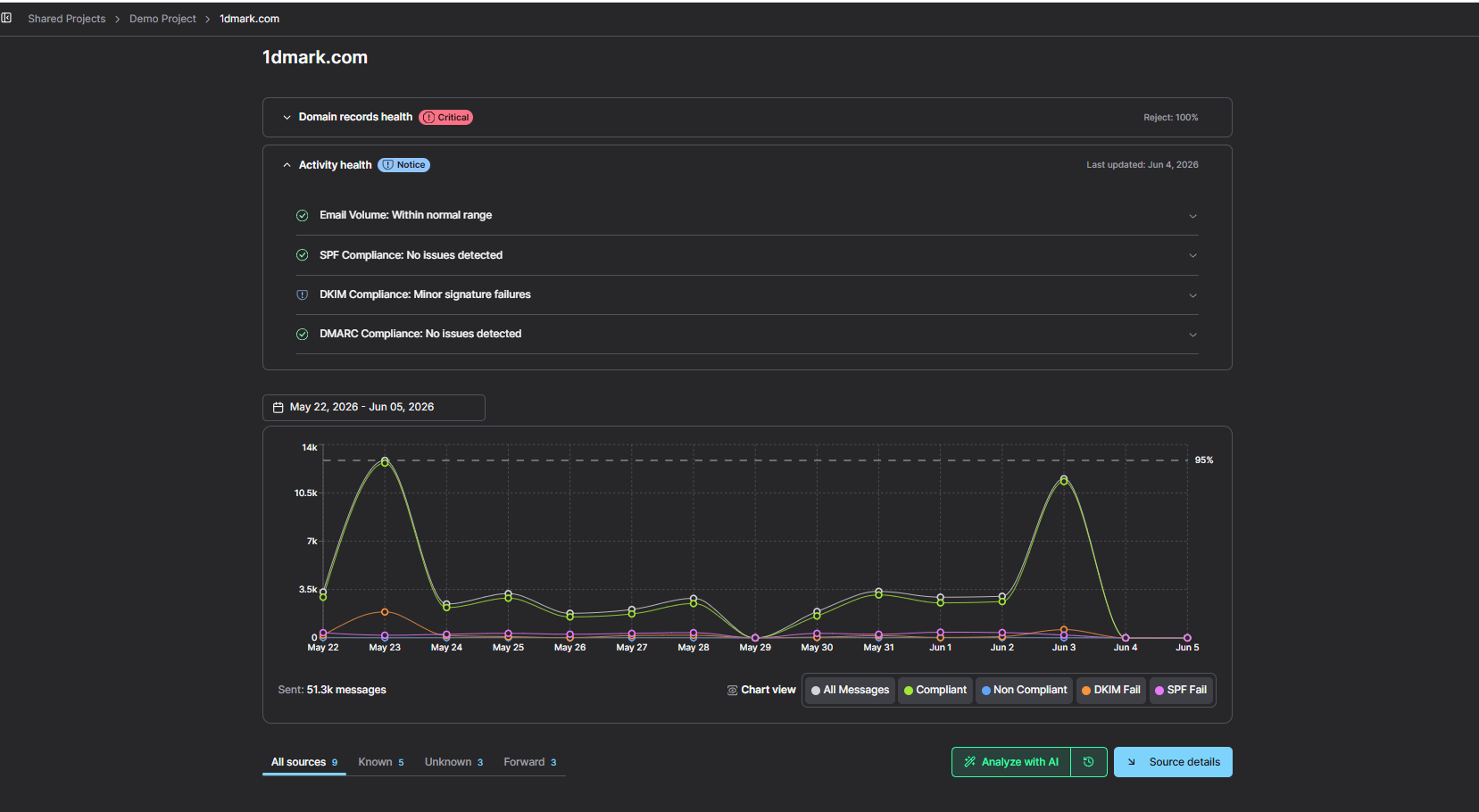
Activity Health Report
Customizable Date Ranges
Choose a particular time frame to show results inside. With the help of this function, you can focus your investigation on particular time periods.
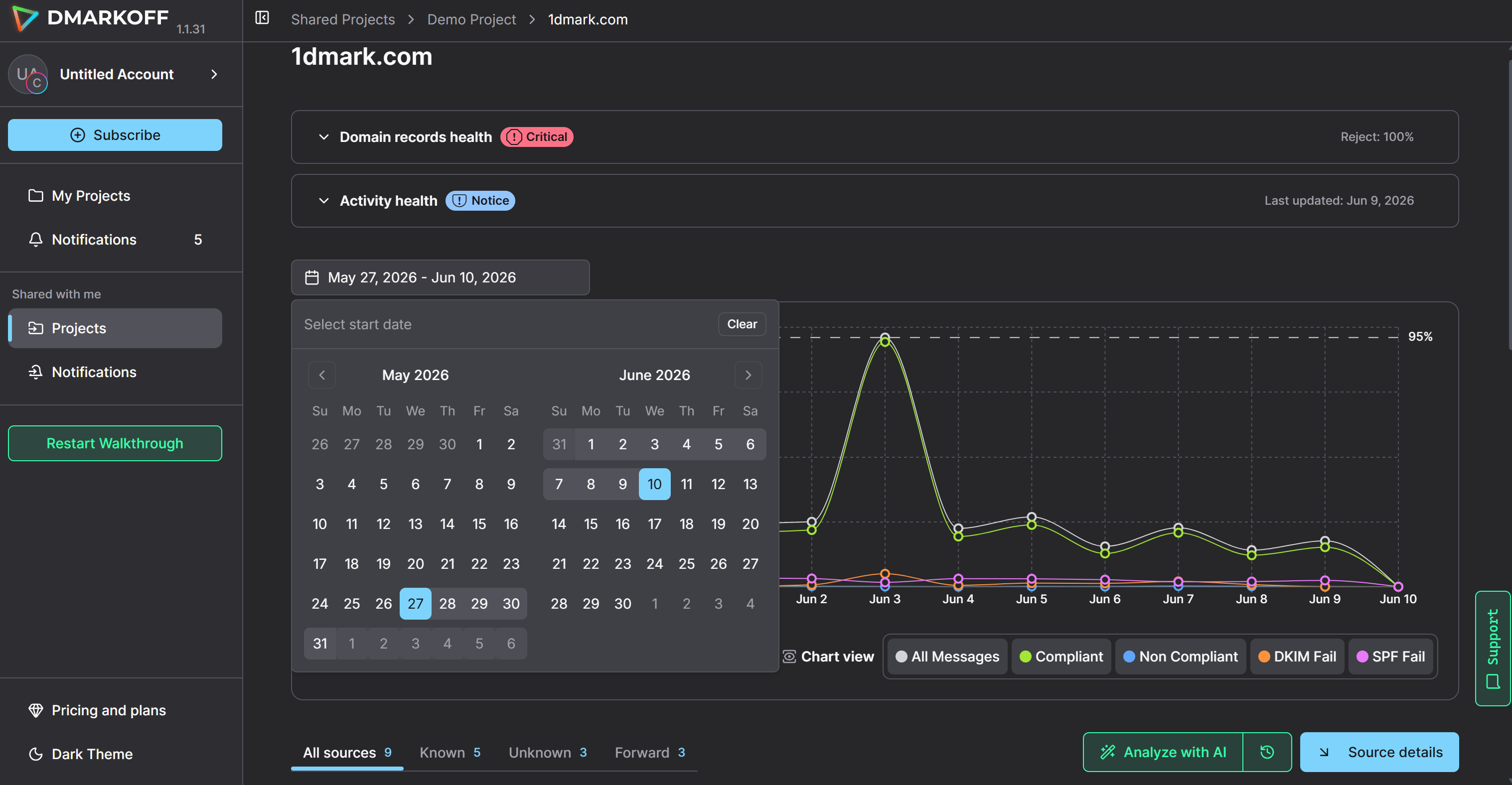
Customizable Date Ranges
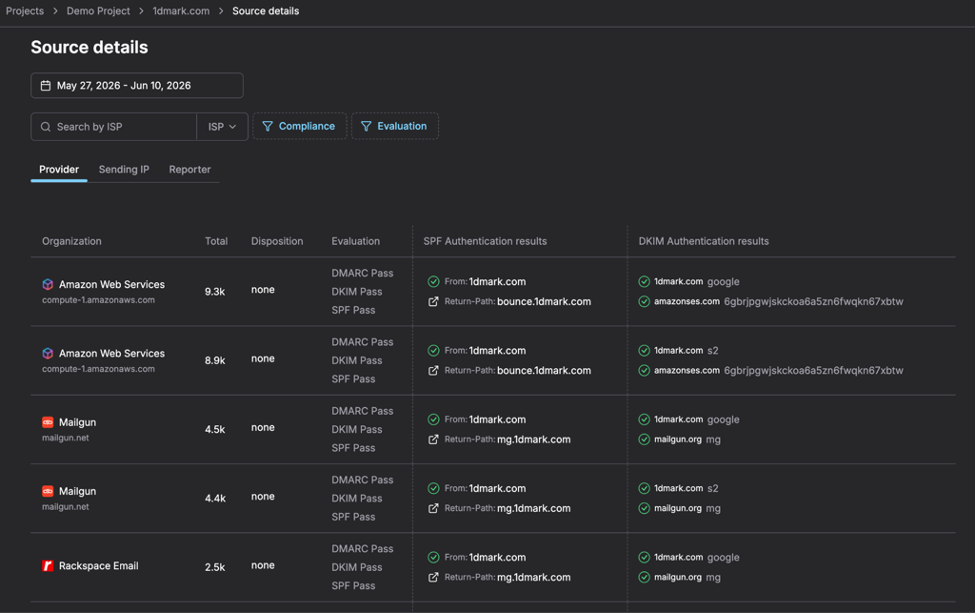
Advanced Data Segmentation
View Source Details by - Provider, Sending IP, Reporter
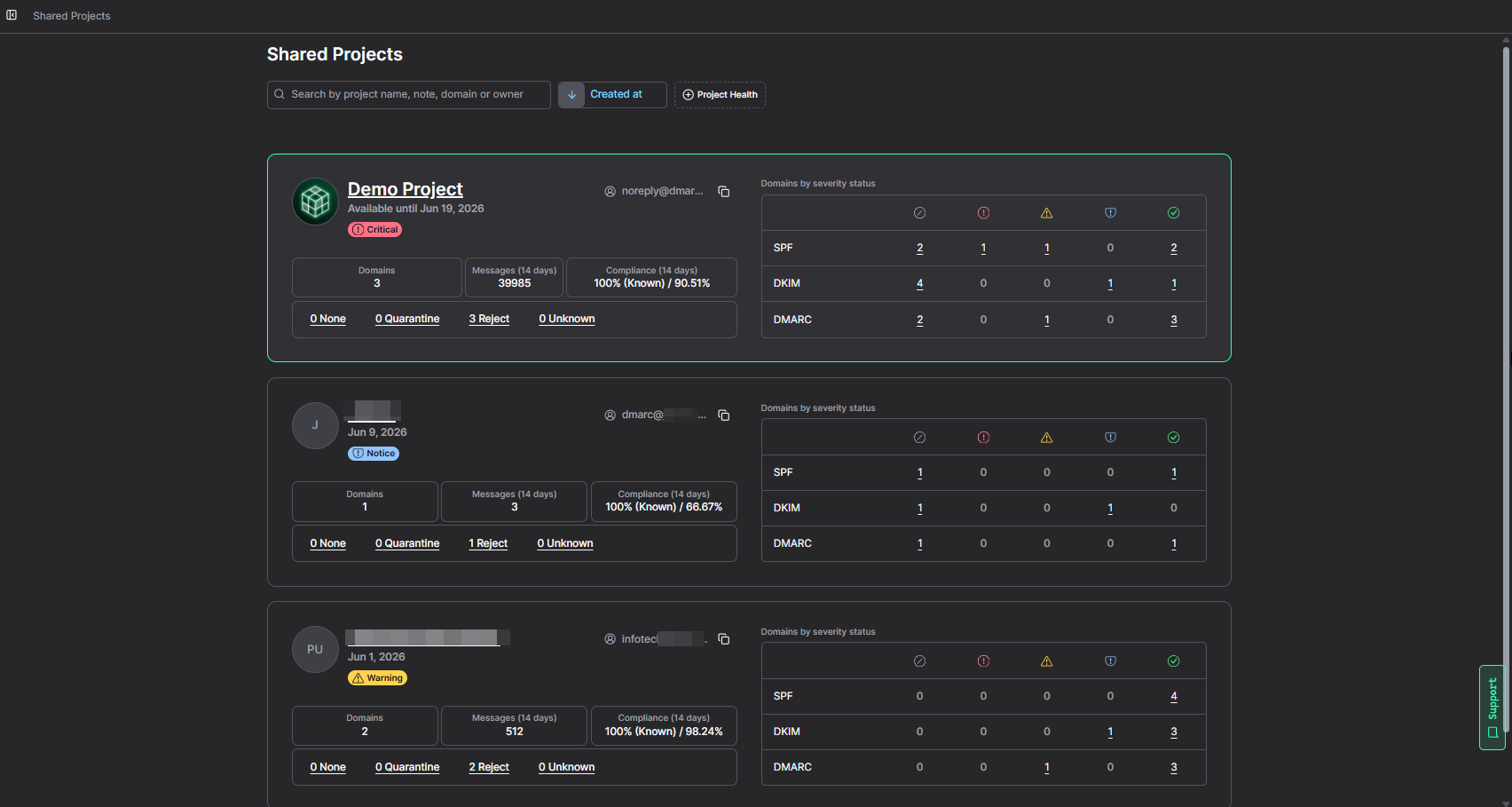
Group multiple domains in Projects by client, brand, or department.
Inside every Project, domains are sorted by severity, with instant shortcuts to spot domains that need attention:
- DMARC record status
- Policy
- Domain Health
- SPF, DKIM, DMARC health
- Message volume
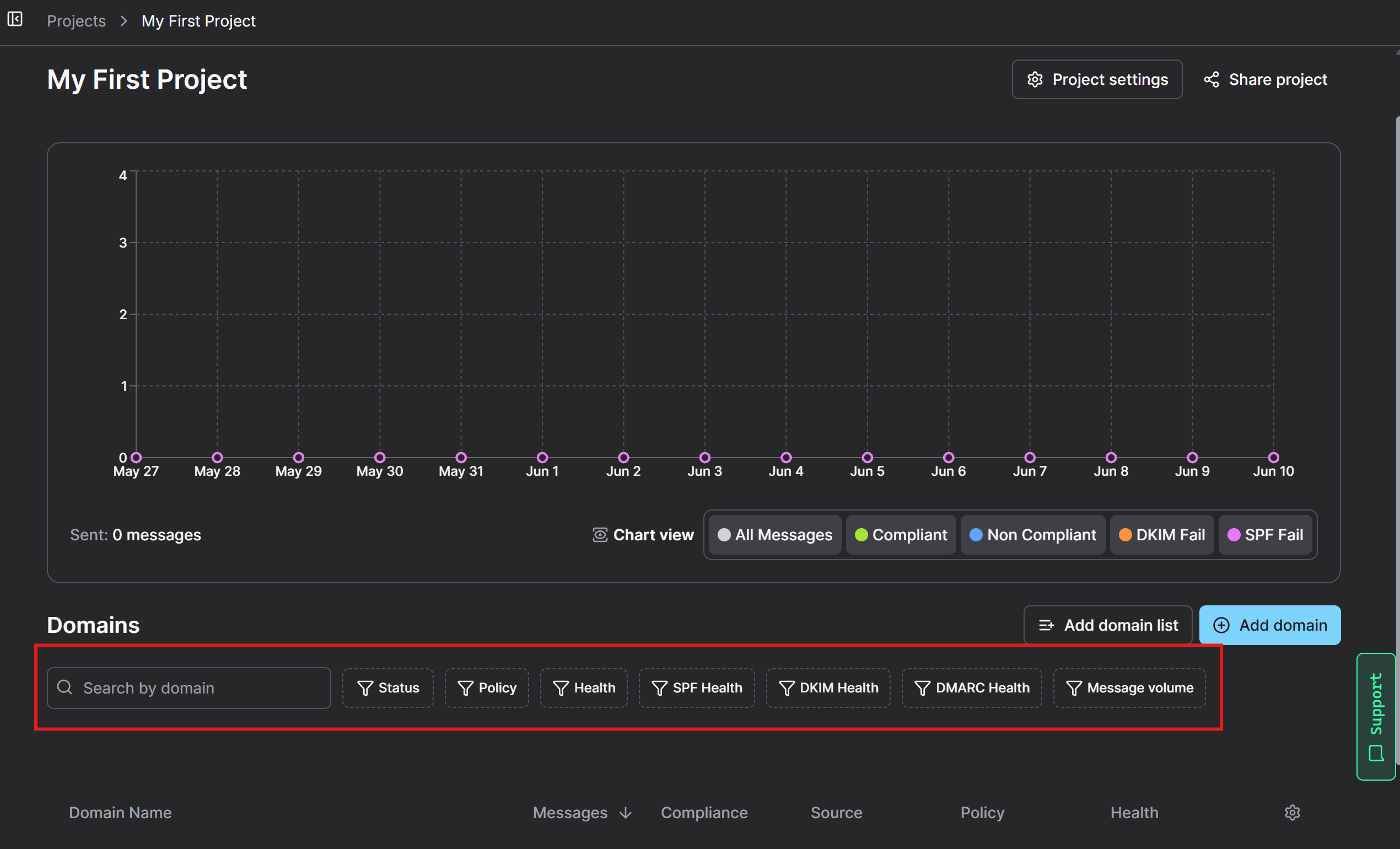
Domain Sorting in Project
This way, it’s easier to identify issues and understand sending behavior.
Interactive Dashboard
Raw XML reports can be difficult to interpret.
DMARKOFF presents information through a user-friendly dashboard that makes authentication data easier to understand, even for non-technical users.
Faster Threat Detection
By consolidating and organizing DMARC data, DMARKOFF helps organizations identify unauthorized senders and authentication failures before they become larger security or deliverability issues. With DMARKOFF’s smart alerts, you can catch unusual activity early on. It analyzes your patterns and signals if something goes wrong.
Built-In AI Assistant
DMARKOFF also includes Luma, a built-in AI assistant designed to simplify DMARC analysis. Luma translates complex authentication reports into clear, easy-to-understand explanations and provides recommended actions to help resolve issues faster. Each domain includes up to 30 Luma AI reports per month.
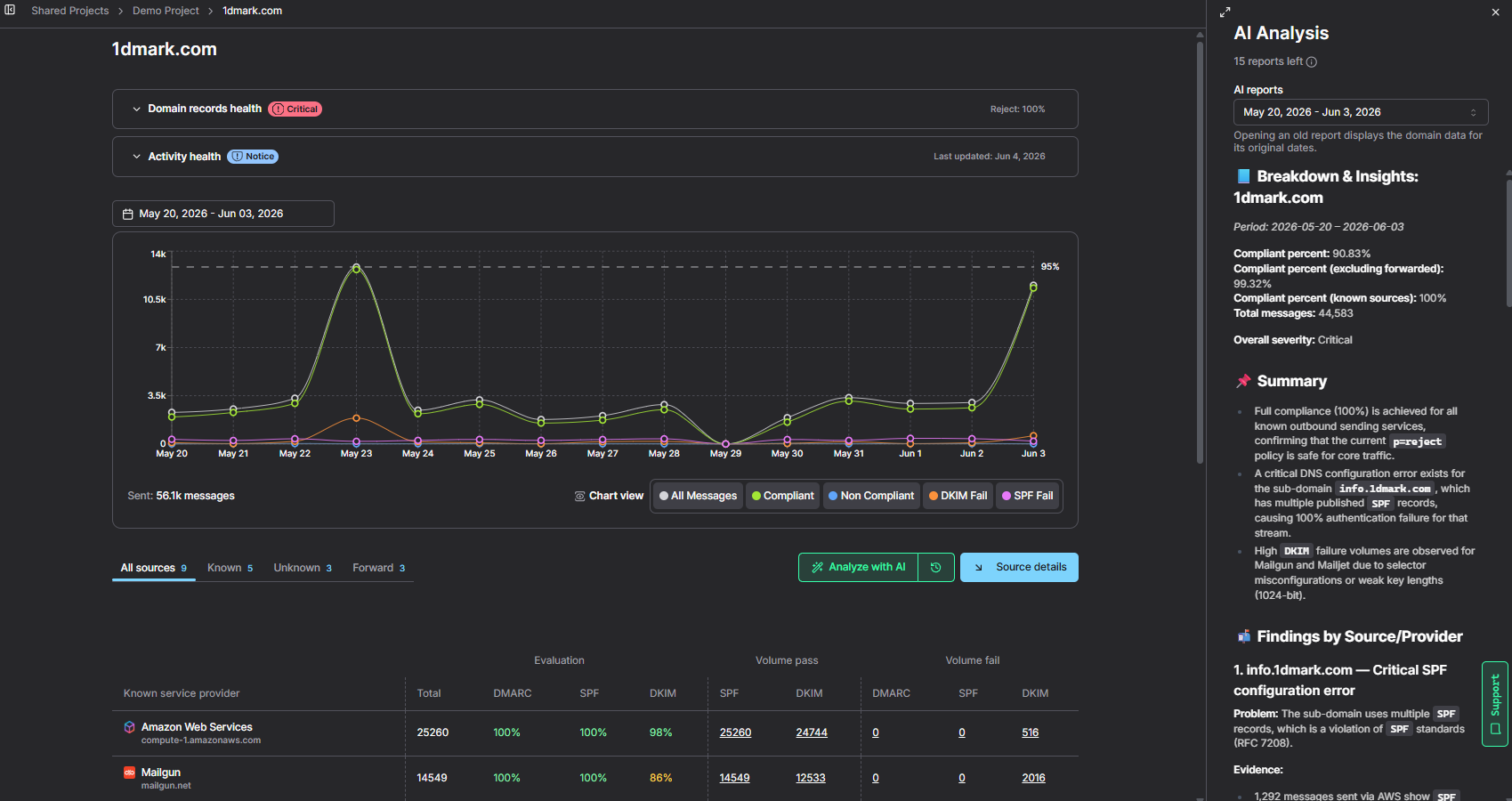
Luma AI report
Conclusion
DMARC reports are one of the most valuable resources available for monitoring email authentication. But raw DMARC reports can be difficult to interpret, particularly for teams that manage multiple domains or send large volumes through various platforms.
Tools like DMARKOFF make this process significantly easier by transforming complex XML reports into actionable insights. It allows organizations to focus on improving security and deliverability rather than manually processing report data.
FAQ
A DMARC report is a feedback report sent by mailbox providers that contains information about email authentication activity associated with your domain, including SPF, DKIM, and DMARC results.
Aggregate reports (RUA) provide summarized authentication data across many messages, while forensic reports (RUF) contain detailed information about individual authentication failures.
Yes. DMARC reports help identify authentication problems that may impact inbox placement, allowing organizations to fix issues before they affect sender reputation.
Using a DMARC reporting platform such as DMARKOFF is typically the easiest approach, as it converts complex XML files into visual dashboards and actionable insights.

The author has several years of experience creating high-quality content, with a strong focus on clear structure, readability, and truly meaningful insights.
She specializes in topics related to email authentication, deliverability, marketing technology, and digital communication.