
What Is the DMARC sp Tag? DMARC Subdomain Policy Explained



Email spoofing doesn't only target your primary domain. Attackers frequently abuse subdomains to impersonate, launch phishing campaigns, and damage brand reputation. While many businesses focus on protecting their root domain with DMARC, they often overlook the security of subdomains.
This is where the DMARC sp tag becomes important.
The DMARC sp tag (subdomain policy) allows domain owners to apply a different DMARC policy to their subdomains than the one used for the primary domain. It provides additional flexibility and helps prevent attackers from exploiting unprotected subdomains.
Key Takeaways
- DMARC sp tag allows you to apply a different DMARC policy to subdomains than to your root domain.
- Without an sp tag, subdomains automatically inherit the policy defined by the p tag.
- The sp tag helps protect inactive or unused subdomains from spoofing attacks.
- Organizations can use a strict policy for subdomains while gradually enforcing DMARC on their primary domain.
- If a subdomain has its own DMARC record, that record takes precedence over the parent domain's policy.
- Tools like DMARKOFF make it easier to generate, manage, and monitor DMARC policies across domains and subdomains.
Understanding DMARC Policies
DMARC (Domain-based Message Authentication, Reporting & Conformance) helps domain owners protect their email ecosystem from phishing, spoofing, and unauthorized use.
A standard DMARC record includes a policy tag (p) that tells receiving mail servers what to do with emails that fail DMARC authentication.
Common DMARC policies include:
- p=none
- p=quarantine
- p=reject
These policies typically apply to both the primary domain and its subdomains unless otherwise specified.
What Is the DMARC sp Tag?
The sp tag stands for subdomain policy.
It allows domain owners to define a separate DMARC policy for subdomains while maintaining a different policy for the root domain.
The syntax looks like this:
v=DMARC1; p=none; sp=reject;
In this example:
- The root domain operates in monitoring mode (p=none).
- All subdomains without their own DMARC record use a strict reject policy (sp=reject).
This approach is particularly useful if you want to continue monitoring your main email infrastructure while fully protecting unused or inactive subdomains.
Why Is the DMARC sp Tag Important?
The DMARC sp tag allows you to apply a different DMARC policy to your subdomains than the policy used for your root domain. This is especially useful when you want to protect inactive or unused subdomains from spoofing while maintaining a different enforcement level for your primary domain.
Example 1: Root Domain Protected, Subdomains Exposed
Suppose your DMARC record is configured as follows:
v=DMARC1; p=reject; sp=none; rua=mailto:aggrep@domain.com; ruf=mailto:forrep@domain.com;
In this scenario:
- The root domain is protected with a reject policy.
- The record explicitly sets sp=none, applying a monitor-only policy to all subdomains.
- Emails that fail DMARC checks from the root domain are rejected.
- Subdomains remain vulnerable to impersonation and spoofing attacks, even if they are not actively sending email.
Example 2: Inactive Subdomains Protected
Consider the following DMARC record:
v=DMARC1; p=none; sp=reject; rua=mailto:aggrep@domain.com; ruf=mailto:forrep@domain.com;
In this configuration:
- The root domain remains in monitoring mode with p=none.
- The record explicitly sets sp=reject, applying a reject policy to all subdomains that don't publish their own DMARC record.
- Inactive or unused subdomains are protected against spoofing and impersonation attempts.
- You can continue evaluating email authentication on your primary domain before moving to full enforcement.
Benefits of Using the DMARC sp Tag
By utilizing the DMARC sp tag, you can:
- Apply different DMARC policies to your root domain and subdomains.
- Protect inactive subdomains from unauthorized use.
- Gradually enforce DMARC on your primary domain while maintaining stricter controls on subdomains.
- Control how receiving mail servers process messages sent from different parts of your domain structure.
When Can You Omit the sp Tag?
You can omit the DMARC sp tag if you want your subdomains to follow the same policy as your root domain.
For example:
v=DMARC1; p=reject;
In this case, the root domain's policy is automatically inherited by all subdomains that don't publish their own DMARC record, making a separate sp tag unnecessary.
Important note: If you're building a DMARC record using DMARKOFF and you want to specify DMARC for subdomain, you must explicitly enable the DMARC subdomain policy option and choose your DMARC sp policy, as shown below:
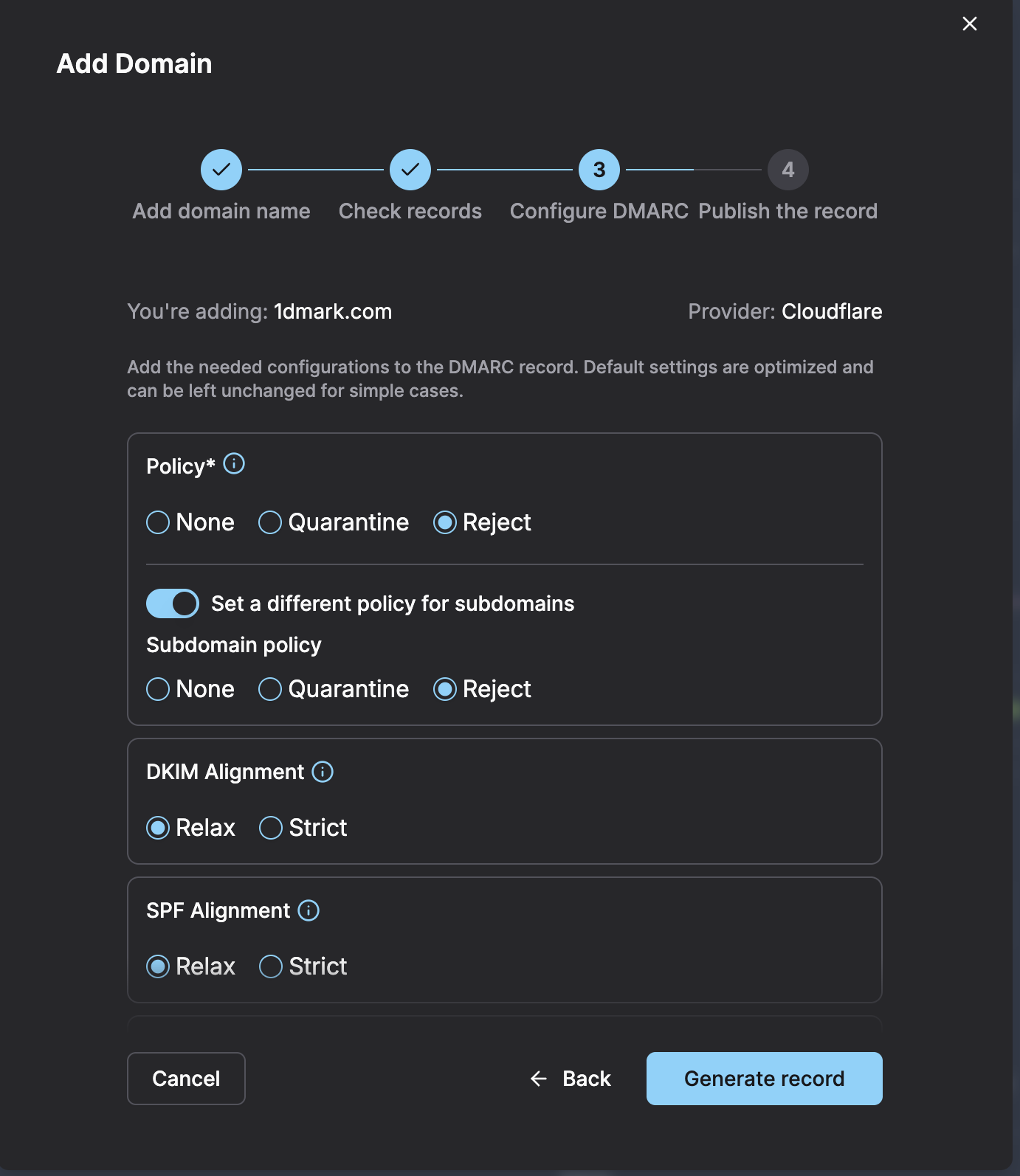
It is important to use a dedicated tool to verify your DMARC record's accuracy and authenticity after you've generated it. This step makes sure that your record is accurate and valid.
Validating your DMARC record confirms the syntax is correct and that receiving mail servers can parse it. Monitoring the aggregate reports is what shows whether the policy actually behaves as intended. DMARKOFF covers both: it checks the record and surfaces which sources fail SPF and DKIM alignment.
The DMARC np Tag: Closing the Gap for Non-Existent Subdomains
The sp tag is only for subdomains that exist but haven't published their own DMARC record. It says nothing about subdomains that don't exist at all in your DNS, like names you've never created, but that an attacker could still use in a spoofed "From" address.
This is exactly the gap the np tag closes. The np tag lets users apply a stricter policy specifically to “phantom” subdomains that should never be sending legitimate mail. The tag was first introduced experimentally, then folded into the current standard: the np tag sets a policy specifically for non-existent subdomains.
The np tag accepts the same three values as the p and sp tags:
np=reject (recommended): Blocks mail from non-existent subdomains from
reaching the inbox.
np=quarantine: Sends it to spam.
np=none: Just monitors, no blocking, which is useful for initial testing.
Benefits of Using the DMARC sp and np Tags:
By combining sp and np, you can:
- Protect inactive subdomains from unauthorized use, whether or not they currently exist in DNS.
- Gradually enforce DMARC on your primary domain while maintaining stricter controls on subdomains.
- Eliminate the blind spot where spoofed, never-created subdomain names default to a weaker fallback policy.
Conclusion
The DMARC sp tag is a valuable but often overlooked component of DMARC implementation. It allows organizations to apply a separate authentication policy to subdomains, helping protect against spoofing attacks without affecting the primary domain's enforcement strategy.
While many businesses focus exclusively on the root domain, attackers frequently target forgotten or inactive subdomains. Implementing an appropriate subdomain policy can significantly strengthen your overall email security posture.
FAQ
The sp tag stands for subdomain policy. It allows domain owners to define a DMARC policy specifically for subdomains without their own DMARC record.
Yes. This is a common configuration that allows monitoring on the primary domain while enforcing strict protection on subdomains.
Yes. A strict subdomain policy such as sp=reject can help prevent attackers from spoofing inactive or unused subdomains.
The p tag defines the policy for the primary domain, while the sp tag defines the policy for subdomains that do not publish their own DMARC records.
You can manually create the record in DNS or use a DMARC monitoring platform such as DMARKOFF to create, validate, and monitor your DMARC configuration.
The sp tag covers subdomains that exist but haven’t published their own DMARC record. The np tag covers subdomains that don’t exist at all: names you’ve never created, but that attackers could still put in a spoofed “From” address.

Author of numerous articles on email deliverability and email authentication. She is known for her practical, data-driven approach that helps teams get more emails into inboxes and keep sending practices healthy.
Julia works closely with senders every day, providing technical support, troubleshooting deliverability issues, and making complex topics such as email infrastructure, authentication, and sender reputation easier to understand and deal with.