
Free Email Security Checker
Skip multiple tools. Run one complete email security check to analyze your domain's authentication, delivery, reputation, identity, and DNS configuration in one scan.
Get your Email Security Score, Spoofability Level, and a clear breakdown of the issues affecting your domain protection.
Stop guessing. Start monitoring.
This audit is a snapshot in time. DMARKOFF continuously monitors your DMARC, SPF and DKIM — alerting you the moment something drifts — and turns your DMARC reports into one-click visibility of everyone sending as your brand.
FAQ
An Email Security Checker is a tool that analyzes your domain's email infrastructure to identify security, authentication, and deliverability issues. It conducts a complete email security check online by scanning your existing DNS records, including SPF, DKIM, DMARC, MTA-STS, TLS-RPT, MX, DNS, rDNS, BIMI, and other domain signals.
The scan returns an overall Email Security Score and Spoofability Level, highlights the most important issues, and provides a detailed report with recommended fixes.
To run a free email security check, enter your domain name. Domain DNS checker will scan all your existing DNS records, identify any configuration issues, and calculate your Email Security Score and Spoofability Level. You'll receive a report accessible via a shareable link for easy collaboration.
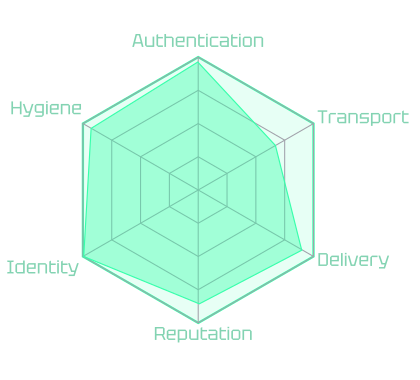
Your Email Security Score (0-100) shows how well your domain is protected across six areas: Authentication, Transport, Delivery, Reputation, Identity, and Hygiene. Each category has a different weight based on its impact on email security, spoofing protection, and deliverability.
Your overall score converts into one of six grades:
- A+ (95-100): Excellent email security posture.
- A (85-94): Strong protection with minor improvements possible.
- B (70-84): Good setup, but some areas need attention.
- C (55-69): Several security or configuration issues were detected.
- D (40-54): Significant weaknesses affecting protection.
- F (0-39): Critical issues requiring immediate attention.
The higher your domain's score, the better protection you have against threats.
The Spoofability level is a separate security signal that shows how easily attackers could impersonate your domain. It reflects your domain's protection level against spoofing:
- Low: Strong anti-spoofing protection. SPF, DKIM, and DMARC are configured correctly, with DMARC enforcement set to quarantine or reject and no test mode enabled.
- Medium: Your domain has protection, but one or more settings need improvement, such as a weaker DMARC policy (
p=quarantine) or less strict SPF configuration. - High: Your domain is easier to spoof. This usually happens when SPF, DKIM, or DMARC is missing, SPF allows unauthorized senders, or DMARC is running in test mode.
- Unknown: The required authentication records could not be checked, for example, if the domain is inactive or unavailable.
The email security test analyzes six key areas of your domain:
- Authentication: SPF, DKIM, and DMARC configuration to verify sender identity and prevent spoofing.
- Transport: MTA-STS and TLS-RPT settings to check secure email transmission.
- Delivery: MX, DNS, and rDNS records that affect email routing and reliability.
- Reputation: IP and domain blocklists (DNSBL/URIBL) that may impact inbox placement.
- Identity: BIMI and VMC configuration for trusted brand display in inboxes.
- Hygiene: TXT records, deprecated tags, and configuration issues that may affect security.
DMARKOFF's DNS Record Checker combines multiple email security tools into one scan. Instead of running separate audits, you can analyze your entire domain setup in one place:
- SPF Checker: Checks whether your SPF record is correctly configured and whether your domain allows only authorized senders to send emails on your behalf.
- DKIM Checker: Checks whether DKIM authentication is properly configured and whether your email signatures can be validated by receiving servers.
- DMARC Checker: Verifies your DMARC policy, alignment, and enforcement level to help protect your domain from spoofing and phishing attacks.
- MX Record Checker: Analyzes your MX records to confirm your domain points to the correct mail servers and can properly receive email.
- DNS Checker: Reviews your domain DNS configuration for email-related records and detects missing, incorrect, or conflicting settings.
- rDNS Checker: Checks reverse DNS configuration to confirm your sending IP has a valid hostname, which can support email trust and delivery.
- MTA-STS Checker: Validates your MTA-STS policy to ensure secure SMTP connections are enforced where supported.
- TLS-RPT Checker: Checks TLS reporting configuration to help identify email delivery security issues.
- BIMI Checker: Verifies BIMI setup and checks whether your brand logo configuration is ready for supported email clients.
- TXT Record Checker: Finds duplicate, outdated, or incorrect TXT records that may affect email authentication and domain configuration.
The easiest way to check email security is to run an automated domain scan. Enter your domain into DMARKOFF's email security checker, and the tool will analyze your email setup, calculate your security score, and show issues to fix.
Your email infrastructure changes. New sending platforms, DNS changes, expired certificates, or configuration updates can affect your protection and deliverability. Regularly testing email security helps you detect issues early, reduce the risk of email spoofing and phishing attacks, and keep your domain properly configured.