
DMARC Monitoring for MSPs: A Complete Guide


Why MSPs Offer DMARC Monitoring
Implementing DMARC is recommended for any domain regardless of whether or not it is sending emails. For high-volume senders, publishing a DMARC record is required by mailbox providers' rules.
DMARC provides domain owners with visibility into authentication results, domain alignment, email sources, volume, and the effect of a published DMARC policy.
This opens great opportunities for Managed Service Providers (MSPs) working with clients’ domains and ensuring their configuration, functionality, and security.
This guide walks MSPs through choosing a DMARC monitoring tool, deciding on the client management option in DMARKOFF, onboarding client domains, reviewing reports, and preparing recommendations for the client.
Key Takeaways
- By offering client DMARC monitoring, MSPs can boost the value of their services and increase revenue;
- MSPs can establish a reputation of an expert and gain new clients;
- MSPs can help clients with meeting mailbox provider requirements concerning email authentication;
- MSPs can help clients identify and fix email authentication issues early;
- MSPs can provide better visibility and clarity to the clients by turning complex DMARC reports into actionable steps.
According to the sender requirements published by Google, Yahoo, and Microsoft, bulk senders need an SPF, a DKIM, and a DMARC record with at least a p=none policy, and a From domain aligned with SPF or DKIM.
However, simply publishing SPF, DKIM, and DMARC records is not enough. Domain owners need ongoing monitoring and visibility into who is sending email on their behalf, whether their emails are properly authenticated with SPF and DKIM, and whether unauthorized sources are blocked.
By adding DMARC monitoring to the package, an MSP can stand out from the competition and generate additional revenue by providing a high-value service to clients.
Ongoing DMARC monitoring allows MSPs to determine email authentication breaches, unknown sources, and harmful activity on the clients’ domains. When identified and fixed early, this ensures domain security and prevents reputation damage.
A DMARC monitoring service also gives a good opportunity for MSPs to establish a reputation as an expert in email security and get new clients who are specifically concerned about their domain protection.
By adding DMARC monitoring to their packages, MSPs can enhance the value of their services and boost revenue, stand out from the competitors, and gain a reputation as a highly specialized service in email authentication and security.
What DMARC Monitoring Covers
When a DMARC configuration for a client’s domain is done, ongoing monitoring starts.
MSPs should receive DMARC aggregate reports sent for a client’s domain and analyze the data to find out who sends emails on behalf of each client’s domain, whether those senders are legitimate ones, whether legitimate messages are authenticated correctly, and whether the domain is ready for a stronger policy.
Key Takeaways
- MSPs identify the domain’s legitimate email sources;
- MSPs verify email authentication outcomes for legitimate sources;
- MSPs verify if legitimate emails are correctly aligned by SPF or DKIM;
- MSPs examine SPF and DKIM failures for legitimate emails and provide “how to fix” steps to the client;
- MSPs notice unusual email volume for a domain and investigate where it comes from;
- MSPs inform the client when a DMARC policy can be enforced in a safe mode and rolled back if needed.
A 6-Step DMARC Monitoring Workflow for MSPs
In practice, a recommended DMARC monitoring workflow for MSPs is as follows:
Inventory → Reports → Triage → Fix → Verification → Enforcement
1. Identifying known email sources for a client’s domain.
An MSP creates a list of legitimate email sources for a client’s domain. They can contact a specialist responsible for the domain administration in the client’s organization and question them about email services that may be sending emails on behalf of the domain. This list will help an MSP differentiate email sources and focus on legitimate ones.
2. Checking SPF and DKIM authentication results.
An MSP verifies email authentication results for each legitimate email source. If failures are noticed, an MSP investigates them to determine the cause.
3. Checking domain alignment results.
An MSP verifies if the emails sent by legitimate email sources pass either the SPF or DKIM alignment test.
4. Making DNS changes.
When an issue is detected, an MSP makes DNS changes within the scope agreed in the contract with the client, through an approved change request.
5. Verifying the result.
After the DNS changes are made, an MSP verifies the effect of the changes in the reports.
6. Helping a client enforce the policy.
Based on the analyzed data, an MSP informs the client when they can change the DMARC policy from p=none to p=quarantine and then to p=reject without affecting their legitimate emails. The policy can be enforced when all legitimate email sources consistently pass DMARC, ideally through aligned DKIM, since SPF breaks on forwarding.
If ongoing monitoring shows unexpected authentication failures, an MSP informs the client about the policy rollback and takes the steps to fix the issues.
Start 14-day Free Trial
For MSPs, client DMARC monitoring means collecting DMARC reports, identifying email sources, verifying SPF and DKIM authentication results, verifying domain alignment results, fixing authentication and alignment issues, helping with policy enforcement, and responding to urgent issues.
How to Choose a DMARC Tool for Client Domain Monitoring
Managing DMARC for several clients means keeping domains, reports, and follow-up work organized.
When choosing a DMARC monitoring tool suitable for client work, an MSP should focus on these key criteria: multi-tenancy, reporting, integrations, alerting, scalability, and vendor reputation.
Key Takeaways
- A DMARC tool for MSPs should have multi-tenant support with one account;
- A DMARC tool should provide detailed reports per client, domain, source, and DMARC results;
- A DMARC tool should have a strong alert system;
- A DMARC tool should be scalable as an MSP's client base and monitored volume grow;
- The tool vendor should be reputable and should actively maintain and update the platform following DMARC changes.
Key Features to Look for in an MSP DMARC Monitoring Tool
Here are the recommended features to look for when choosing the best DMARC monitoring tool for an MSP’s needs:
1. Multi-Tenant Management.
Multi-tenancy becomes increasingly important as the number of clients and managed domains grows. A suitable DMARC tool should allow an MSP to:
- Manage multiple clients from one account;
- Keep each client’s domains and reports in a separate project or workspace;
- Easily switch between the clients’ projects/workspaces;;
- Add and remove the client’s domains easily.
2. Data Analysis and Reporting.
This is particularly important because DMARC reports can reveal authentication issues for legitimate senders and point to unauthorized sources. A good DMARC tool should convert raw data contained in DMARC aggregate reports into information an MSP can actually use and communicate to the client.
Thus, when evaluating a tool, an MSP should look for dashboards that show:
- SPF authentication results;
- DKIM authentication results;
- DMARC compliance rate;
- SPF and DKIM alignment results;
- DMARC policy: none, quarantine, reject;
- Sending sources: IP addresses and appropriate ESPs;
- Source categorization: known, unknown, gateway, forward;
- Email volume per domain and source.
3. Alerting System.
Monitoring is only useful when the problems are detected on time. A suitable DMARC monitoring tool should send alerts when something requires attention, in particular:
- A new sending source appears;
- DMARC failures increase;
- SPF/DKIM alignment failures increase;
- A domain's DMARC policy changes;
- An SPF or DKIM record changes;
- A client’s email volume suddenly increases.
4. Integrations.
The ability to integrate a DMARC tool with third-party platforms can facilitate DMARC monitoring for MSPs. For instance, REST APIs and webhooks allow MSPs to set up an automatic ticket creation process when an alert is received or to download the client’s reports. The MCP support allows connecting an AI tool for quick data analysis.
5. Scalability and Pricing.
As a client base grows, a good DMARC monitoring tool should handle a lot of reports daily without degrading in performance.
The tool’s pricing tiers also matter. Is it paid per client, domain, or email volume? A tool that is affordable for 10 domains with a low volume may become much more expensive for 10 domains sending millions of emails.
The pricing model should be straightforward and disclose all the fees upfront.
6. Support and Maintenance.
MSPs should consider the reputation of the vendor and read the product feedback. The vendor should actively maintain and update the tool to comply with the latest DMARC changes. The customer support team should be available and responsive. The site should provide educational material (tutorials, videos, how-to guides, FAQ, Help Center, etc.).
Reading reviews, user feedback, and comparisons of the top DMARC platforms for MSPs helps an MSP to get an independent view of the tool.
The best DMARC monitoring tool is one that integrates seamlessly into an MSP’s workflow, handles a high volume of reports flawlessly, and delivers informative and client-oriented reports. It should make a complex DMARC monitoring process easy and effective.
How DMARKOFF Supports MSPs’ Workflow
DMARKOFF is an email authentication and DMARC report monitoring service designed to help domain owners track, analyze, and secure their domain reputation and email deliverability.
It simplifies DMARC report processing, allowing senders to achieve strict compliance with email sender requirements mandated by major providers like Google, Yahoo, and Microsoft.
Thanks to its multi-tenant architecture and scalability, DMARKOFF suits for MSPs managing many clients and hundreds of domains.
Key Takeaways
- With DMARKOFF, MSPs can maintain all the clients’ domains in one account;
- MSPs can use a built-in AI analyzer for a quick data examination and integrate DMARKOFF with any MCP-compatible AI tool;
- MSPs can receive alerts when authentication issues or unusual activity are detected;
- MSPs can use a branded reporting email address;
- MSPs can receive high-level performance and data analysis regardless of the monitored email volume.
Top 10 Reasons Why MSPs Should Choose DMARKOFF
1. Multi-tenant architecture: manage multiple clients in one account.
With one account, an MSP can create multiple projects and store each client’s domains and reports in one dedicated project.
2. Project sharing: use shared projects for quick data access.
Clients using DMARKOFF can share their projects with monitored domains with an MSP’s account. An MSP can access all the client’s domains and analytics without needing to provide their own rua email address to the client.
3. Widget view: get a quick overview of client domains.
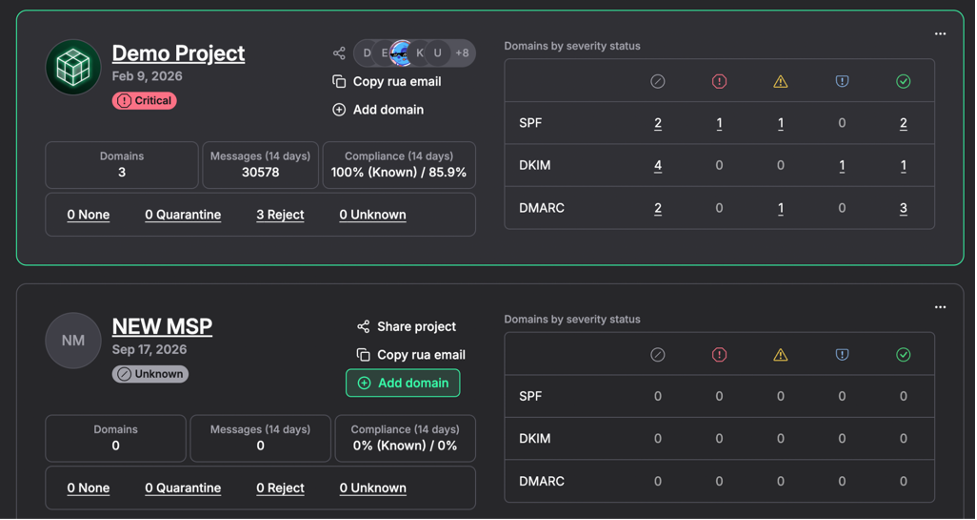
Projects appear as widgets for a quick overview. They are sorted automatically by "Severity" – the projects with critical issues are always at the top.
The project widget has all essential DMARC data in one place:
- domain count,
- message count,
- compliance rate,
- DMARC policy breakdown,
- authentication health summary.
This eliminates the need to dig into multiple pages to assess a domain’s health. MSPs can quickly see how many domains are using none, quarantine, or reject policies in order to prioritize configuration fixes and spot weak enforcement instantly.
A visual breakdown of pass, warning, and fail states for SPF, DKIM, and DMARC across all domains in the project makes it easy to detect trends and focus remediation efforts.
4. Quality report: focus on problem domains.
Inside the project, the analytics for each domain are presented in the manner to provide good visibility into a domain’s status. Specifically, MSPs can quickly spot:
- Domain’s email volume;
- Domain DMARC compliance rate;
- Published policy;
- Health and activity status;
- Number of unknown sources;
- Number of messages failing SPF;
- Number of messages failing DMARC.
5. Detailed analytics: get an in-depth domain analysis.
A domain-related report provides comprehensive data about a client domain’s authentication records and outcomes for the selected period. MSPs can examine:
- Records health: DMARC, SPF, and DKIM;
- Activity: SPF, DKIM, and DMARC compliance and email volume;
- “How to fix” recommendations if an issue is detected;
- Domain sources: known, unknown, forward, gateway.
- Source analytics: message count, volume pass, volume fail, SPF/DKIM/DMARC evaluation, and authentication.
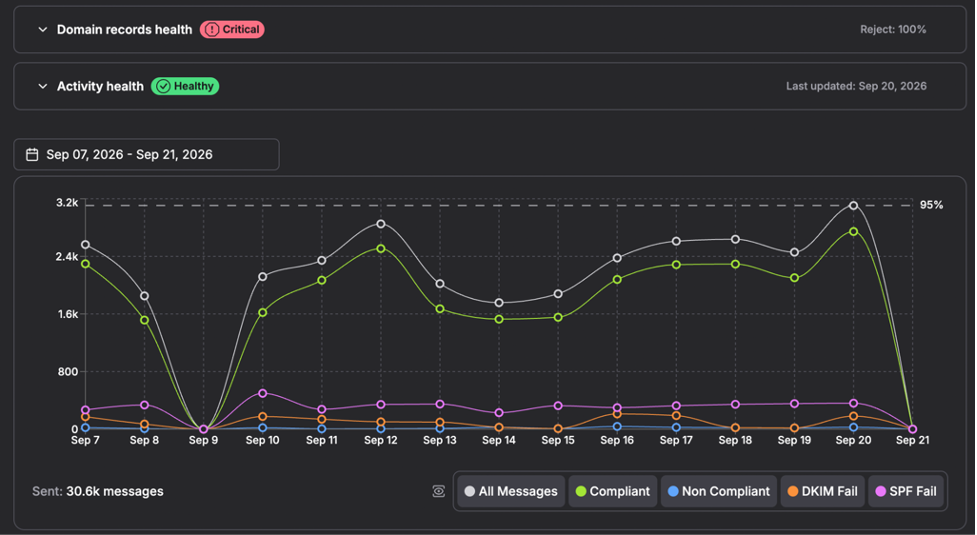
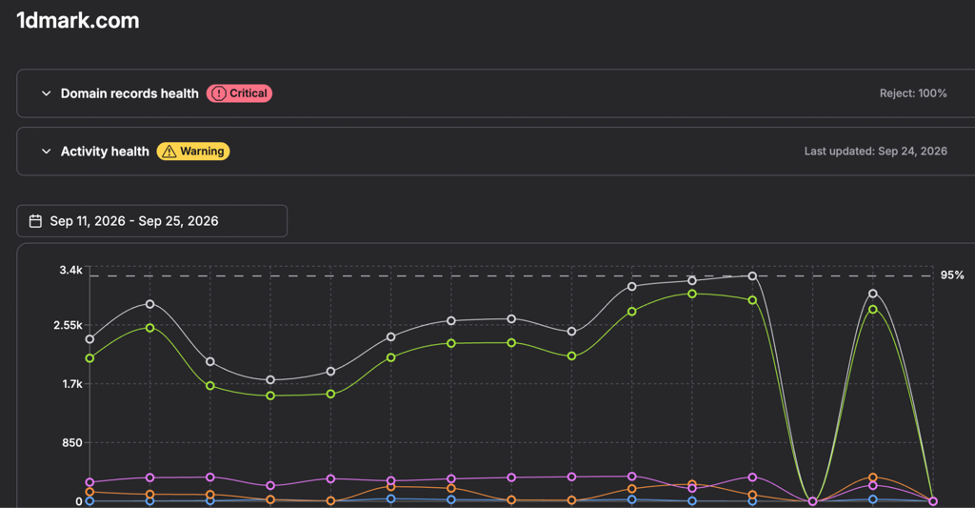
An interactive chart displays trends in compliant and failed messages (SPF, DKIM, DMARC) over time and helps spot incidents, improvements, or sudden deliverability issues.
6. Luma: examine the report with AI
MSPs can use Luma to analyze a domain’s data for the selected period in one click. Luma will highlight found problems and provide actionable steps on how to fix them. 30 AI reports per domain per month are available.
7. MCP support: integrate it with AI tools.
In addition to Luma, MSPs can connect DMARKOFF with Claude, ChatGPT, Windsurf, Cursor, and any other MCP-compatible AI client. This allows an AI client to read the data in DMARKOFF, create comprehensive feedback showcasing the issues, and provide remediation steps.
8. Smart notifications: get alerted about issues.
MSPs can get alerts on any anomalies detected by DMARKOFF: changes in DNS records, compliance drops, email volume spikes, sudden increases in unknown email volume, or no email volume in recent days.
Alert settings and types can be customized for each project. Thus, each MSP technician can only receive alerts regarding the client’s domains they are responsible for.
9. Branded reporting address: whitelabel DMARC monitoring.
An MSP can set up a dedicated email address on their own domain to receive a client’s DMARC reports and then forward the reports to the DMARKOFF email address for processing.
10. Scalability: pricing doesn’t depend on email volume.
DMARKOFF can process many reports daily without losing processing speed, performance, and data quality. The prices don’t increase as the email volume scales. This makes DMARKOFF suitable and affordable for any MSP regardless of their client base size, number of monitored domains, and sent email volume.
Become a Partner
Thanks to a modern multi-tenant architecture, high-speed performance, quality analysis, and AI integration, DMARKOFF stands as an effective and reliable DMARC report processing tool, meeting the requirements of individual users, agencies, and MSPs.
How to Onboard Client Domains for DMARC Monitoring: Two Options
DMARKOFF provides two options for MSPs to manage domain monitoring for their clients. MSPs can choose the suitable approach depending on the client’s requirements.
Key Takeaways
- MSPs can onboard and manage clients’ domains via an MSP program and shared projects;
- MSPs can onboard and manage clients’ domains in their own account;
- MSPs can use a branded reporting address for collecting a client’s reports;
- MSPs or their clients can bulk import a list of domains for monitoring;
- DMARKOFF can automatically add domains for monitoring when the reports are received;
- MSPs can enable DMARKOFF notifications to be alerted about critical issues with a client’s domains.
Option 1: How to Onboard Client Domains via MSP Program
An MSP can monitor clients’ domains via shared projects and get paid for each domain as long as it is shared with them. The commission rate is 25% for each paid domain shared with an MSP’s account. Once the MSP’s referred revenue reaches $1,000+ in total (around 10 deals), the MSP is automatically moved to the highest tier with the 30% commission per shared domain.
To apply, create a free account at DMARKOFF and sign up for an MSP program.
Here is a step-by-step guide on how to onboard your first client’s domains:
-
Get a contact email of the specialist responsible for domain administration in the client’s organization.
-
Make a list of the client’s domains subject to monitoring.
-
Give the instructions to the specialist on what they have to do.
The client needs to:
- Create an account at DMARKOFF;
- Buy a subscription for the needed number of domains;
- Add the domains to their account (individually or in bulk);
- Publish a DMARC record generated by DMARKOFF or add DMARKOFF’s rua email address to the DMARC records on the monitored domains;
- Share the project(s) with the added domains with you (MSP).
-
Verify that all the client’s domains appear in a shared project.
-
Verify the DMARC records to ensure they include the rua email address pointing to DMARKOFF.
If everything is done right, DMARKOFF should start collecting domain analytics within a few days.
Option 2: How to Onboard Client Domains via Your Account
Alternatively, an MSP can manage all the clients’ domains in their own account, separating them by different projects for easier access and overview.
When an MSP chooses this option, they don’t get a commission. However, an MSP can have the Agency+ subscription plan for 10+ domains at a special price.
Here are the steps to onboard clients’ domains in your MSP’s account:
-
Make a list of a client’s domains subject to monitoring.
-
Create a project for a client.
-
Add the client’s domains to the project (individually or in bulk).
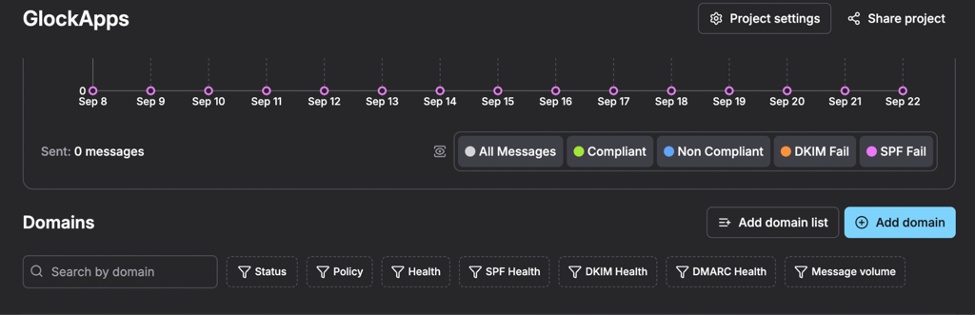
- Copy the rua email address from the project and send it to the specialist responsible for DNS settings in the client’s organization.
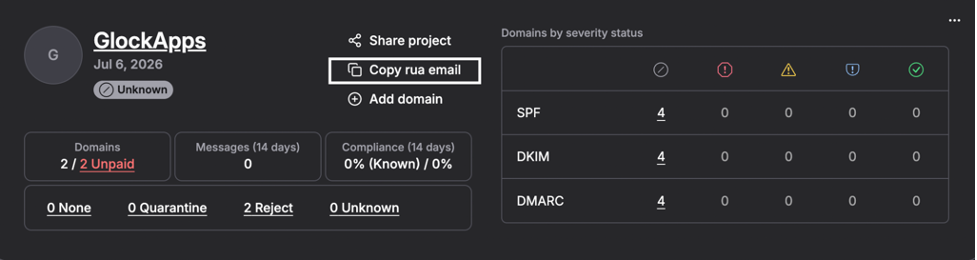
- Ask the specialist to add the rua email address to the DMARC records published for the monitored domains.
Or add the rua email yourself if making the changes to DNS settings is permitted by your contract with the client.
- Verify the DMARC records published for the monitored domains to ensure the rua email address was added.
DMARKOFF will start showing domain analytics when the first reports are received.
Using a Branded Reporting Email Address
This is a great option for MSPs to whitelabel domain monitoring when they are managing clients’ domains directly in their own account instead of shared projects.
Here is the process recommended for MSPs to set up a branded reporting email address:
- Set up an email address dedicated to receiving the client’s reports on your domain, for example,
dmarc_client1524531@msp.example.com - Publish an External Destination Verification DNS TXT record on your receiving domain.
Record Name: [sending-domain]._report._dmarc.[receiving-domain]
Record Type: TXT
Record Value: "v=DMARC1;"
Such a record is required for each client’s domain.
Alternatively, you can publish a wildcard record if you manage multiple clients’ domains:
*._report._dmarc.[receiving-domain] with the value "v=DMARC1;"
Using a wildcard, you allow any domain to send reports to your receiving domain. This is acceptable only for a dedicated reporting domain.
- Send your branded reporting address to the client and ask them to add it as a rua email address to the DMARC records.
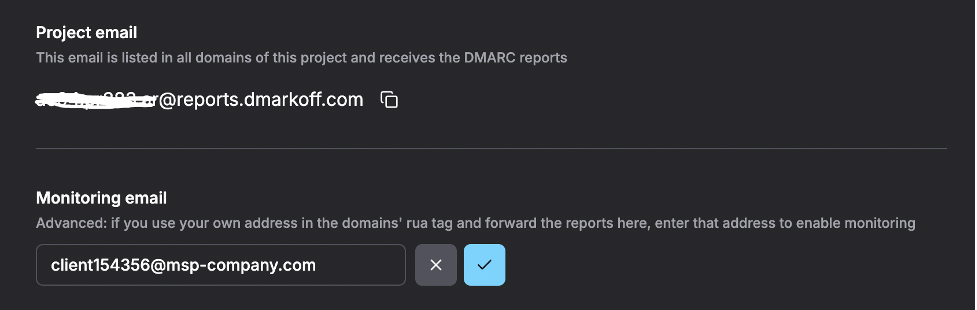
- Click on the client’s project name and go to the Project Settings.
- Click “Add Monitoring Email”.
- Enter your branded reporting address and save it.
- In your email system, set up forwarding of DMARC reports from your branded reporting address to the Project email address appearing in DMARKOFF.
Below is a quick comparison of the two client DMARC monitoring options in DMARKOFF:
The client domain onboarding is successful when the domains are added to DMARKOFF, and the reports are sent to the dedicated email address. This enables domain monitoring, which provides MSPs and clients with visibility into a domain’s health, activity, and critical problems.
An 8-Step DMARC Monitoring and Reporting Checklist for MSPs
Once the domains are added and the reports are sent to DMARKOFF, MSPs start receiving analytics about the domains’ health and activity. In DMARKOFF, the data is organized in a manner that makes critical issues with authentication records and domain alignment instantly noticeable.
Key Takeaways
- MSPs can quickly identify the domains with critical authentication issues;
- MSPs can check the domain’s health and activity data;
- MSPs can determine SPF, DKIM, and DMARC failures for known sources;
- MSPs can view unknown sources and their email volume;
- MSPs can run an AI analysis of the reports;
- MSPs can get a list of “how to fix” steps.
Step-by-Step: How to Monitor and Analyze Client Domains
Here is a workflow recommended for MSPs to monitor and analyze managed domains in DMARKOFF effectively:
1. Make a list of all services sending mail on the client’s behalf.
Before analyzing a client’s domain data, list the email services that use those domains. Contact the specialist in the client’s organization regarding this matter.
Ensure you list all the services sending emails on the client’s behalf, including:
- Billing systems;
- Help Desk and support platforms;
- CRM;
- Email service providers for marketing campaigns;
- Subscription and contact forms on the website.
This will help you identify known and unknown email sources and determine issues with SPF and DKIM faster.
2. Identify the domains with critical issues.
In DMARKOFF, the projects with domains having critical email authentication issues are displayed at the top. The red “Critical” label below the project name helps identify them.
Look at the “Domains by severity status” table to see how many domains have issues with SPF, DKIM, or DMARC authentication.
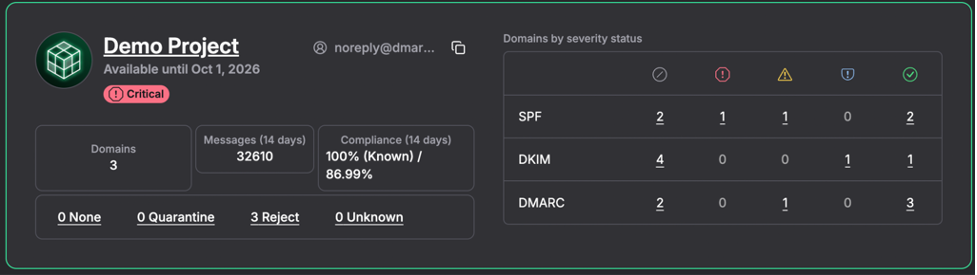
Click on the number to show the problem domain analytics.
3. Examine the domain’s health and activity.
Look at the domain’s analytics and take note of the number of unknown sources, and emails failing SPF and DKIM.
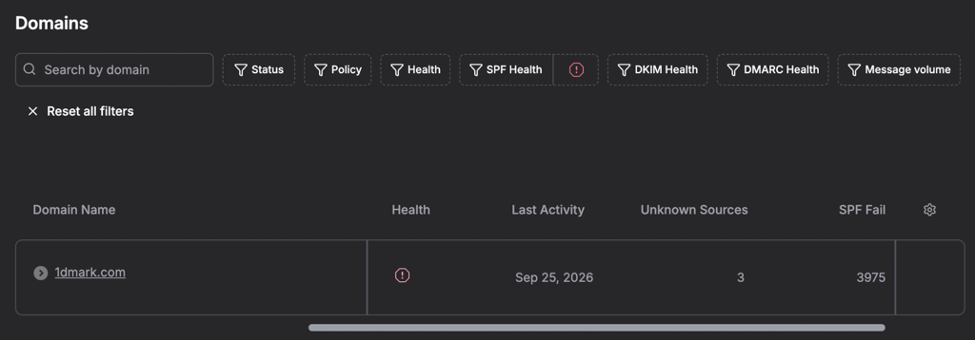
Click on the domain name to drill down into the details.
Examine the “Domain records health” and the “Activity Health” reports.
Pay attention to the items with the Critical icon. Read the “How to fix” steps recommended by DMARKOFF.
Also, pay attention to the items with the Warning and Info icons – although they don’t indicate serious problems, they might point to minor issues that can lead to inconsistent authentication results.
4. Notice failures for known sources.
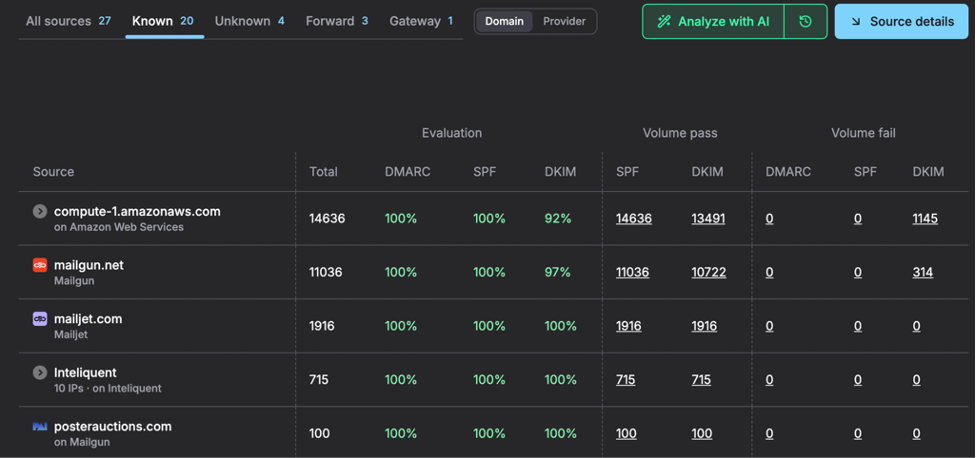
Below an interactive chart, look at the list of email sources determined based on processed DMARC reports.
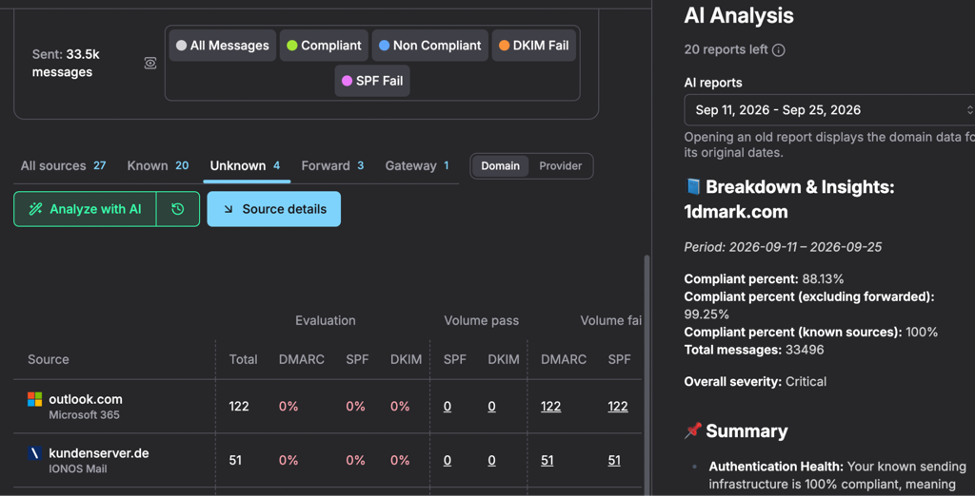
Click on the Known tab to display legitimate sources. Notice the evaluation rates and the Volume Fail numbers.
Click on the failing number for further examination.
5. Determine why SPF or DKIM failed.
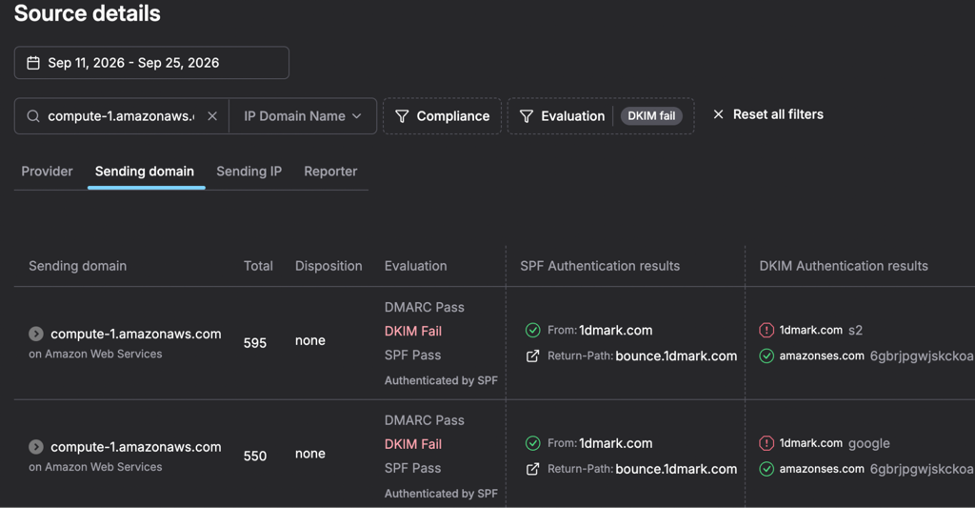
In the Source Details, notice SPF and/or DKIM failures.
Look at the SPF and DKIM authentication results to see what failed and why.
Write down the determined problems for further corrections.
6. Check unknown sources.
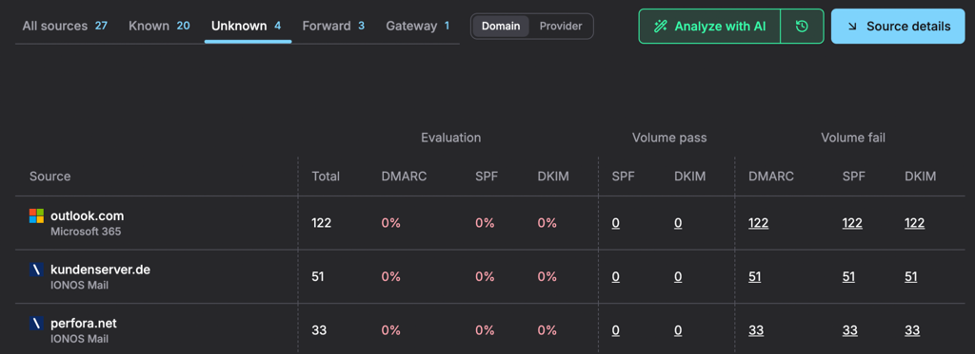
Return to the domain overview and click on the Unknown sources tab.
Check the list of unknown email sources to ensure no legitimate source is listed as unknown.
Look at the email volume for unknown sources (Total) – a huge sending volume can signify a domain spoofing attack.
7. Analyze with AI.
Click on the “Analyze with AI” button to get an overview of the domain’s health and activity, including authentication failures and recommendations on how to fix them.
The AI agent Luma is your assistant in data analysis. However, you should always match its findings and recommended steps with your own conclusions.
8. Fix authentication issues.
Apply fixes following Luma’s recommendations and your own findings.
If making the DNS changes is not permitted by your contract with the client, create a comprehensive report describing the problems found and the steps to take, and send it to the specialist in the client’s organization.
Tips to Make DMARC Monitoring More Effective
1. Automatically Analyze Reports and Get Recommendations
DMARKOFF can be connected to any MCP-compatible AI tool. An AI agent will access the domains’ data, conduct a thorough analysis, examine sending sources, email authentication, and evaluation outcomes, and come up with a comprehensive report about identified problems and ways to solve them. This saves hours of work an MSP would spend on data analysis and lets MSPs catch the problem early.
2. Add Domains for Monitoring Automatically
If a domain is not yet added to DMARKOFF, it can be added automatically by the tool when the reports for that domain are received. This eliminates a manual setup.
In the Project settings, an MSP or a client can enable the "Automatically add domains" option. After the rua email address for a new domain is added, the domain automatically goes to the client’s project when the first reports are received.
With the "Make added domains paid” option, new domains can be automatically converted into paid ones. This works when the paid domain slots are available in the subscription.

3. Get Notified about Critical Issues
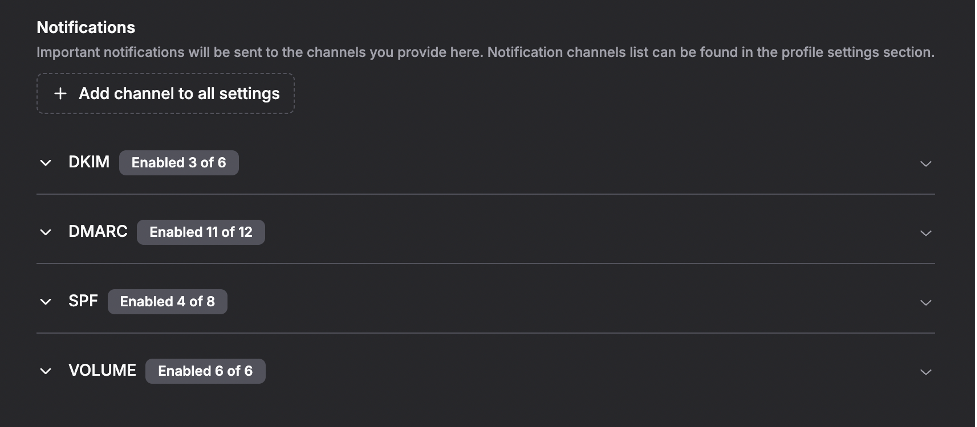
In the Project settings, an MSP can customize notifications for the client’s domains.
DMARKOFF can notify an MSP about important changes in DNS records or domain activity, highlighting problem areas. The tool compares yesterday's pass rates with the domain's 14-day norm and automatically flags unusual activity that may require attention.
An MSP should review the notifications regularly and adjust the alert rules when needed.
Ongoing DMARC monitoring allows MSPs to maintain a healthy configuration of clients’ domains and keep the domains protected with an enforced DMARC policy. Smart notifications and an additional AI analysis of the reports make DMARC monitoring with DMARKOFF easier and more effective.
FAQ
Publishing a DMARC record for every domain is recommended. For domains sending a high volume of emails, it’s a requirement.
For high-volume senders, Google, Microsoft and Yahoo require a DMARC record with at least a p=none policy and domain alignment.
Non-sending and parked domains can also benefit from DMARC, especially with a restrictive policy, because it helps block any unauthorized email.
A non-sending domain should have an SPF record that excludes all senders and a DMARC record with a p=reject policy:
SPF record: v=spf1 -all
DMARC record: v=DMARC1; p=reject;
Adding the rua email address to the DMARC record is optional. It is important to remember that all the subdomains will inherit a DMARC record published on the main domain if they don’t have their own records.
To specify a different policy for subdomains, the sp= tag can be used. The np= tag can be used to specify a policy for non-existent subdomains.
If a domain doesn’t accept email messages, it should also have a null MX record:
Priority (preference): 0
Value/host: .
Yes, if DKIM passes with an aligned domain. A message passes DMARC when SPF passes for a domain aligned with the From domain, or when DKIM passes with an aligned signing domain or both pass. A plain SPF or DKIM pass for some other domain does not count.
Not necessarily. Unknown sources include email forwarders, gateways, domain spoofing sources, and legitimate senders not included in the domain’s SPF record.
Mailbox providers create and send aggregate reports once every 24 hours. The first reports usually come in 24-48 hours provided that email messages were sent on behalf of the domain after the DMARC record is published.
If the reports don’t arrive in a reasonable amount of time, the most common reasons are:
- No emails were sent on behalf of the domain;
- The rua tag in the DMARC record is malformed and is missing mailto: before the email address;
- A EDV record wasn’t published for a domain receiving the reports.
An External Destination Verification (EDV) record is a special DNS TXT record that must be published on a receiving domain to authorize an external domain to send its DMARC reports there.
The right DMARC tool should support multi-tenancy so all clients can be managed from one account without switching logins. It should convert raw DMARC aggregate data into clear, actionable dashboards rather than leaving MSPs to interpret XML files manually. A strong alerting system is essential, as problems need to be caught quickly, not discovered during a weekly review. API and MCP support should allow MSPs to automate workflows and connect AI tools for deeper analysis. And as the client base grows, the tool should handle increasing report volumes without performance degradation or pricing tied to email volume. Vendor reliability also matters. The platform should be actively maintained, updated to reflect changes in DMARC standards, and backed by responsive support and thorough documentation.
In DMARKOFF, MSPs can choose to monitor clients’ domains either via an MSP program and shared projects or via their own subscription. MSPs can choose the best option based on the contract with a client and their own preferences. An MSP program provides a commission to the MSP, but limits their domain management capabilities. The other option gives MSPs full control over domain management and monitoring, but doesn’t provide a commission. Instead, MSPs can get an Agency+ plan at a special price.
In a shared project, an MSP can view the analytics for the domains existing in the project, analyze data with AI, and receive notifications enabled in the project by the client.
Luma is read-only. It analyzes a domain’s DMARC data for the period you choose and suggests fixes, but it does not change anything in your account or DNS. Each domain includes 30 Luma analyses per month. Luma is available on paid plans for domains that already receive DMARC reports.
The MCP server requires authentication and works within the permissions of the account that connected it. Most of its tools only read data: domains, sending sources, authentication results, and record history. Two tools can change data in your account. One adds domains to a project you own; each added domain takes a paid domain slot unless it is added as parked. The other tool records your decision about a sending source (ours, not ours, or ignore), which DMARKOFF uses to assess whether a domain is ready for a stricter policy.
Neither tool can edit DNS. When the AI agent adds a domain, it receives the DMARC record to publish, and someone with access to the DNS zone has to publish it. In a project shared with you, the AI agent cannot add domains.
With the MSP program, the client revokes access to the project shared with an MSP when the contract ends. An MSP can no longer view the client’s domain analytics. With the MSP’s own account, the MSP or the client deletes the rua= email address associated with DMARKOFF from the DMARC records on monitored domains. The reports are no longer sent to DMARKOFF. An MSP deletes the client’s domains from their account and confirms the deletion in the scope of the contract.

Author of numerous articles on email deliverability and email authentication. She is known for her practical, data-driven approach that helps teams get more emails into inboxes and keep sending practices healthy.
Julia works closely with senders every day, providing technical support, troubleshooting deliverability issues, and making complex topics such as email infrastructure, authentication, and sender reputation easier to understand and deal with.