
We Ran the Same DMARC Reports Through 11 Free XML Converters. Most Got the Math Right. Few Got the Story Right.


If you publish a DMARC record with an rua= tag, you know the routine. Every morning, a pile of .gz attachments arrives from Google, Microsoft, Yahoo, and the rest. Inside each one is an XML file that says who sent mail as your domain and whether it passed. A free "DMARC XML to human" converter promises to turn that file into something you can read in a minute.
Readable is not the same as correct, though, and correct is not the same as useful. A converter can get every number right and still send you off to debug the wrong vendor.
So we ran a test. We took two real aggregate reports that Microsoft sent us for our own domains, fed them to 10 popular free converters and to our own DMARC XML Report Analyzer, and checked every result against a count taken straight from the XML.
Disclosure: DMARKOFF builds one of the tools in this comparison. To keep the test honest, the reports are real and unedited, the answer key comes directly from the XML, and every claim below is backed by a screenshot. Where a competitor does something well, we say so.
TL;DR
- 8 of 11 tools got the core numbers right (155 messages, 151 passed, 4 failed): DMARKOFF, dmarcian, MxToolbox, PowerDMARC, DMARC Report, Zoho, Bird and IntoDNS.ai.
- 2 tools reported the wrong pass rate. Resend's analyzer showed 94.8% because it only counts messages that passed both SPF and DKIM. MailSlurp showed 98% aligned / 3 failed while its own tile said 4 messages were rejected. The real figure is 97.4%.
- EasyDMARC showed no results at all without an email address. The blurred dashboard behind its email form was placeholder data, and the newsletter box was pre-ticked.
- The real test was the 4 failures. All four were our own mail, broken in transit by recipients' security gateways (Check Point Harmony/Avanan, INKY) and by a Microsoft 365 forward. Only DMARKOFF and dmarcian identified them correctly. PowerDMARC filed them under "Amazon Technologies". Bird said each was either an unauthorized sender or spoofing. IntoDNS.ai told us to reconfigure Amazon SES, a stream that was already 100% aligned.
- 2 tools still can't open a
.gzfile, which is the format Microsoft and Google actually send. MxToolbox threw an error, and Zoho silently ignored it. - DMARKOFF was the only converter that also audited the domain's live DNS (score 93/100, eight findings with fixes) and accepted both files in a single upload.
- If the report must never leave your machine, DMARC Report (dmarcreport.com), Bird, and IntoDNS.ai parse it in your browser. Their math was right. Their interpretation of failures needs a second look.
The test: two real Microsoft reports and one answer key
We used two daily aggregate reports from Microsoft (reporter name "Enterprise Outlook", dmarcreport@microsoft.com) covering 2 Oct 2026 00:00 to 3 Oct 2026 00:00 UTC:
enterprise.protection.outlook.com!glockapps.co!1790899200!1790985600.xml.gzenterprise.protection.outlook.com!gappie.glockapps.com!1790899200!1790985600.xml.gz
Both domains belong to us and publish p=reject. Here is what the XML says, counted per record from policy_evaluated:
The larger glockapps.co report is our main benchmark, because most free tools only take one file at a time. We used the second report to test multi-file uploads.
What's really inside the glockapps.co report
That last group is the trap. None of the four failures is spoofing. Each rejected message still carried our own DKIM signatures (d=glockapps.co and d=amazonses.com) and a Return-Path on bounce.glockapps.co. That is the fingerprint of genuine mail that was modified after it left Amazon SES. A gateway that rewrites links or adds a warning banner breaks the signature, and the message then fails DMARC at the final hop.
The correct read: this is your mail, there is nothing to authorize, and under p=reject a few gateway-processed messages will be rejected. The fix sits with the receiving side (trusting the gateway's ARC results, for example), not in your DNS. A converter that tells you to authorize those IPs, investigate an attack, or fix Amazon SES is sending you in the wrong direction.
How we ran it
- A fresh Chrome profile with no accounts. Where a banner allowed it, we declined optional cookies.
- Each tool got the
.gzfile exactly as Microsoft delivered it. If a tool refused it, we gave it the extracted.xml. Paste-only tools got the XML text. - We did not sign up anywhere or hand over an email address. Tools that require either are marked.
- We tested on 12–13 October 2026. Free tools change often, and the screenshots show what we saw on those dates.
What we checked
- Input. Does it accept the file as delivered (
.gz,.zip), and several files at once? - Accuracy. Do the totals, pass rate, and failure count match the XML?
- Senders. Does it tell you who sent the mail, or only list IPs?
- Failures. Does it recognize forwarding and security gateways?
- Next steps. Does it tell you what to do, and is that advice correct?
- Cost to you. Signup, an email address, and where your data is processed.
Results at a glance
Tool by tool
dmarcian: XML-to-Human Converter
URL: dmarcian.com/xml-to-human-converter · Input: .xml, .zip, .gz, several files, up to 10 MB each · Account: not needed
You drop the files, click Upload all files, wait for "Valid XML", then open each report on its own page.
What it got right. The totals add up: 147 "DMARC Capable" plus 8 "Forwarders" makes 155. Senders are named (Amazon SES, Google), and the Forwarders tab is the best of any competitor we tested. It lists Microsoft 365 (3 messages, 66.67% compliant), Harmony Email & Collaboration (formerly Avanan) (2, 0%), Gmail/Apps forwarding (1), servers that forward and preserve DKIM (1) and Inky (1, 0%). The Threat/Unknown tab is empty, which is the correct answer. Drilling down gives you each IP with its PTR hostname, country flag, SPF and DKIM alignment and selectors.
What it missed. There is no "4 messages failed DMARC" figure anywhere. You have to work it out from "8 forwarders at 50%". Each file opens as a separate report, so two domains means two pages and no combined view. The converter does not check your live DNS (dmarcian offers that as separate tools). Each result also gets a results URL you can copy, which is handy for sharing and worth knowing about.
Verdict: the strongest competitor on interpretation, and the closest to the right answer.
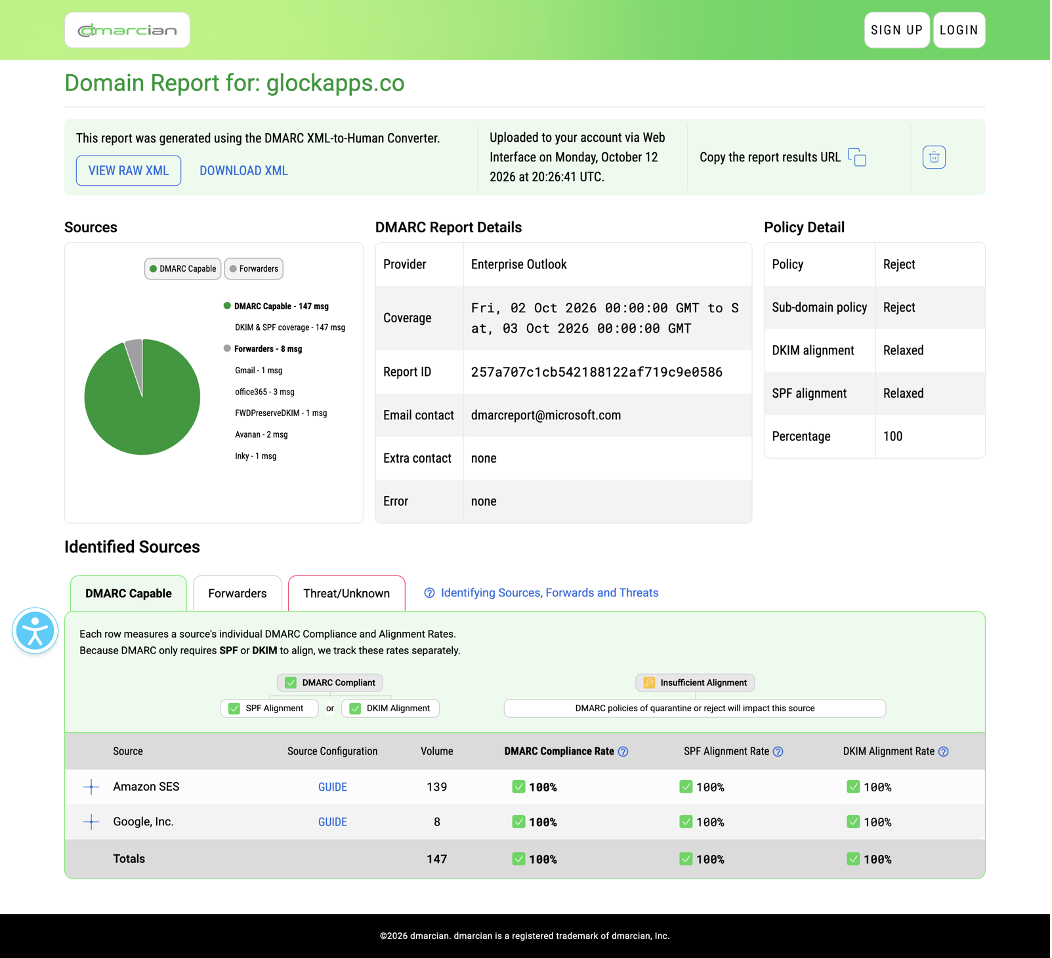
dmarcian's report page. The pie chart splits DMARC-capable mail from forwarders.
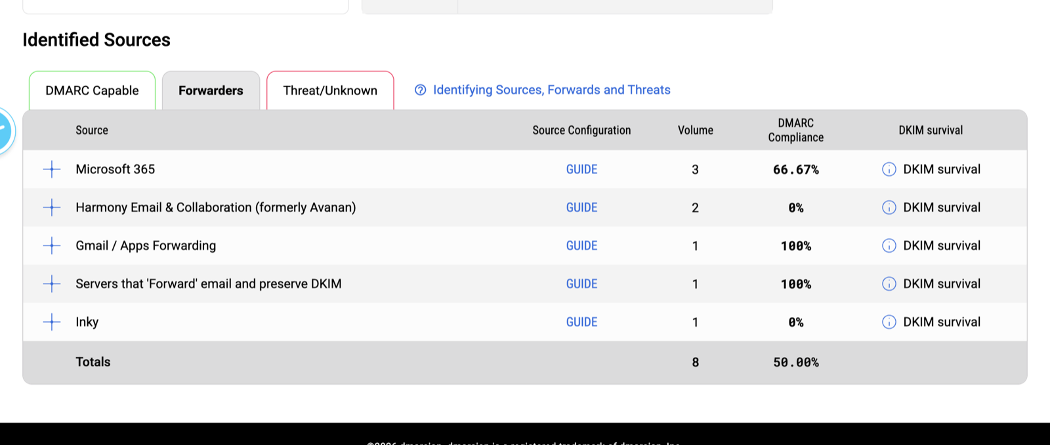
The Forwarders tab correctly names Avanan and Inky as forwarders rather than threats.
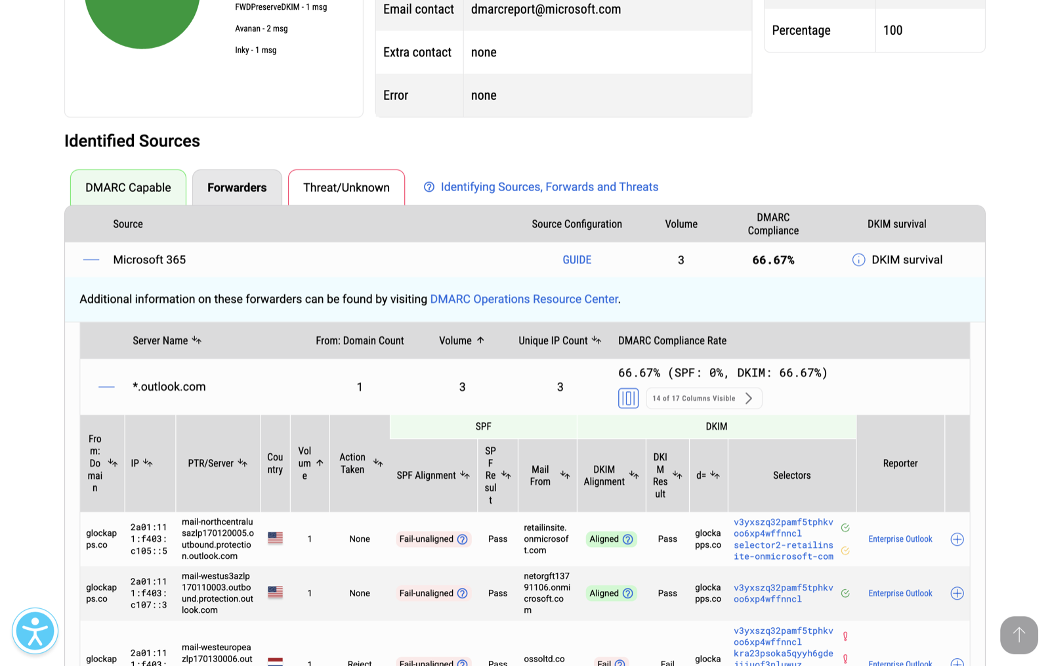
Three clicks deep, you get per-message detail with PTR hostnames.
MxToolbox: DMARC Report Analyzer
URL: mxtoolbox.com/DmarcReportAnalyzer.aspx · Input: .xml only, one file · Account: not needed
We uploaded the original .gz file and got an error saying the report aggregates could not be loaded. After we unzipped it, the tool produced a per-IP table: 21 IPs, 155 messages, 97% compliance, with pass/fail counts for DMARC, SPF, DKIM, alignment, and policy. The numbers are correct.
What it missed. There are no hostnames, no provider names, no grouping, and no explanation. 3.132.222.232 is just an IP that failed. You would need a separate lookup to learn that it belongs to INKY.
Verdict: an accurate calculator rather than an analyst. It works for a quick numeric check if you don't mind unzipping files and looking up IPs yourself.
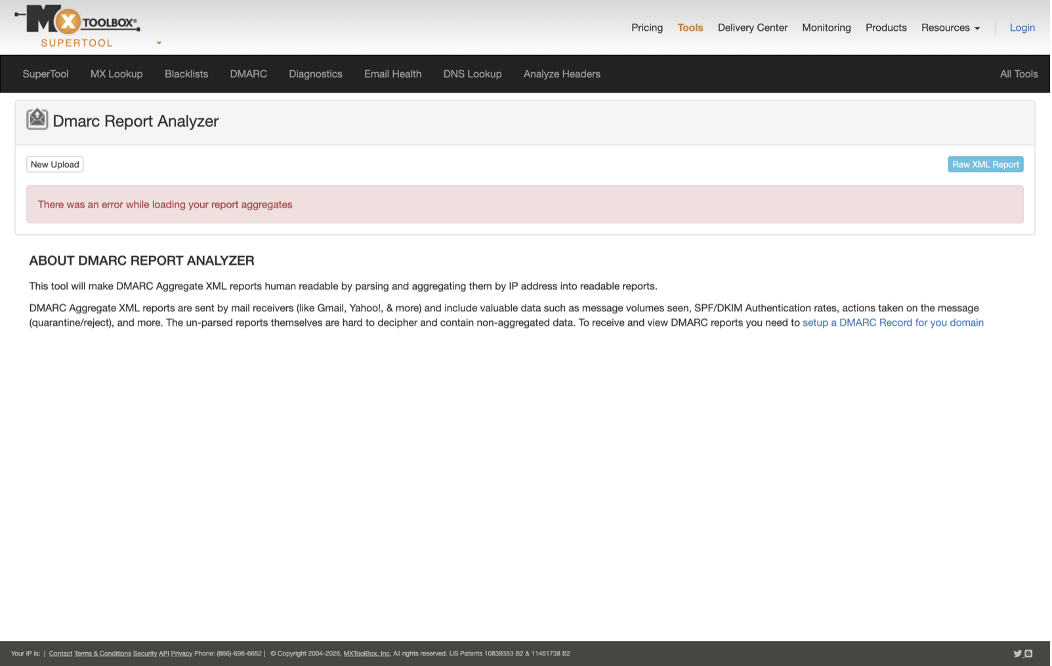
MxToolbox can't read the compressed file Microsoft actually sends.
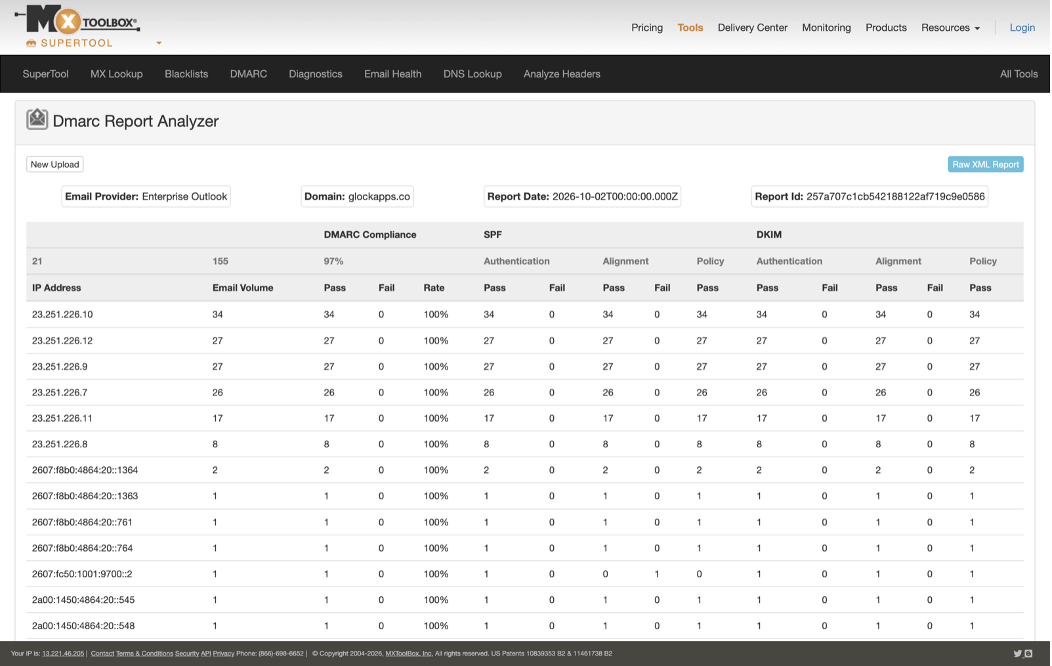
After manual unzipping: correct numbers, but only IP addresses.
EasyDMARC: DMARC Report Analyzer
URL: easydmarc.com/tools/dmarc-report-analyzer · Input: .xml, .zip, .gz, several files · Account: email required to see results
Both files uploaded without a problem. Clicking View Results scrolled to a blurred dashboard covered by a form asking for an email address so the report could be sent to our inbox. Below the field, the checkbox subscribing you to EasyDMARC's weekly newsletter was ticked by default.
The blurred dashboard behind the form is not built from our data. Its chart runs from Nov 20 to Nov 26 and its tabs read Compliant 3400, Non-compliant 50, Threat 200 and Forwarded 20, so it is a placeholder. The cookie banner offered only one button: Agree.
We did not hand over an email address, so we can't grade the analysis itself.
Verdict: in our test, this was a lead-capture form rather than a converter.
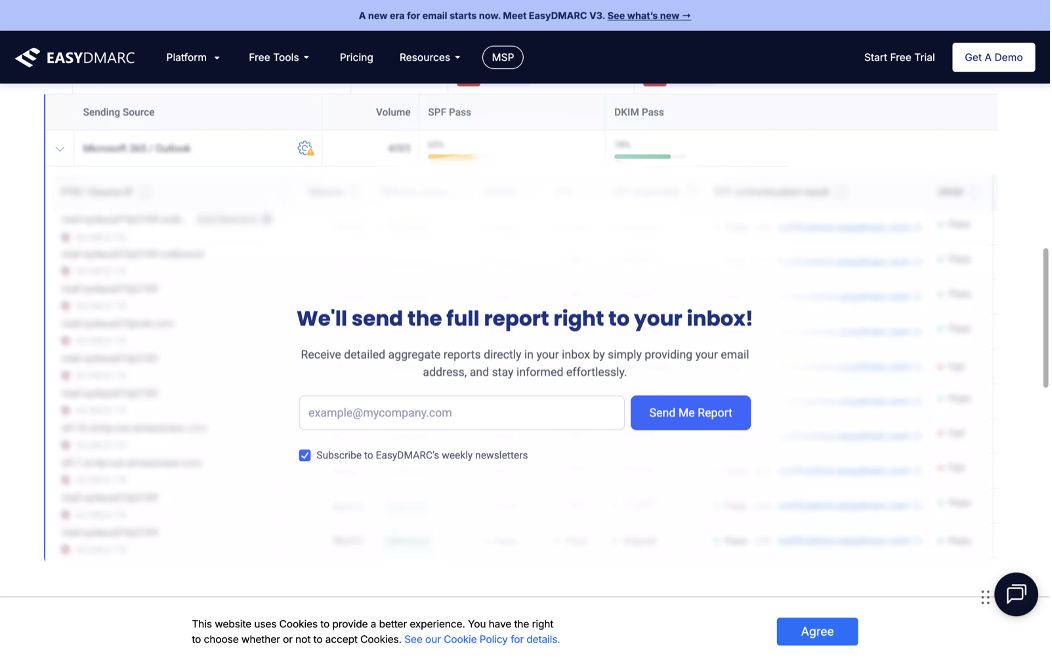
Results are gated behind an email form, and the newsletter box is checked by default.
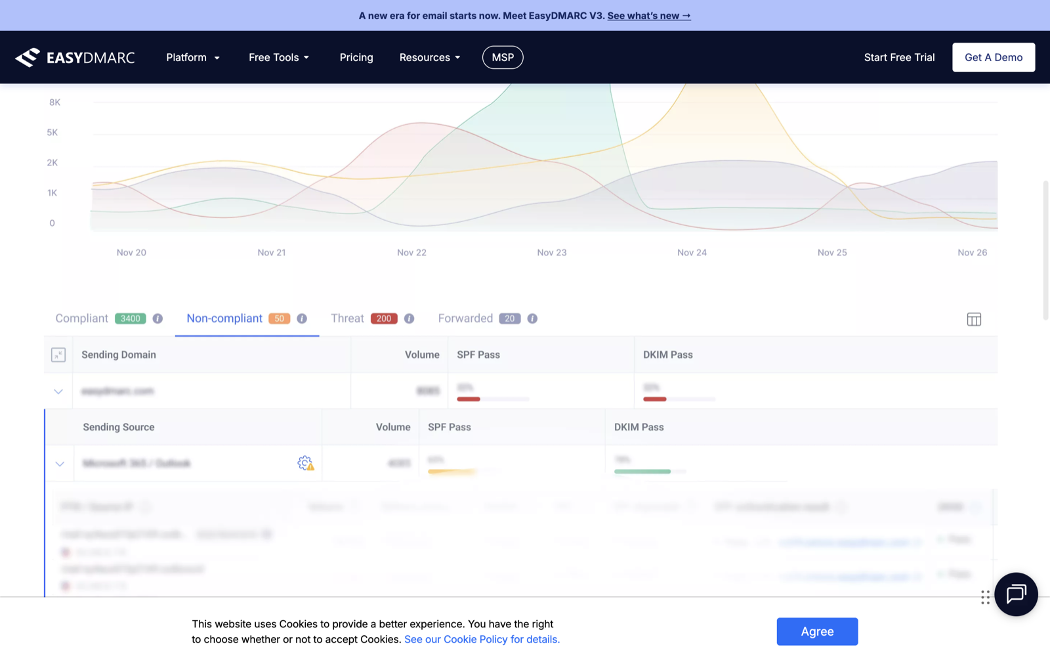
The preview behind the form shows sample data (Nov 20–26, "Compliant 3400"), not our report.
PowerDMARC: DMARC Report Analyzer
URL: powerdmarc.com/dmarc-report-analyzer · Input: .xml, .zip, .gz up to 10 MB, one file · Account: not needed (older guides say otherwise, but that has changed)
What it got right. The headline is correct: 97.4% compatible, 0% forwarded, 2.6% failed (151 / 0 / 4). You also get report and policy details and a CSV export.
What it got wrong. Senders are named after whoever owns the IP block, not after the service that sent the mail. Our Amazon SES traffic appears as "Amazon Web Services, Inc. (AMAZO-22)". The four failures appear as "Amazon Technologies Inc. (AT-88-Z)" ×3 and "Microsoft Limited" ×1. Expand the Amazon row and the hostnames tell the real story: us.cloud-sec-av.com and eu.cloud-sec-av.com (Check Point Harmony/Avanan) and ipw-outbound.inkyphishfence.com (INKY). Those are security gateways that happen to run on AWS. The Forwarded table stays empty. An orange "100.0% aligned" label also appears on rows where SPF did not align, including the failed Microsoft row.
Verdict: correct counts, misleading names. A busy admin who sends through Amazon SES would read the top-level table and go debug the wrong system.
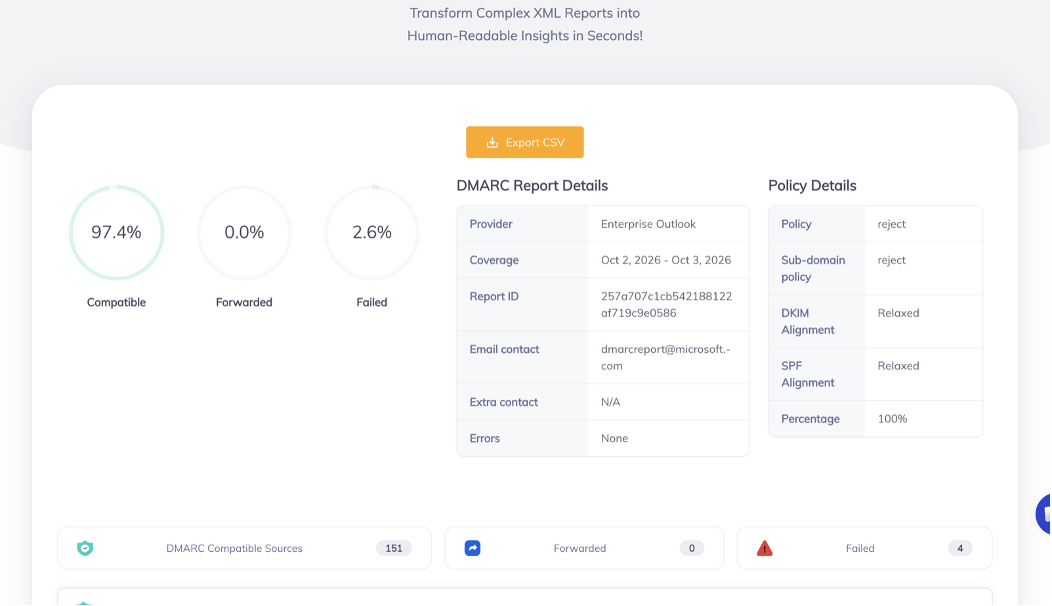
The headline numbers are right.
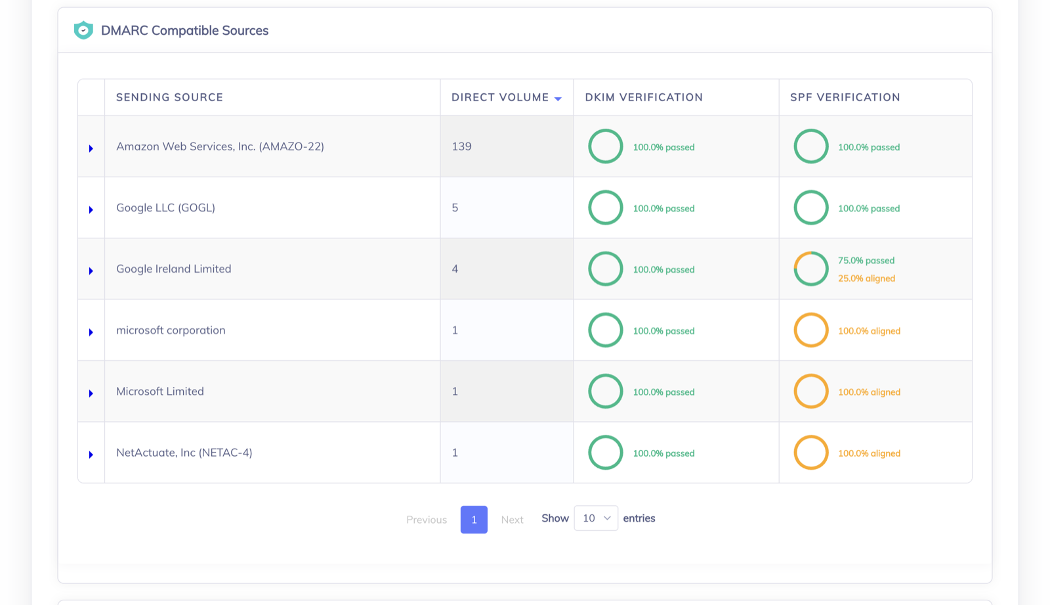
Sources are named by IP owner, and orange "aligned" labels mark rows where SPF did not align.
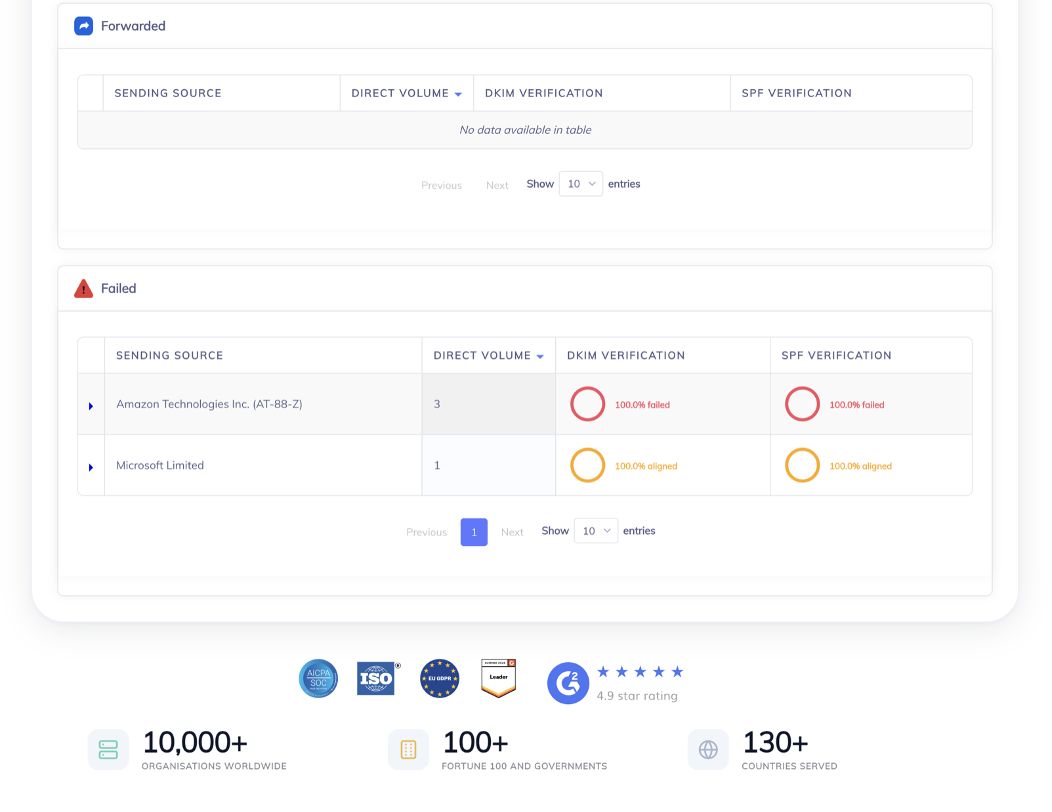
The failures are labelled by IP owner, and the Forwarded table is empty.
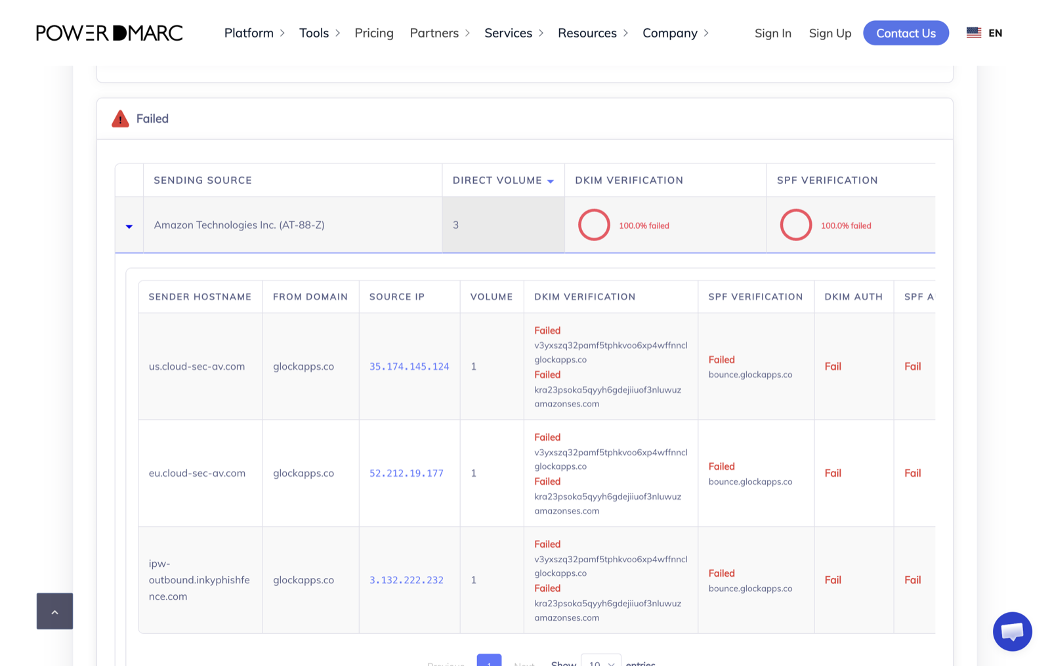
Only the expanded rows reveal that "Amazon Technologies" is really Avanan and INKY.
DMARC Report (dmarcreport.com): Free DMARC Report Analyzer
URL: dmarcreport.com/tools/dmarc-report-analyzer · Input: .xml or .xml.gz, one file · Account: not needed · Processing: in your browser, according to the page
What it got right. The numbers are right: 155 messages, 151 passed, 4 failed, 97.4%. It breaks DKIM down into 151 aligned, 1 passed but unaligned and 3 failed, and SPF into 147, 5 and 3, which is useful nuance. Top source IPs come with readable names (Avanan, Outlook, Google, Amazon SES, inkyphishfence.com), and the per-record table sorts problems first.
What it missed. Here, a "problem" means any unaligned SPF or DKIM result. So four forwarded messages that passed DMARC thanks to DKIM are marked "1 problem · 100% bad" and ranked alongside the real rejections. The tool has no concept of forwarding.
Verdict: one of the better free readers, and a good pick if privacy is your top concern. Just don't take "100% bad" literally.
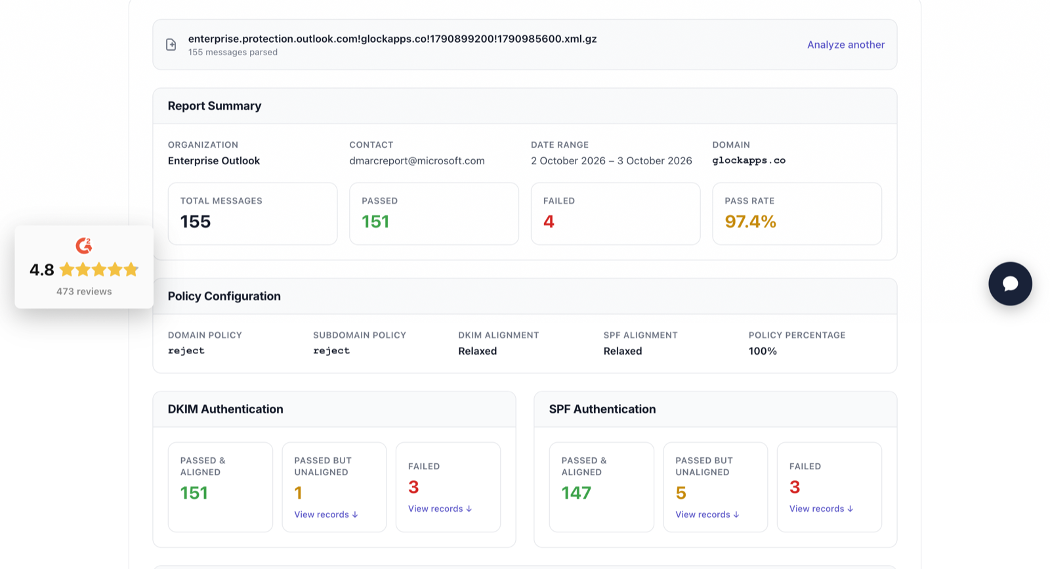
Accurate totals plus a useful split between aligned and unaligned passes.
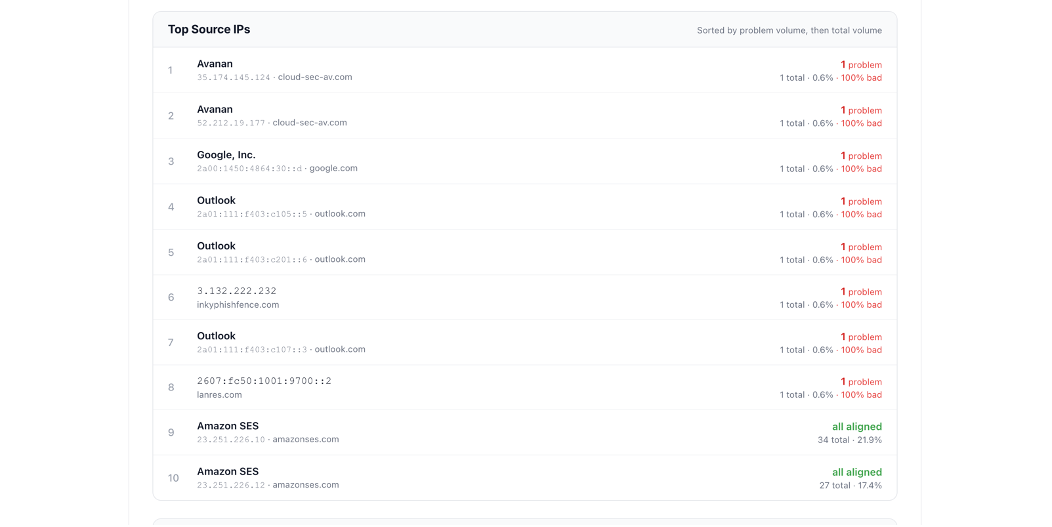
Rows 3, 4, 7, and 8 passed DMARC, but they are flagged the same way as the real failures.
Zoho Toolkit: DMARC Report Analyzer
URL: zoho.com/toolkit/dmarc-report-analyzer.html · Input: .xml only, one file, up to 50 MB · Account: not needed
The .gz file was silently ignored: no error, and nothing happened. With the extracted XML, the tool groups senders by sending domain. The compliant list shows amazonses.com 139, google.com 9, outlook.com 2, and lanres.com 1, for 151. The non-compliant list shows cloud-sec-av.com 2, outlook.com 1, and inkyphishfence.com 1, for 4. That is correct and easy to read.
What it missed. There are no totals or pass rate on screen, and the results sit in a small scrolling box. "Incapable" badges appear almost everywhere, including SPF alignment for google.com, where 8 of the 9 messages actually aligned. The non-compliant tab also reuses the compliant tab's description text.
Verdict: useful grouping, very little context, and no .gz support.
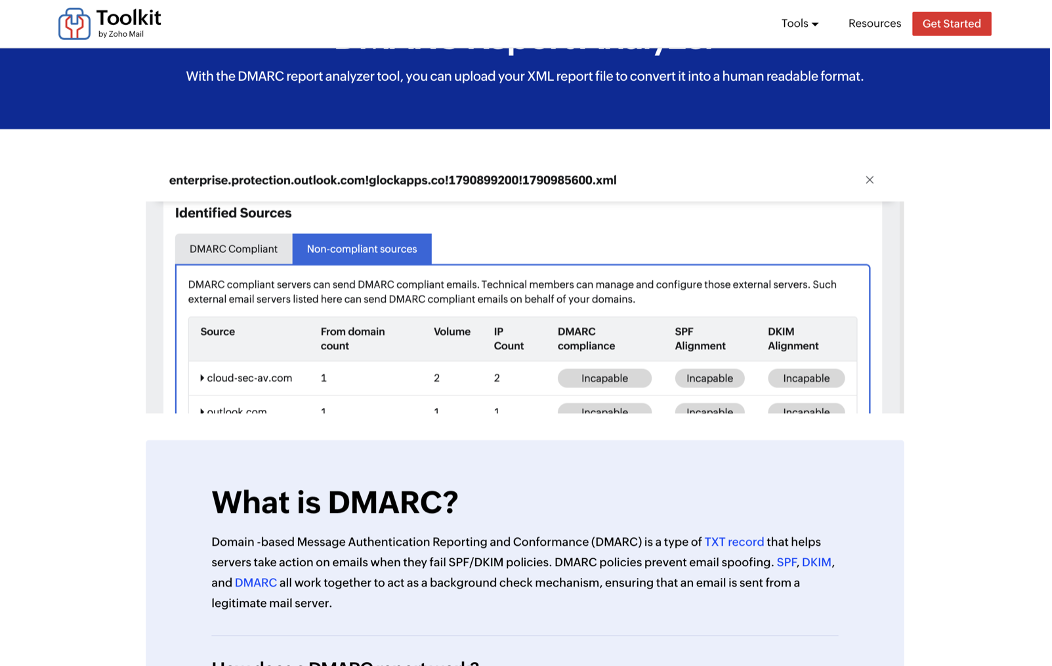
Correct grouping inside a small embedded frame, with "Incapable" badges throughout.
Resend: DMARC Analyzer (checkdmarc.email)
URL: checkdmarc.email · Input: paste only · Account: not needed · License: open source (github.com/resend/resend-dmarc-analyzer), self-hostable
What it got right. The totals are right (155 messages; DKIM 151 passed and 4 failed; SPF 147 and 8; dispositions 151 none and 4 rejected), and the design is clean.
What it got wrong. The headline says Pass rate 94.8%, 147 passed both. DMARC passes when either aligned SPF or aligned DKIM passes, so the real pass rate is 97.4%. The "153 sources" label counts XML records, while the report actually came from 21 IPs. The records table lists 153 raw rows, with no hostnames and no grouping.
Verdict: the headline number is the one people paste into a status update, and here it is wrong in the alarming direction.
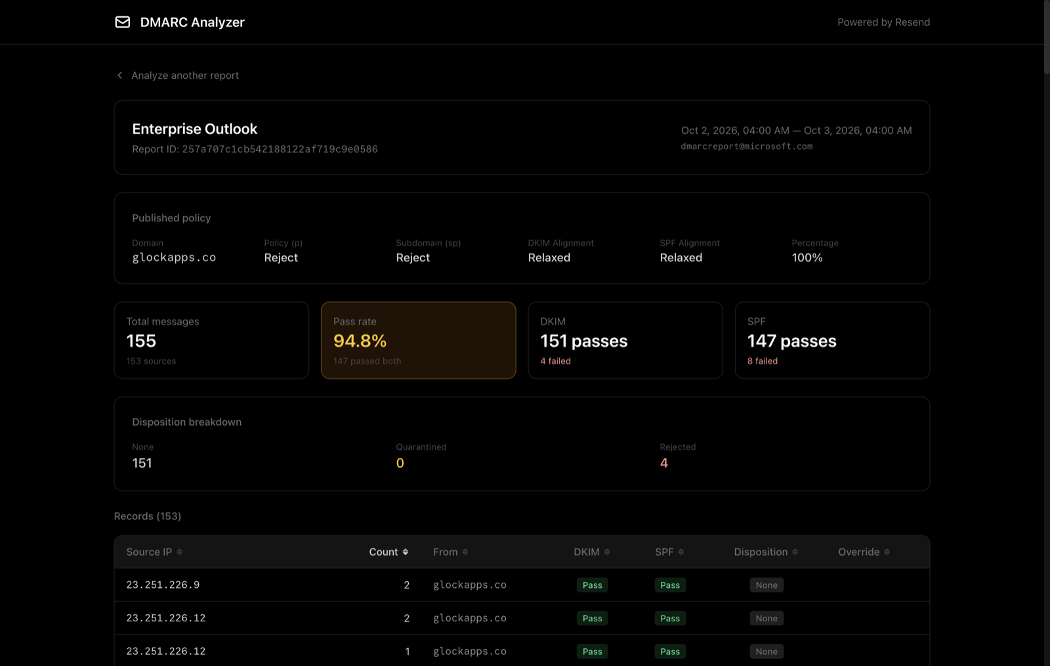
Counting only messages that passed both SPF and DKIM understates DMARC compliance.
Bird: DMARC report analyzer
URL: bird.com/tools/dmarc-report-analyzer · Input: paste, or upload .xml / .xml.gz, one file · Account: not needed · Processing: in your browser
What it got right. The numbers are right: 155 messages, 97% passed, 4 failed, 21 sending IPs. A plain-English "What this means" box gives the friendliest summary of the browser-only tools, and a per-IP sources table shows the SPF domain for each IP.
What it got wrong. Every failing IP gets the same explanation: "Either it's a sender you forgot to authorize, or someone spoofing your domain." In this report it was neither. Without hostnames there is no hint that 35.174.145.124 is a Check Point gateway. Acting on "authorize it" would mean adding a security gateway that many other organisations share to your SPF record, which lets their mail pass as yours.
Verdict: right numbers, but both of the explanations it offers are wrong for this report.
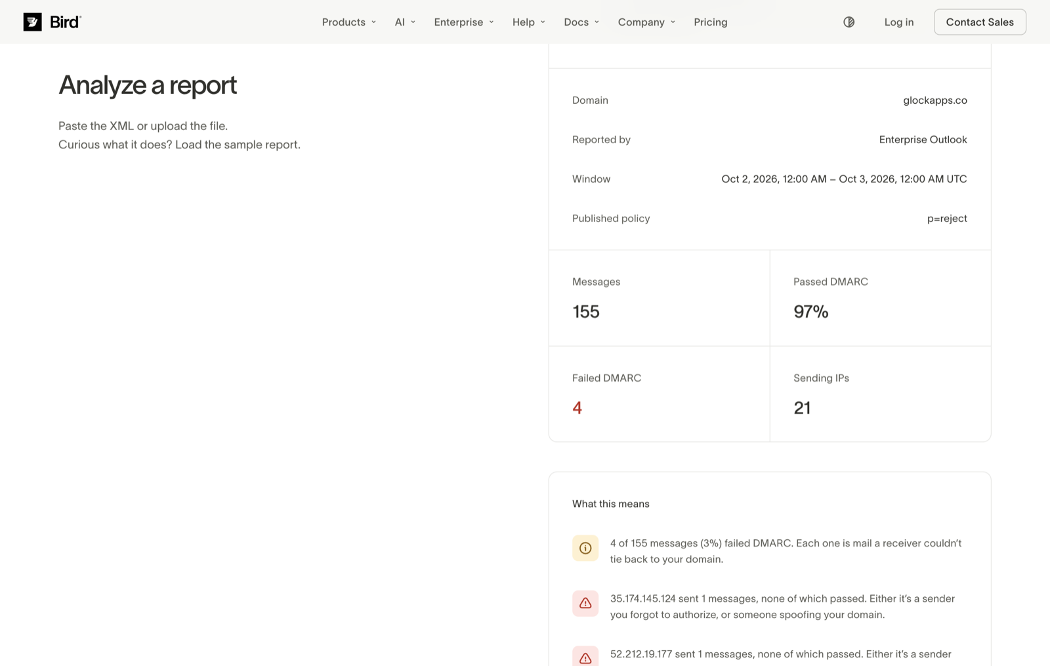
Clean, correct headline numbers.
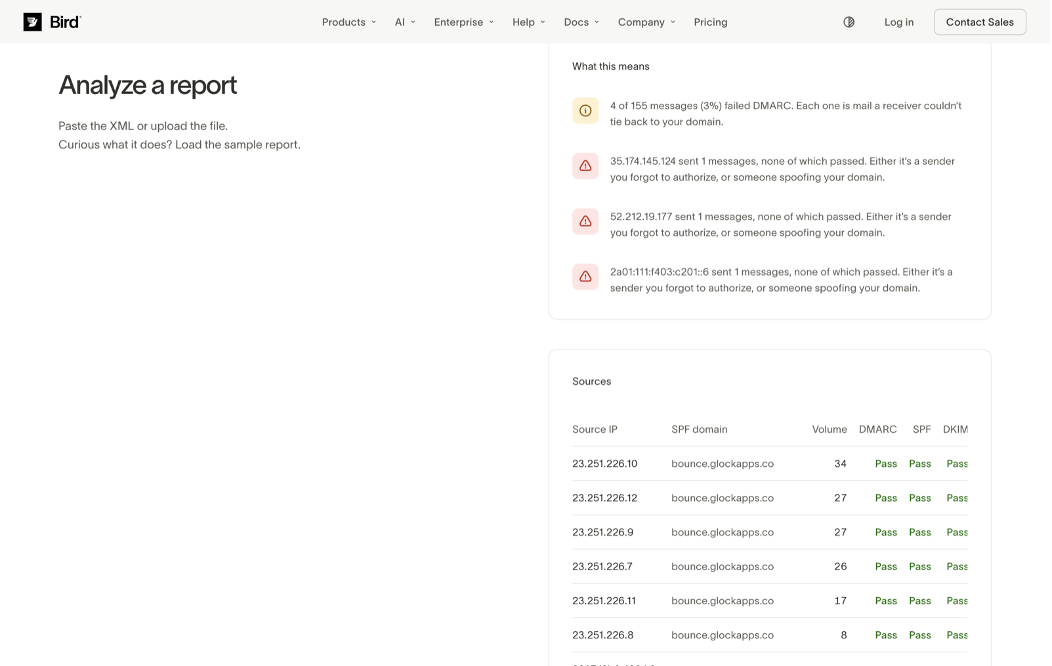
The plain-English verdict misses the most common real cause: forwarding and security gateways.
MailSlurp: Free DMARC Report Analyzer
URL: mailslurp.com/tools/dmarc-report-analyzer · Input: paste only · Account: not needed
What it got right. It shows 155 messages, dispositions of 151 none, 0 quarantine, and 4 reject, and the report metadata.
What it got wrong. The tiles read Fully aligned 98%: 152 messages passed SPF and DKIM alignment and Failed alignment 2%: 3 messages. The report says 151 passed and 4 failed, and MailSlurp's own Reject tile says 4. The figure of 152 matches what you get if any passing DKIM signature counts as aligned, including one from a third-party onmicrosoft.com tenant on a message Microsoft rejected. The "passed SPF and DKIM" label doesn't fit either, because that figure is 147. Finally, "Top sources: 20" is a list of 20 individual records with repeating IPs, and two of the four failing records never appear in it.
Verdict: the numbers don't reconcile with each other, and reconciling is the one job a converter must do.
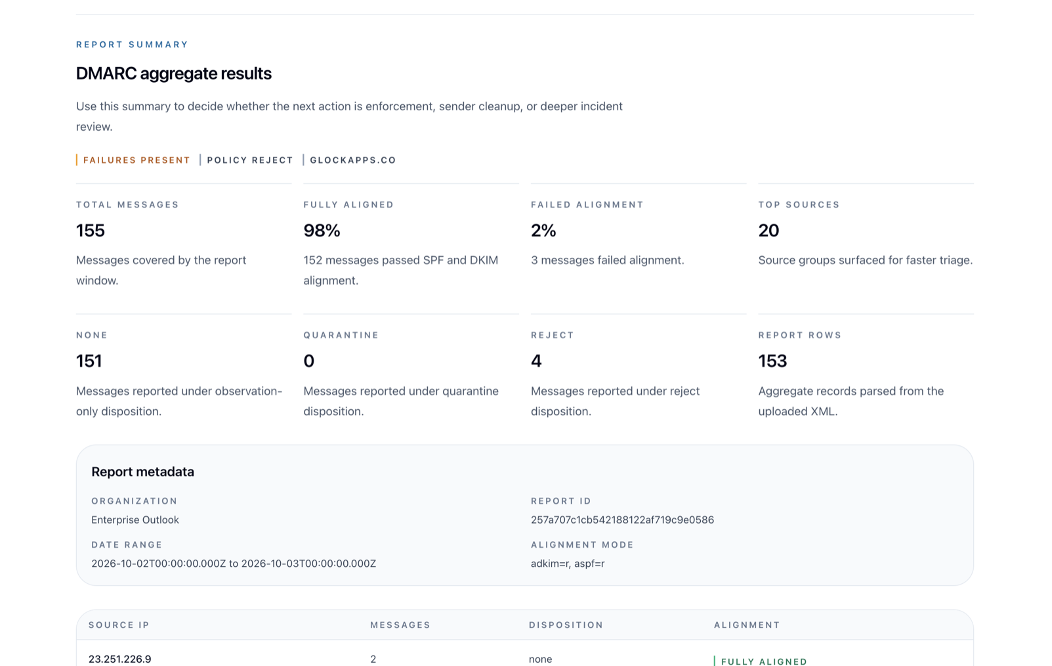
Three failed alignments, but four rejected: the tiles contradict each other.
IntoDNS.ai: DMARC Report Analyzer
URL: intodns.ai/tools/dmarc-report-analyzer · Input: .gz, .zip, .xml upload or paste · Account: not needed · Processing: in your browser, with no reverse-DNS lookups (stated on the page)
What it got right. The summary is right: 155 messages, 97.4% pass (151), 2.6% fail (4), 153 rows, 4 rejected. It also has a clear one-line definition of a DMARC failure.
What it got wrong. The action plan. Under "Sources to verify before authorizing" it lists a single source, Amazon SES, marked "4 failing", and folds in every unrelated domain from the forwards (three onmicrosoft.com tenants, mylrap.org, ossoltd.com, lanres.com). It then walks you through Easy DKIM CNAMEs, a custom MAIL FROM, and include:amazonses.com. Our Amazon SES traffic was 139 of 139 aligned. The tool seems to have merged every forwarded and gateway message into one "Amazon SES" bucket because those messages still carried the amazonses.com DKIM signature.
Verdict: accurate counts, confident advice pointed at the wrong system.
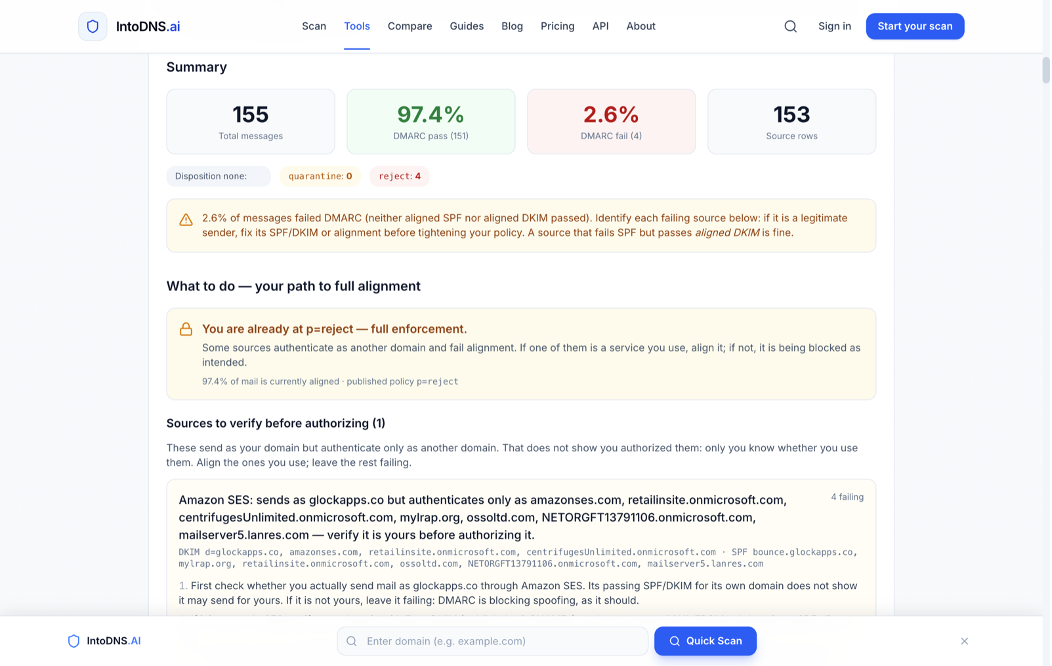
The counts are correct.
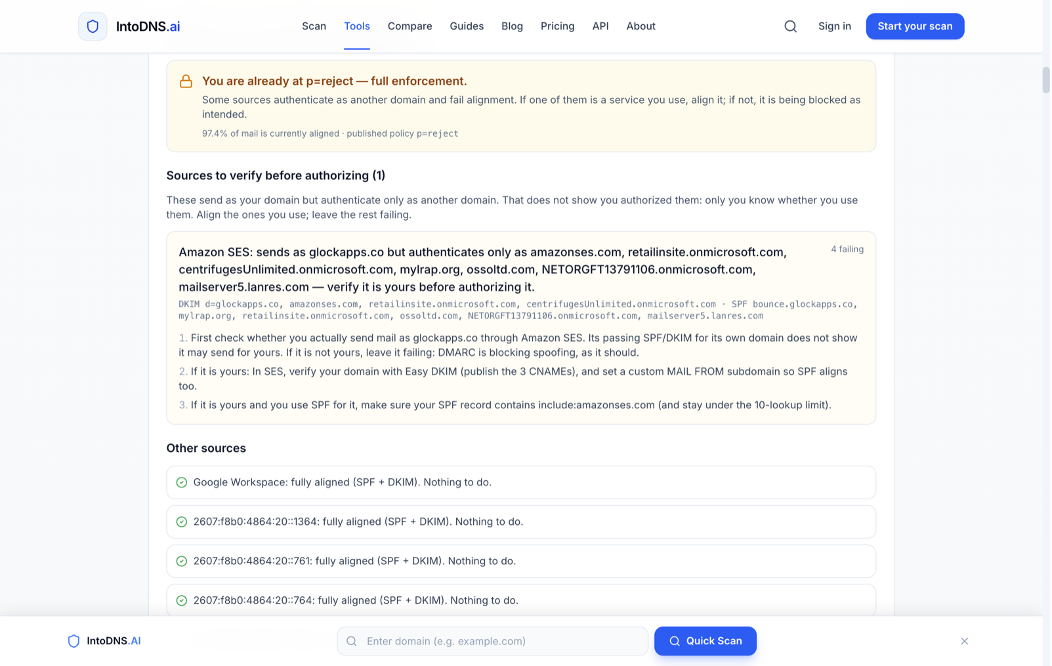
The advice targets Amazon SES, which was already fully aligned.
DMARKOFF: DMARC XML Report Analyzer
URL: dmarkoff.com/tools/dmarc-report-analyzer · Input: .xml, .zip, .gz, .eml, several files at once · Account: not needed (the browser is remembered). The free demo keeps reports for 30 days, for up to 10 domains or reports.
We dropped both .gz files into one upload. A few seconds later, both domains showed success, each with its own result page.
Numbers. For glockapps.co: 155 messages, 97% DMARC compliant (151), 4 DMARC fails, 8 SPF fails, 4 DKIM fails, 4 forwarded. For gappie.glockapps.com: 41 messages, 95% (39), 2 fails. Both match the answer key. The page also lists the DKIM selectors seen (google: 8 pass; v3yxszq…: 143 pass and 4 fail) and the Return-Paths seen (bounce.glockapps.co: 139 pass and 3 fail).
Senders. Senders are named by provider, not by IP owner: Amazon SES (Known, 139, 100%), Google (Known, 8), Microsoft 365 (Forward, 2, DMARC 100% via DKIM), Google (Forward, 1), NetActuate (Forward, 1), Check Point Harmony (Avanan) (2, 0%), INKY (1, 0%) and Microsoft 365 (1, 0%). Tabs filter the list by Known, Unknown, Forward, and Gateway.
Failures explained. Click a failing number to see the matching records. For Check Point Harmony, both rejected messages are marked "Signature broken in transit", with our From and Return-Path and the DKIM selectors that failed. In other words, it is our mail, and a gateway altered it. You can regroup the same records by provider, sending IP, host, or reporter, and filter by SPF, DKIM, DMARC, and disposition.
Domain audit. On upload, the tool also audited glockapps.co's live DNS: 93/100, Grade A, low spoofability. The score breaks down across six categories, with eight findings and a fix for each: no BIMI record, no MTA-STS, no TLS-RPT, no DNSSEC, no DANE, and an SPF record on bounce.glockapps.co that ends in ~all. That last one is the same Return-Path that logged the three SPF soft-fails in the report. The page also shows the raw SPF, DMARC, DKIM, and MX records and the SPF lookup count (3 of 10).
Trade-offs. Processing happens on our servers. Files and results are kept for 30 days and then deleted, which is what lets you come back to them. If your policy forbids uploading reports, use an in-browser reader. The free demo is capped at 10 domains or reports. In the main sources table, gateway traffic carries an "Unknown" badge. The Gateway tab and the drill-down make the cause clear, but it takes one extra click.
Verdict: the only converter in the test that got the numbers, the senders, the explanation, and the next steps right in one place.
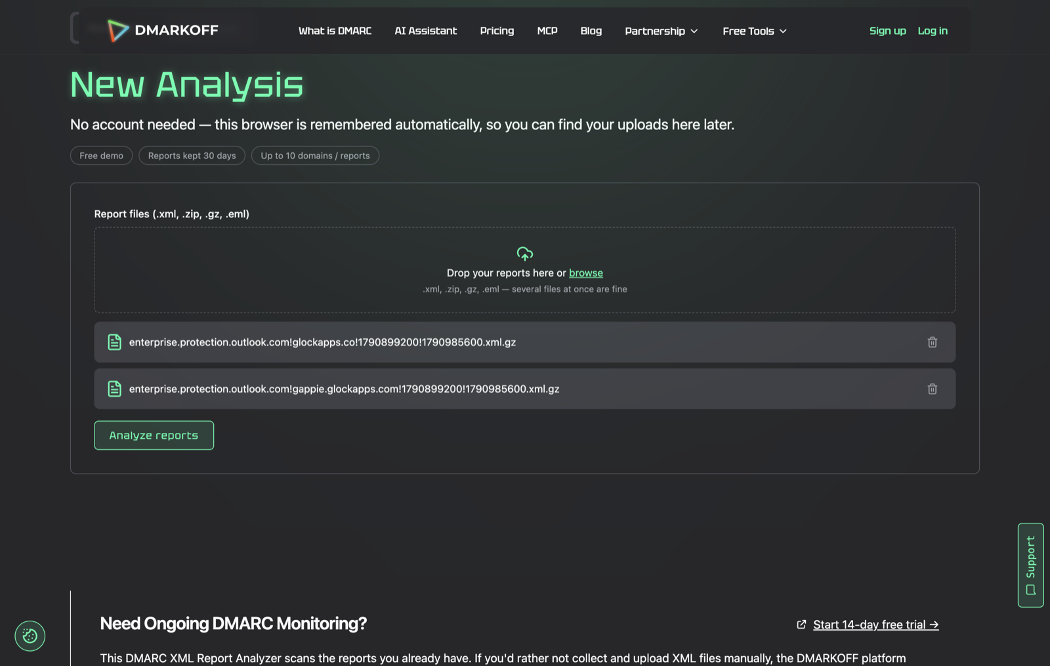
Both compressed reports in one upload, with no account and no unzipping.
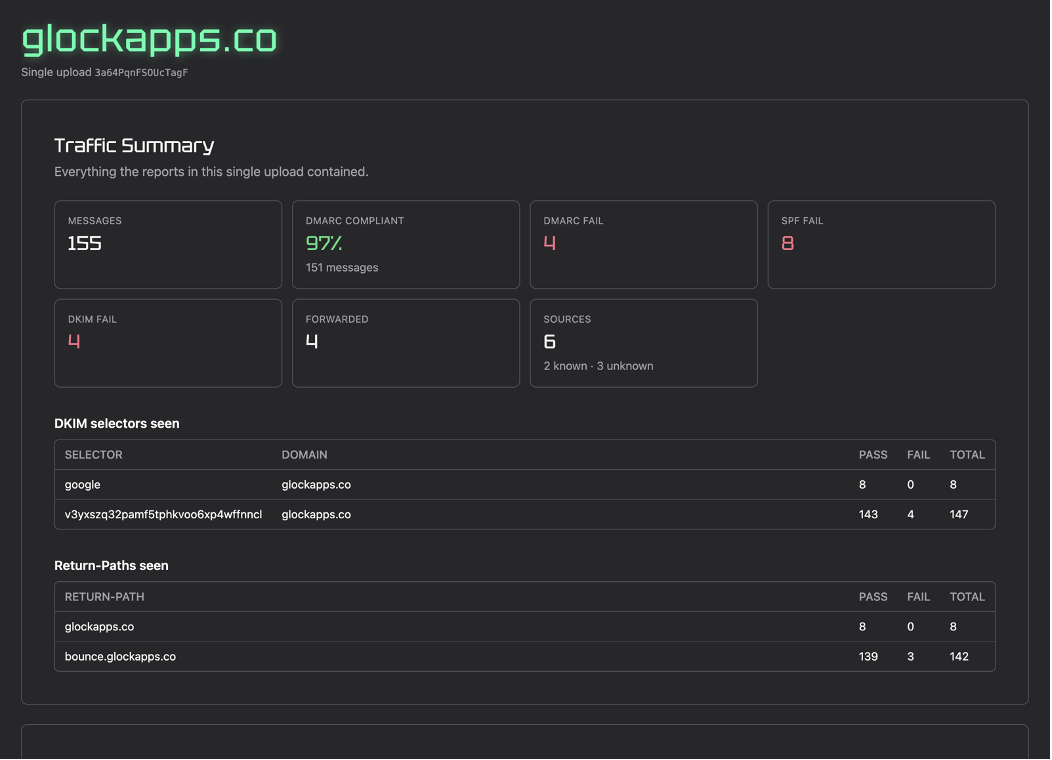
Traffic summary with the DKIM selectors and Return-Paths seen in the report.
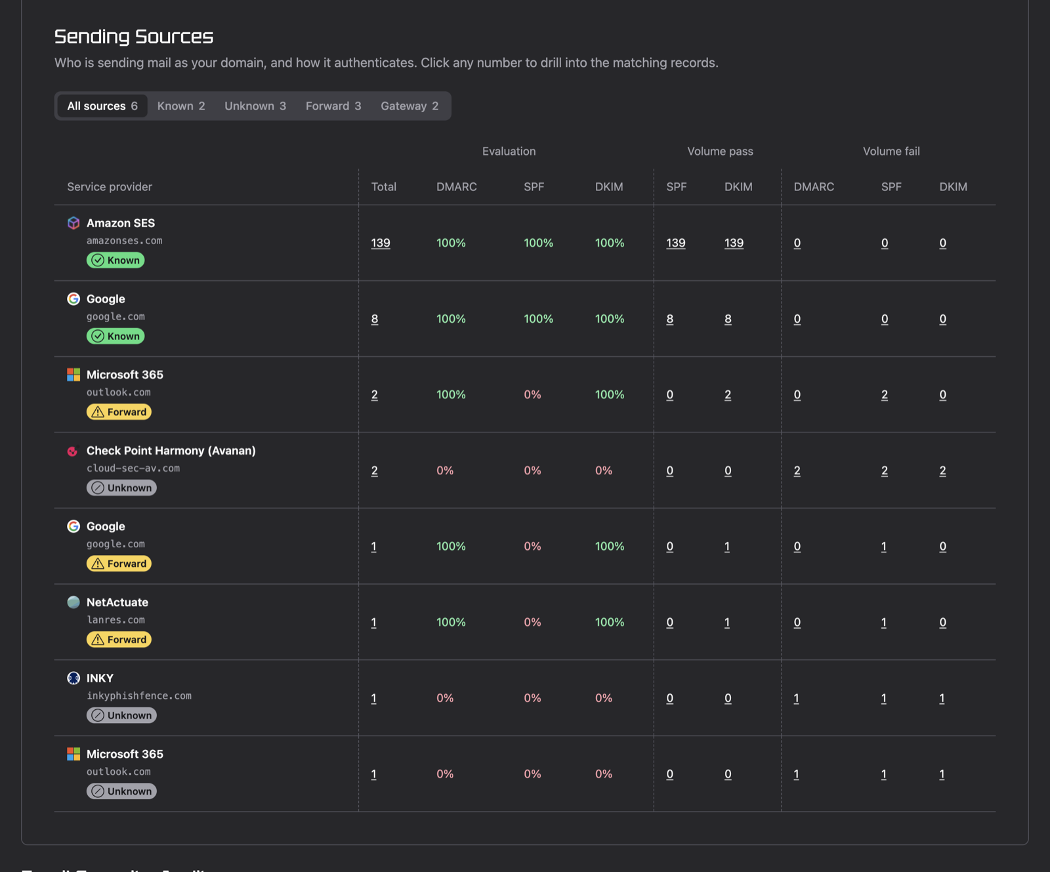
Senders are named by provider, and forwards are separated from real problems.
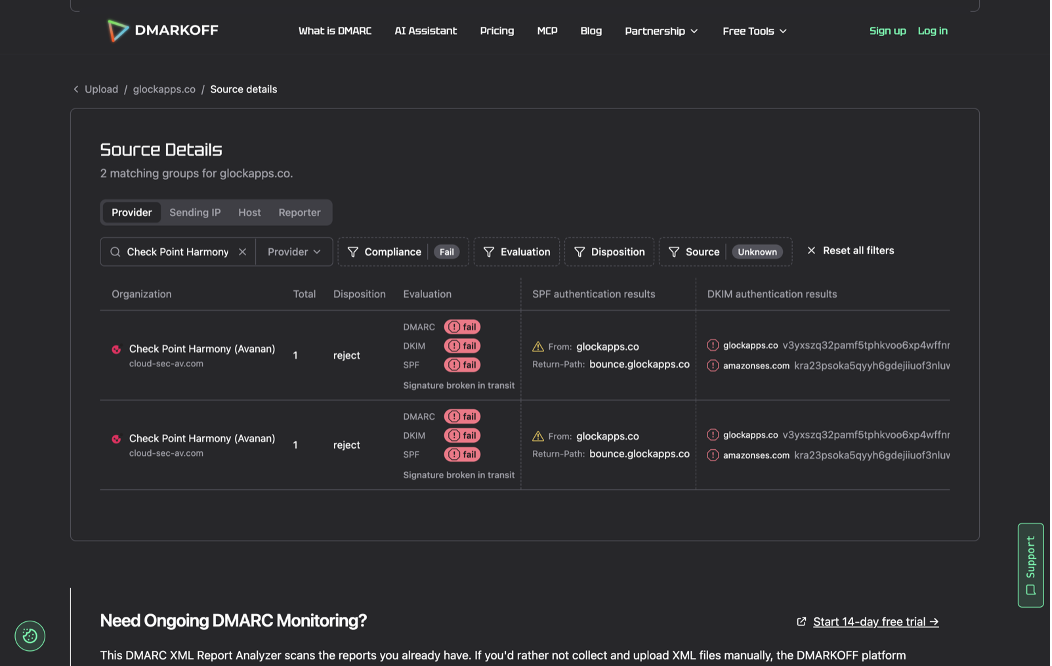
The drill-down explains why the rejected messages failed.
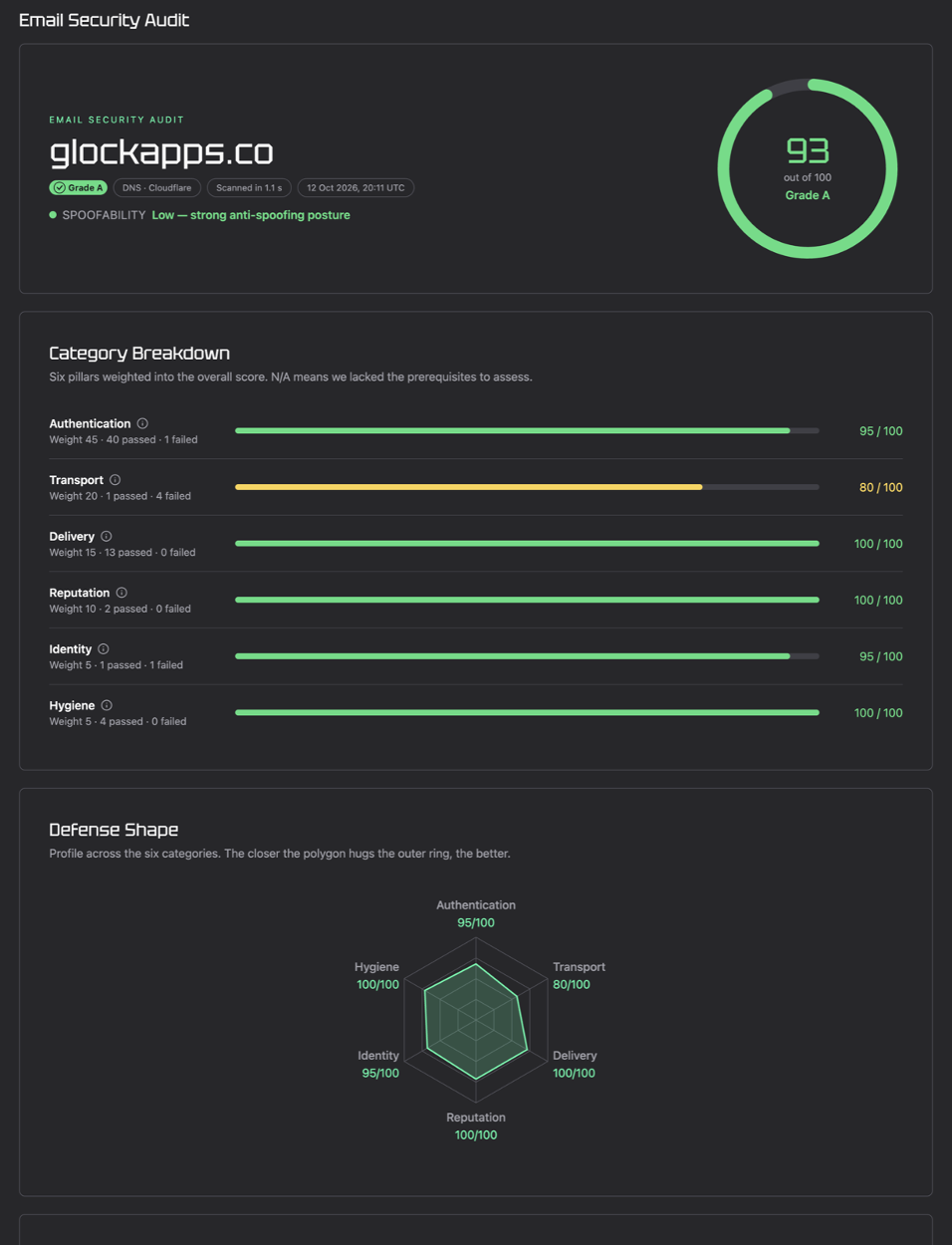
A live DNS audit runs automatically for the domain in the report.
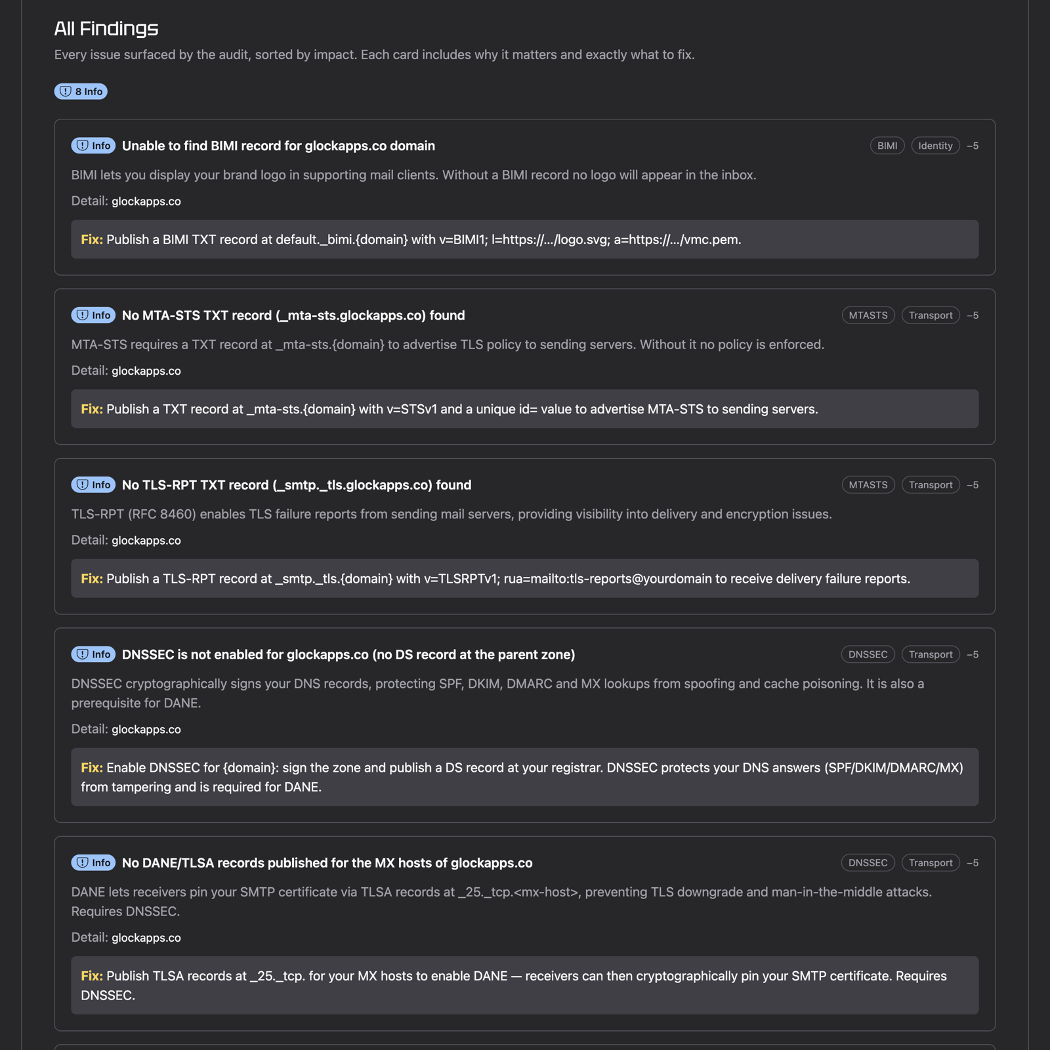
Every finding says why it matters and exactly what to change.
The four failures: which tools got them right?
This is the part of a DMARC report that drives decisions, so here is each tool's account of the same four rejected messages side by side:
A wrong read here costs real time and can hurt your security:
- Authorizing a gateway in SPF lets every customer of that gateway pass SPF as you.
- Chasing your ESP wastes an afternoon on a system that was working.
- Treating gateway traffic as an attack, or holding off on
p=rejectbecause of "unknown senders", is a common way DMARC projects stall.
Five ways a DMARC converter can mislead you
- Pass-rate math. DMARC passes if aligned SPF or aligned DKIM passes. A tool that counts "both" understates compliance (Resend: 94.8%). One that counts any passing DKIM signature overstates it (MailSlurp: 98%). To check, count the records where
policy_evaluatedshowsdkim=passorspf=passand multiply each by itscount. - Records are not sources. Our report's 153 records came from 21 IPs and roughly half a dozen organisations. "153 sources" is not a meaningful number.
- The IP owner is not the sender. Many security gateways and SaaS senders run on AWS, Azure or Google Cloud. WHOIS says "Amazon", while reverse DNS says
cloud-sec-av.com. - Forwarding and gateways are normal. SPF breaks when mail is forwarded. DKIM survives unless the message is modified. A failure that still carries your own DKIM signature is almost never spoofing.
.gzis the real format. Google and Microsoft send compressed reports. A converter that can't read them adds a manual step to every report.
Privacy: where does your report go?
Aggregate reports contain no message content, but they do include sending IPs, volumes, and the domains of your vendors. Microsoft's reports also list recipient domains in envelope_to, which shows who you email. Before you upload one, know where it goes:
- Parsed in your browser: DMARC Report, Bird, IntoDNS.ai (according to each tool's page).
- Processed on the vendor's servers: DMARKOFF (keeps 30 days and is tied to an anonymous ID stored in your browser rather than a public link), dmarcian (creates a shareable results URL), MxToolbox (result page with an ID), PowerDMARC (uploads to its API), EasyDMARC (also asks for your email).
- Not stated on the page: Zoho Toolkit, Resend (open source, so you can self-host it), MailSlurp.
Which free DMARC converter should you use?
- You want the answer, not just a table: DMARKOFF. It gives you correct numbers, real sender names, forwarding and gateway detection, a live DNS audit with fixes, and several files in one upload.
- You want a second opinion with solid forwarder detection: dmarcian.
- The report can't leave your machine: DMARC Report or Bird. Both get the math right, but treat their verdicts on failures as a starting point.
- You only need to sanity-check the numbers in an
.xml: MxToolbox. - Be careful with: Resend and MailSlurp headline percentages, sender attribution in IntoDNS.ai and PowerDMARC, and EasyDMARC if you don't want to hand over an email address.
One report is only a snapshot
Each file covers one receiver for one day. The things that actually break DMARC projects show up as patterns over weeks and across Google, Microsoft, Yahoo, and dozens of smaller receivers: a new marketing tool sending without DKIM, an expired key, a jump in forwarded mail. Uploading XML by hand won't catch those.
The DMARKOFF platform collects your reports automatically, keeps the history, applies the same source classification you saw above across every receiver, and alerts you when something changes. You can try it free for 14 days. To check a report you already have, the free analyzer is still the quickest way to get the full story.
Methodology notes
- The answer key was computed directly from the XML: each record's
policy_evaluatedresult multiplied by itscount. - We tested all tools using their free, no-account versions on 12–13 October 2026, using a clean browser profile. Paid tiers may behave differently.
- Where a tool rejected the
.gzfile, we retried with the extracted XML and noted the rejection. - We didn't enter email addresses, create accounts, or accept anything beyond what a tool required to run.
- If you maintain one of these tools and something has changed, tell us, and we'll retest and update this article.
FAQ
Because DMARC passing does not automatically mean all authentication requirements are satisfied. If DKIM or SPF fails, Outlook may still reject the message under its sender requirements.
Check whether DKIM signing is enabled, whether the correct selector and public key are published, and whether a gateway modifies the message after it is signed.
Check the SMTP envelope sender, the outbound IP address, and the SPF record for the domain actually being evaluated.

Co-founder & CTO at DMARKOFF and GlockApps, email security specialist with 20+ years of experience, Golang & ClickHouse expert. A happy father of two teenagers.