
SPF PermError: What It Means and What Causes It



SPF permerror (permanent error) means a receiver couldn't complete its SPF check because of what's published in DNS: two v=spf1 records, a syntax error, too many DNS lookups, too many void lookups, or an include that points to a name with no SPF record. RFC 7208 says it "definitely requires DNS operator intervention", so resending won't help. The record has to change.
Which cause you have decides who notices. In our test of 21 mailbox providers, a record over the lookup limit passed at Gmail and was refused by Microsoft, while one with three void lookups passed at both. Here's how to find the cause, fix it and read what receivers do with it.
TL;DR
permerrorisn'tfail.failmeans the check finished and the sender isn't authorized.permerrormeans the receiver couldn't finish the check because of a permanent problem in the published records. Neither gives DMARC an SPF pass, so without an aligned DKIM signature, DMARC fails.- Two causes break every sender, three break only some. By the standard, a second record or a syntax error stops SPF before any sender is checked. A lookup overrun, a dead include or too many void lookups only hit the senders whose evaluation reaches the problem, so your main sender can look fine.
- Reports won't always say
permerror. The same broken record appeared asfail,noneorpass, depending on the reporter.
What causes SPF permerror
In our October 2026 DNS scan of the Tranco top 100,000, 4,241 of the 71,117 domains with SPF (6.0%) ended in permerror for a sender their record doesn't list. These are the checks they failed, and a domain can fail more than one.
All: by the standard, SPF stops before any sender is checked. Some: only senders whose evaluation reaches the problem, and for void lookups only where the receiver applies the limit. The lookup row also counts loops, such as a record that includes itself.
Too many DNS lookups
RFC 7208 §4.6.4 allows 10 terms that trigger DNS queries (include, a, mx, ptr, exists, redirect=) in one evaluation, nested includes included. Past that, the result is permerror, so a record can break without you touching it when a vendor adds a lookup to its own include. Here's how to count and cut lookups.
An include that points nowhere
An include: whose target has no SPF record returns permerror (§5.2), and so does a redirect= (§6.1). A mistyped target name ends the same way. This one can appear overnight, when a vendor renames its SPF host or lets a domain expire. More on broken includes.
Two SPF records
Two TXT records that start with v=spf1 at one name are a permerror before any sender is checked (§4.5), even when each lists a different provider. Here's how to merge them.
A syntax error
A syntax error anywhere in the record returns permerror immediately, without evaluating anything (§4.6). Unknown mechanisms like ipv4: and includes: do this, and so does include: _spf.example.net with a space after the colon. Not every typo counts: ip4= and include= read as unknown modifiers, which receivers ignore (§6), so evaluation carries on without the term, and it no longer authorizes the sender it was meant for. Our syntax guide covers the valid forms.
Too many void lookups
A void lookup is a DNS query that comes back with no answer or no such name. RFC 7208 §4.6.4 says implementations SHOULD limit them to two, and that going over produces permerror, but few receivers acted on it: in our test, only Onet, ukr.net and the Barracuda filter did. More on the void-lookup limit.
Rarer causes include redirect= or exp= appearing twice (§6), an mx term whose hosts need more than 10 address lookups (§4.6.4), and a malformed macro (§7.3). A domain with no SPF record at all gets none, not permerror: that's a different problem.
How to find which cause you have
Start with the domain in the message's MAIL FROM (Return-Path), shown as smtp.mailfrom in the headers. It can differ from the domain in the From address.
dig +short TXT example.com
Read the answer in this order, because the first two stop the SPF check before any sender is evaluated:
- Count the lines that start with
v=spf1. More than one means two records. - Look for typos in the terms. A valid term is
ip4:,ip6:,a,mx,ptr,include:,exists:orall, with an optional qualifier such as~, or aname=valuemodifier. Soipv4:,includes:andinclude: nameare wrong. This catches typos, not every syntax error:ip4:999.0.0.1has the right name and an invalid value. - Query each include target with plain
dig TXT _spf.vendor.example, which also prints the status.NXDOMAIN, orNOERRORwith nov=spf1line, means a dead include.SERVFAIL,REFUSEDor a timeout is a DNS failure, so look again before you delete anything:+shortprints nothing in those cases too. Twov=spf1lines at the target also end inpermerror. - Count the lookups and void lookups on the full path, nested includes included, for a sender the record doesn't list.
Steps 2 to 4 get tedious by hand. DMARKOFF's free SPF Checker walks the whole record and shows where evaluation stops.
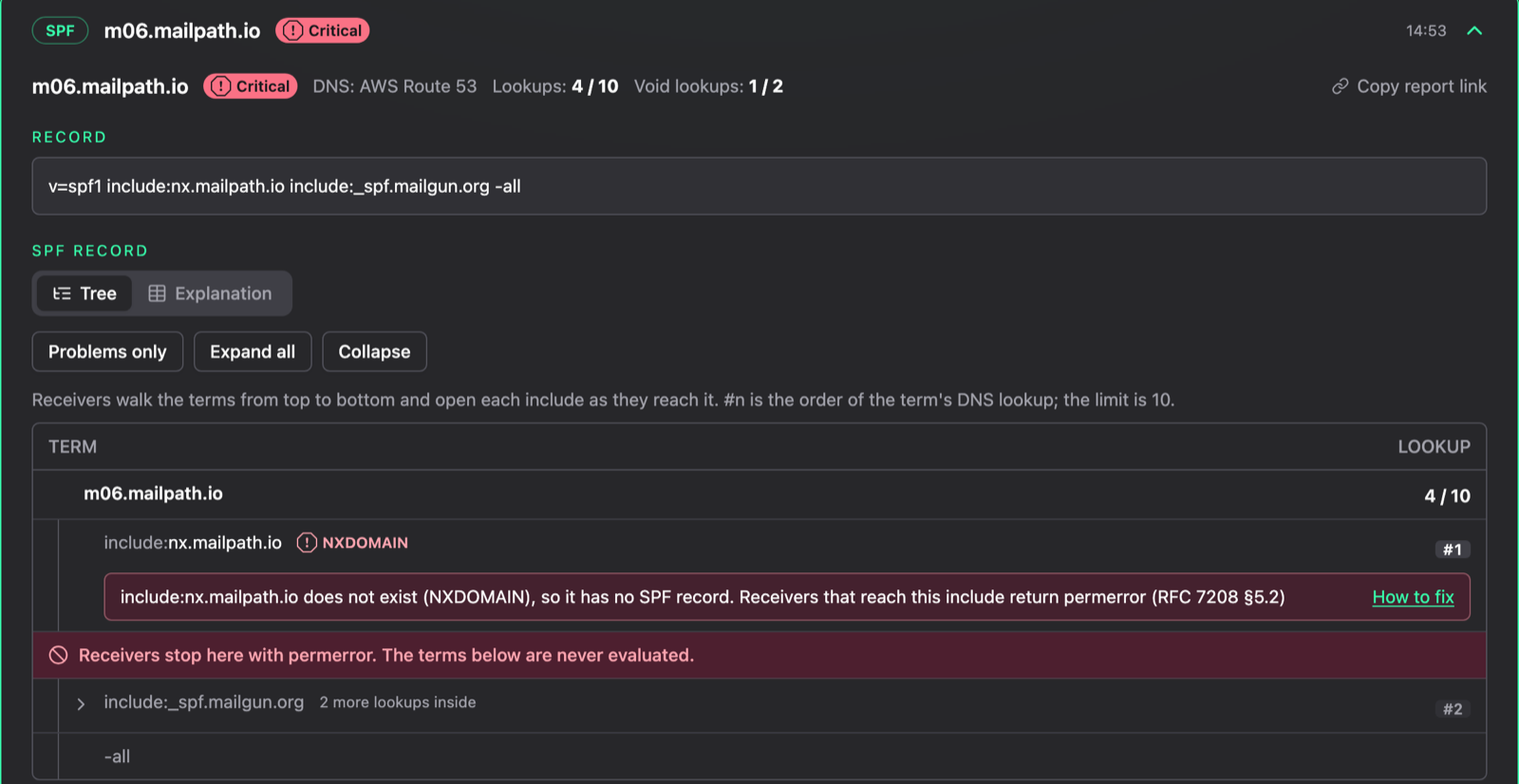
The SPF Checker on one of our test domains. The first include has no SPF record, so the Mailgun include below it is never reached. The 4 / 10 counter shows the expanded DNS-lookup cost, including branches a receiver doesn't reach after this error.
How to fix an SPF permerror
This record has two faults, and fixing only the first would look like success. old-esp.example stands for a service you've stopped using, with no SPF record left:
Before
v=spf1 ipv4:192.0.2.25 include:spf.protection.outlook.com include:old-esp.example include:sendgrid.net ~all

After
v=spf1 ip4:192.0.2.25 include:spf.protection.outlook.com include:sendgrid.net ~all
With only ipv4: corrected, mail from 192.0.2.25 and Microsoft 365 passes, but mail through SendGrid still gets permerror, because the dead include sits in front of it. The fixed record takes three lookups on the full path, at the time of writing: one for Microsoft's include and two for SendGrid's. Use your own IP and services: these are only examples.
Work through a broken record in this order:
- Get to one record. Merge the senders instead of deleting a record, or you'll lose a sender.
- Correct the syntax. Until you do, no sender can pass.
- Update or remove dead targets. If you still use the service, take the current include from its documentation. If you don't, delete the term.
- Drop
a:andmx:terms for hosts that no longer exist. - Bring the lookup count to 10 or fewer. This guide lists the options.
- Test each sender, not only the main one. Senders listed later are the ones a partial fix leaves broken. Look for
spf=passin the headers.
While you work on a lookup overrun or a dead include, moving your main sender to the front keeps it passing. In our test, the same 11 includes and the same dead include placed after the sender passed everywhere. That doesn't help with a second record or a syntax error, and the senders behind the break still fail.
Before you touch DNS, paste the corrected record into the checker as a draft: it evaluates the text you give it instead of what's published.
What the error looks like
In a message that got through, look at Authentication-Results or Received-SPF. The text in brackets is the receiver's own, and it can be the only clue to the cause:
ukr.net   Authentication-Results: ukr.net; spf=permerror (multiple SPF records provided by …) …
ukr.net   Authentication-Results: ukr.net; spf=permerror (DNS void lookup limit during evaluation of A mechanism of …) …
WorkMail  Authentication-Results: amazonses.com; spf=permerror (spfCheck: Error in processing SPF Record) …; dmarc=temperror …
Libero    Received-SPF: permerror
A bounce usually says less. Under p=reject, most replies in our test cited DMARC rather than SPF: 5.7.26 at Gmail, 5.7.509 at Microsoft, 5.7.9 at Yahoo. Interia was the exception, with 550 5.5.2 … Rejected due to SPF with invalid content, the code RFC 7208 §8.7 suggested for refusing a permerror before RFC 7372 replaced it with X.7.24, which no receiver in our test used. So a DMARC bounce can have a broken SPF record behind it. Our post on bounce codes lists the replies by provider.
What mailbox providers do with a permerror
We published each broken record on its own subdomain, with DMARC p=reject and no aligned DKIM signature, and sent it once through Mailgun to 44 seed mailboxes (test accounts at real providers) on 23 October 2026. The seed mailboxes came from GlockApps, which is made by the same team as DMARKOFF. The study has the method and every receiver. This is the view by cause:
Pass: accepted with an SPF pass, and the folder then depends on other signals. Refused: rejected during the SMTP session. Bounced: accepted, then returned as undeliverable.
¹ Three seed mailboxes that receive through Microsoft 365: a plain Microsoft 365 seed, an EOP filter seed and a Proofpoint filter seed.
² 11 includes that match nothing, in front of Mailgun's own, so 13 lookups to reach its sending IP. In follow-ups, Gmail and the Yahoo family passed 17 lookups and refused 22.
³ The pair here is v=spf1 -all next to a working record. On 6 November we tested two working records in both orders: Gmail's answer followed the order, and Google's report recorded the result of whichever record came first: results by provider.
Beyond these providers, the answers spread out. Libero and Virgilio filed the first four records in spam, and Amazon WorkMail delivered them to the inbox with spf=permerror in its headers; all three passed the void lookups. Seznam and Naver accepted some of them at SMTP, with no bounce afterward, and the message never appeared in the seed mailbox (we checked until 25 October). T-Online and Vodafone delivered to the inbox mail that failed DMARC under p=reject.
What it means for you: a delivered test message doesn't clear your record. The over-limit row is the trap: the same record passes at Gmail and Yahoo and fails at Microsoft and Apple, so it can sit unnoticed until a recipient on the stricter side bounces your mail.
SPF permerror in Office 365 and Outlook
First, check whose record it is. Microsoft documents the header field in this form, and the domain after smtp.mailfrom is the one with the problem:
Authentication-Results: spf=permerror smtp.mailfrom=contoso.com
If it's yours, fix it at your DNS host: Microsoft 365 has no admin portal or PowerShell cmdlet for SPF records. Microsoft manages the record for *.onmicrosoft.com domains itself. If the domain is someone else's, only they can fix it. On inbound mail, Microsoft combines SPF with DKIM, DMARC and other signals in compauth, so spf=permerror alone doesn't settle where the message goes.
Here's what we saw when mail with a broken record went to Microsoft's mailboxes:
5.7.509is a DMARC refusal. The full text reads550 5.7.509 Access denied, sending domain … does not pass DMARC verification and has a DMARC policy of reject. Outlook.com and Hotmail sent it during the SMTP session. Microsoft 365 accepted the message first, Mailgun logged it as delivered, and the bounce arrived 2 to 17 seconds later.- It doesn't name SPF. Microsoft's SPF guide says too many lookups produce a bounce such as "The message required too many lookups". Under
p=reject, we never saw that text: every refusal and bounce carried5.7.509. - Its reading isn't uniform. Microsoft passed three void lookups and gave mixed answers on two records. Outlook.com's reports show a
passfor anipv4:typo sent from our own server, andpermerrorfor aninclude=typo. By the standard, our test record should have returnedfailthere, because the ignored modifier leaves only-all, though Microsoft's guide listsinclude=as a syntax mistake.
Microsoft's own include took one lookup when we scanned it on 27 October 2026, so if a Microsoft 365 domain goes over the limit, look first at what's been added next to it.
What a permerror does to DMARC
DMARC doesn't separate permerror from fail. It needs an aligned SPF pass or an aligned DKIM pass, and a broken SPF record only removes the first. Mail signed with an aligned DKIM key can still pass DMARC, and that can keep a broken record out of sight for a long time.
We tested only the unsigned case, under p=reject. One caution about relying on the signature: Interia refused our over-limit record at the recipient step, before the message body was sent, so it hadn't seen any signature at that point.
How a permerror shows up in DMARC reports
Searching your reports for permerror finds only part of the problem. Read the raw SPF result, under auth_results/spf/result in the XML. policy_evaluated/spf is the DMARC alignment outcome, a plain pass or fail (RFC 9990 §3.1.1). Here's what the reporters recorded for the same run:
Interia reported fail for two records, pass for three void lookups and nothing for the other three. Many others sent no report at all, Apple and Yandex among them.
So a fail from Google can mean a broken record of your own as well as an unauthorized sender, Mail.ru's none looks like a domain with no SPF, and a pass from Google on an over-limit record tells you nothing about Microsoft. After a fix, check that failures clear reporter by reporter, not only in total, and read the SPF domain next to each result to be sure it's your MAIL FROM domain.
DMARKOFF collects these reports and shows each source's SPF result by reporter, so a receiver that records a failure stands out even when your own test mail passes.
SPF temperror vs permerror
SPF temperror means a DNS problem got in the way of the check: a lookup returned a server failure or another error, or timed out (§4.4), for your record or for a name it includes. A later retry may succeed with no change to DNS.
If temperror repeats, query your authoritative servers directly, and the ones behind your includes, and read the status line:
dig TXT example.com @ns1.example.net
SERVFAIL, REFUSED or a timeout needs DNS investigation. If the authoritative server answers normally but the error persists, compare answers from a recursive resolver too: delegation or DNSSEC problems can still stop receivers from resolving the record. Then check the SPF record and its include targets.
Microsoft also recommends a TTL of at least 3600 seconds on the record to avoid lookup timeouts. Failures like these do happen: from where we scanned, 559 of the 100,000 domains couldn't be analyzed because DNS failed or timed out, also on the retry.
At Hotmail and Outlook.com, a temperror has read Received-SPF: TempError (protection.outlook.com: error in processing during lookup of … DNS Timeout), as in a 2020 thread in Microsoft's community. We didn't produce that one ourselves.
We never broke DNS itself in our test, and no report recorded SPF temperror. We did see the reverse: temporary answers to permanently broken records. ukr.net replied 451 4.1.0 Temporary error during SPF verification of … to the dead include, Interia replied 451 4.4.3 … Deferred due to SPF with invalid content to the includes: typo, and both kept deferring until Mailgun gave up after eight hours. Amazon WorkMail turned spf=permerror into dmarc=temperror. So when a temporary SPF error doesn't clear, check the record as well as DNS.
What this test doesn't show
- Signed mail or softer policies. Every message here had no aligned DKIM signature, under
p=reject. Your signed mail, or a domain onp=none, can end differently. - Small samples. We had one to three seed mailboxes per mailbox type, and each record went through Mailgun once, so a single message stands for some of the receivers above.
- A snapshot. These results describe October 2026, and receivers change their filtering without notice.
The Mailgun logs, seed results, report extracts and DNS snapshots are in dmarcoff/articles on GitHub, under results/g1: m02 is the lookup overrun, m04 the void lookups, m06 the dead include, m09 the typo and m11 the two records.
FAQ
A receiver couldn't complete its SPF check because of what's published in DNS. The usual causes are two SPF records, a syntax error, more than 10 DNS lookups, more than two void lookups, or an include with no SPF record behind it. Resending won't help: the record has to change.
Fail is a negative result: the check finished and the sender isn't authorized. Permerror means the receiver couldn't complete the check because of a permanent problem in the published records or the ones they point to. Neither provides an SPF pass for DMARC.
It depends on where the typo is. A mistyped mechanism name, like includes:, is a syntax error, so every sender gets permerror. A mistyped name after the colon breaks only the senders the evaluation hasn't matched by the time it reaches that include.
Read the domain after smtp.mailfrom in the message's Authentication-Results header. If it's yours, correct the record at your DNS host, since Microsoft 365 has no setting for it. Keep one valid record that authorizes the services you actually send through, and if Microsoft 365 sends mail for the domain, include the SPF host Microsoft specifies for your environment. The 5.7.509 bounce is a DMARC refusal, so what clears it is an aligned SPF or DKIM pass.
It depends on the receiver and on DKIM. A message with an aligned DKIM signature can still pass DMARC. In our test, with no aligned signature and p=reject, most receivers refused or bounced the mail. There were exceptions: Gmail and Yahoo, for example, passed a record over the lookup limit.

Co-founder & CTO at DMARKOFF and GlockApps, email security specialist with 20+ years of experience, Golang & ClickHouse expert. A happy father of two teenagers.